TextPatternRange.MoveEndpointByUnit メソッド
定義
重要
一部の情報は、リリース前に大きく変更される可能性があるプレリリースされた製品に関するものです。 Microsoft は、ここに記載されている情報について、明示または黙示を問わず、一切保証しません。
テキスト範囲の 1 つのエンドポイントを、ドキュメント範囲内の指定した数の TextUnit移動します。
public:
 int MoveEndpointByUnit(System::Windows::Automation::Text::TextPatternRangeEndpoint endpoint, System::Windows::Automation::Text::TextUnit unit, int count);
public int MoveEndpointByUnit(System.Windows.Automation.Text.TextPatternRangeEndpoint endpoint, System.Windows.Automation.Text.TextUnit unit, int count);member this.MoveEndpointByUnit : System.Windows.Automation.Text.TextPatternRangeEndpoint * System.Windows.Automation.Text.TextUnit * int -> intPublic Function MoveEndpointByUnit (endpoint As TextPatternRangeEndpoint, unit As TextUnit, count As Integer) As Integerパラメーター
- endpoint
- TextPatternRangeEndpoint
移動するエンドポイント。
- unit
- TextUnit
移動するテキスト単位。
- count
- Int32
移動する単位の数を指定します。 正の数を指定すると、エンドポイントが前方に移動します。 負の数は後方に移動します。 カウントが 0 の場合は効果がありません。
返品
実際に移動された単位の数。エンドポイントを移動すると、ドキュメントの先頭または末尾に移動する場合に要求された数よりも少なくなる可能性があります。
例
private Int32 MoveEndpointByRangeFromSelection(AutomationElement target, Int32 units)
{
    // Specify the control type we're looking for, in this case 'Document'
    PropertyCondition cond = new PropertyCondition(AutomationElement.ControlTypeProperty, ControlType.Document);

    // target --> The root AutomationElement.
    AutomationElement textProvider = target.FindFirst(TreeScope.Descendants, cond);

    TextPattern textpatternPattern = textProvider.GetCurrentPattern(TextPattern.Pattern) as TextPattern;

    if (textpatternPattern == null)
    {
        Console.WriteLine("Root element does not contain a descendant that supports TextPattern.");
        return 0;
    }
    TextPatternRange[] currentSelection = textpatternPattern.GetSelection();

    return currentSelection[0].MoveEndpointByUnit(
        TextPatternRangeEndpoint.Start, TextUnit.Paragraph, units);
}
Private Function MoveEndpointByRangeFromSelection(ByVal target As AutomationElement, ByVal units As Int32) As Int32
    ' Specify the control type we're looking for, in this case 'Document'
    Dim cond As PropertyCondition = New PropertyCondition(AutomationElement.ControlTypeProperty, ControlType.Document)

    ' target --> The root AutomationElement.
    Dim textProvider As AutomationElement = target.FindFirst(TreeScope.Descendants, cond)

    Dim textpatternPattern As TextPattern = CType(textProvider.GetCurrentPattern(TextPattern.Pattern), TextPattern)

    If (textpatternPattern Is Nothing) Then
        Console.WriteLine("Root element does not contain a descendant that supports TextPattern.")
        Return Nothing
    End If
    Dim currentSelection As TextPatternRange() = textpatternPattern.GetSelection()
    ' GetText(-1) retrieves all characters but can be inefficient
    Return currentSelection(0).MoveEndpointByUnit(TextPatternRangeEndpoint.Start, TextUnit.Paragraph, units)
End Function
注釈
テキスト範囲のコンテンツを走査する必要がある場合、 Move メソッドが正常に実行されるように、一連の手順がバックグラウンドで行われます。
テキスト範囲は正規化されます。つまり、テキスト範囲は、 Start エンドポイントで縮小された範囲に折りたたまれるため、 End エンドポイントは余分になります。 この手順は、テキスト範囲が
unit境界にまたがる状況であいまいさを取り除くために必要です。たとえば、"{The U}RL https://www.microsoft.com/ is embedded in text" ("{" と "}" はテキスト範囲のエンドポイントです)。結果として得られる範囲は、 DocumentRange 内で、要求された
unit境界の先頭に向かって後方に移動されます。その後、要求された 1 つのEnd境界によって
unitエンドポイントを移動することで、範囲が縮退した範囲の状態から拡張されます。
 Move() と ExpandToEnclosingUnit() に対してテキスト範囲を調整する方法の例
テキスト コンテナーのテキスト コンテンツ (または内部テキスト) と、ハイパーリンクやテーブル セルなどの埋め込みオブジェクトは、コントロール ビューと UI オートメーション ツリーのコンテンツ ビューの両方で、単一の連続テキスト ストリームとして公開されます。オブジェクトの境界は無視されます。 UI オートメーション クライアントが、何らかの方法で暗唱、解釈、または分析を目的としてテキストを取得する場合は、テキスト コンテンツや他の埋め込みオブジェクトを含むテーブルなど、特殊なケースに対してテキスト範囲をチェックする必要があります。 これを実現するには、 GetChildren を呼び出して各埋め込みオブジェクトの AutomationElement を取得し、 RangeFromChild を呼び出して各要素のテキスト範囲を取得します。これは、すべてのテキスト コンテンツが取得されるまで再帰的に行われます。
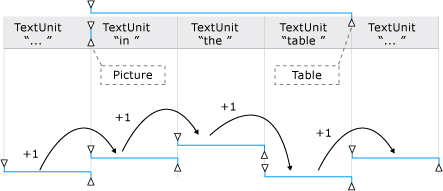 埋め込みオブジェクトとその範囲スパンを含むテキスト ストリームの例
MoveEndpointByUnitは、指定されたTextUnitがコントロールでサポートされていない場合にサポートされる次の最大TextUnitに遅延します。
最小単位から最大値までの順序を次に示します。
