Bemærk
Adgang til denne side kræver godkendelse. Du kan prøve at logge på eller ændre mapper.
Adgang til denne side kræver godkendelse. Du kan prøve at ændre mapper.
Every agent in Microsoft Foundry has a stable endpoint from the moment it's created. Behind each endpoint, a Foundry model processes user input according to the agent's instructions and tools. When end users interact with your agent through Microsoft 365 Copilot, Teams, your existing application, or other surfaces, they interact with the agent's stable endpoint. Before you share your agent, verify these settings:
- Active agent version — Confirm the version that receives traffic is the one you want end users to interact with. By default, the agent automatically updates to the latest version, which means a newly created version is immediately served. If that isn't what you want, pin traffic to a specific version.
- Protocols and authorization schemes — Make sure they match where and how your users interact with the agent. For example, an agent published to Microsoft 365 or Teams must have the Activity protocol enabled and use a BotService or BotServiceRbac authorization scheme.
This article shows you how to select the active version, enable protocols, set authorization schemes, and add an agent card. After you configure the endpoint, you can:
- Publish agents to Microsoft 365 Copilot and Microsoft Teams
- Publish an agent as a digital worker in Agent 365
Note
If you're migrating from the previous publishing model, see Migrate from Agent Applications to the new agent model.
Prerequisites
- A Foundry project with at least one agent version created
- Azure AI User role on the Foundry project scope to create, manage, and invoke agents
- Familiarity with Azure role-based access control (RBAC) for permission configuration
- Familiarity with Agent identity concepts in Foundry
- Install the required language runtimes, global tools, and Visual Studio Code extensions as described in Prepare your development environment
Important
Code in this article uses packages that are currently in preview. This preview is provided without a service-level agreement, and we don't recommend it for production workloads. Certain features might not be supported or might have constrained capabilities. For more information, see Supplemental Terms of Use for Microsoft Azure Previews.
Understand the agent object model
Before you configure the endpoint, understand how projects, agents, agent versions, and the stable endpoint relate to each other.
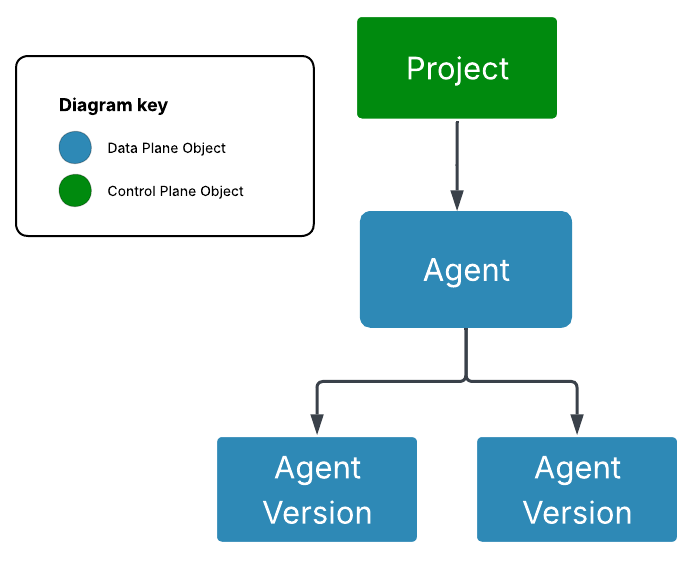
Foundry project: A folder that groups related resources such as agents, files, and tools.
Agent version: An immutable snapshot of the agent's configuration. Any change, even a single prompt edit, produces a new version.
Agent: The stable, consumer-facing representation of an agent. The agent's identity, endpoint, and authorization surface stay consistent as its underlying versions evolve, so consumers always interact with the same entity.
Agent endpoint: The URL consumers call to invoke the agent. It's live the moment you create the agent, with no separate publish step, and the URL doesn't change as you roll out new versions. You configure which version it serves, which protocols it speaks, and how callers authenticate.
For the full list of agent object properties, see the reference section at the end of this article.
Traffic routing
The agent's version_selector determines how traffic routes to agent versions. Two routing policies are available:
- Always use latest (default): 100% of traffic routes to the most recently created agent version. When the agent is published to Teams or Microsoft 365, creating a new version automatically updates what's served in those channels.
- Pinned to a specific version: 100% of traffic routes to the agent version you select, called the active agent version. New versions don't change what's served until you update the selector.
Pin to a specific version when you need stability across new versions, such as when an agent is in production or published to end users in Teams or Microsoft 365.
Protocols
An agent can expose multiple protocols simultaneously:
| Protocol | Endpoint pattern |
|---|---|
| Responses | https://{account}.services.ai.azure.com/api/projects/{project}/agents/{agent}/endpoint/protocols/openai/v1/responses |
| Activity Protocol | https://{account}.services.ai.azure.com/api/projects/{project}/agents/{agent}/endpoint/protocols/activityprotocol |
| Invocations | https://{account}.services.ai.azure.com/api/projects/{project}/agents/{agent}/endpoint/protocols/invocations |
Authorization schemes
You can configure inbound authentication on the agent endpoint:
| Scheme type | Description | Isolation key source |
|---|---|---|
Entra |
Microsoft Entra ID authorization. The caller must have the Azure AI User role on the Foundry project. | Entra — derives user identity from the Microsoft Entra token. Header — reads isolation keys from custom headers (user_isolation_key, chat_isolation_key). |
BotService |
Azure Bot Service channel authorization. Used when publishing to M365/Teams. Configured automatically during the channel publish flow. | N/A |
BotServiceRbac |
Azure Bot Service authorization combined with Azure RBAC. Use when you need Bot Service channel auth with additional RBAC enforcement. | N/A |
API key authentication isn't supported. Use Microsoft Entra ID (Azure RBAC) to authorize callers.
Configure the agent properties
By default, the version selector routes 100% of traffic to the latest agent version, the Responses protocol is enabled, and authorization is set to Entra. You can change the version routing, enable more protocols, set authorization schemes, and add an agent card.
Select the active agent version
By default, the routing policy is Always use latest. To pin traffic to a specific version, update the version_selector.
In the Foundry portal, create an agent or open an existing agent.
Expand the Publish dropdown to see endpoint configuration options.
Expected result: You see the available endpoints for your agent and the current version routing configuration. The endpoints are live from agent creation; no publish step is required to activate them.
Select the version selector arrow and choose a specific version.
Expected result: The stable endpoint routes 100% of traffic to the selected version. When pinned, creating new versions doesn't change what's served.
Enable protocols and authorization schemes
An agent can expose multiple protocols simultaneously. Configure protocols and inbound authorization on the agent endpoint.
Updating protocols and authorization schemes isn't yet configurable in the Foundry portal. Use the REST API or Python SDK.
Add an agent card
An agent card surfaces details and capabilities to consumers, including for agent-to-agent (A2A) discovery.
Adding an agent card isn't yet configurable in the Foundry portal. Use the REST API or SDK.
Get your agent properties
To view your agent's current properties—identity, protocols, authorization, and endpoint configuration—run:
GET {endpoint}/agents/{agent_name}?api-version=v1
Authorization: Bearer {{token}}
Content-Type: application/json
Foundry-Features: AgentEndpoints=V1Preview
Security and privacy considerations
- Use least privilege. Grant users the minimum role they need. For example, create custom roles that separate agent creation permissions from agent invocation permissions.
- Don't embed access tokens in source code, scripts, or client applications. Use the Microsoft Entra authentication flow appropriate for your app.
Limitations
| Limitation | Description |
|---|---|
| No traffic splitting | Only one agent version can be active and receive traffic at a time. |
Troubleshooting
| Issue | Likely cause | Resolution |
|---|---|---|
403 Forbidden when invoking the endpoint |
Caller lacks the required role on the agent | Assign the Azure AI User role on the Foundry project resource. |
401 Unauthorized when invoking the endpoint |
The access token is missing, expired, or for the wrong resource | Reauthenticate and request a token for https://ai.azure.com. |
| Tool calls fail | The agent identity doesn't have access to downstream resources | Assign the required RBAC roles to the agent's identity for any Azure resources it accesses. |
| Publishing to M365/Teams fails | The agent doesn't have a unique identity (agent.identity is null) |
See the migration guide for steps to resolve this. |
Reference: Agent object properties
Agent properties
| Property | Type | Description | Mutable? | Configurable in portal |
|---|---|---|---|---|
object |
string | Always "agent" |
No | No |
id |
string | Unique identifier | No | No |
name |
string (max 63 chars) | Name of the agent | No | No |
versions |
object | Contains latest with the latest AgentVersion |
Yes (via create_version) | Yes |
agent_endpoint |
AgentEndpoint | Endpoint configuration (version selector, protocols, authorization). See the AgentEndpoint table below. | Yes (PATCH /agents/{name}) |
Partial (version selector only) |
instance_identity |
object | The agent's unique Microsoft Entra identity (principal_id, client_id) |
No (read-only) | No |
blueprint / blueprint_reference |
object | Reference to the agent's Microsoft Entra agent blueprint (principal_id, client_id, or type, blueprint_id) |
No (read-only) | No |
agent_card |
AgentCard | Agent details for consumers and A2A | Yes (PATCH /agents/{name}) |
No (REST API / SDK only) |
status |
enum (Enabled, Disabled) |
Whether the agent is serving traffic | Not yet supported | No |
Note
The version_selector, protocols, and authorization_schemes are nested under agent_endpoint. To update any of them, use PATCH /agents/{agent_name} with the changes inside the agent_endpoint property bag.
AgentEndpoint properties
| Property | Type | Description |
|---|---|---|
version_selector |
VersionSelector | How traffic is routed to agent versions |
protocols |
array of string | Protocols enabled (for example, responses, activity, a2a) |
authorization_schemes |
array of objects | Authorization schemes (for example, Entra, BotServiceRbac) |