Bemærk
Adgang til denne side kræver godkendelse. Du kan prøve at logge på eller ændre mapper.
Adgang til denne side kræver godkendelse. Du kan prøve at ændre mapper.
This guide explains how the agent publishing experience changed in Microsoft Foundry. It compares the legacy model (which created a separate Agent Application resource) with the new agent object model, and walks you through migrating your existing agents and published applications.
Overview of the change
The new agent object model collapses Agent Applications and Agent Deployments into the Agent object itself. Previously, publishing created a separate Agent Application resource with its own identity, endpoint, and deployment. Now, every agent has these capabilities from the moment it's created.
Before (legacy model)
- Resource model: An Agent (data plane), Agent Application (control plane), and Deployment (control plane) are separate objects.
- Agent object properties:
id(unique identifier for the agent),name, andversions(the latest agent version). - Identity: Unpublished agents in a Foundry project share an Entra agent identity and an Entra agent blueprint. Upon publishing, an agent receives a unique identity and blueprint scoped to the Agent Application resource.
- Publishing: Two gestures. First, publishing an agent creates an Agent Application resource and a Deployment, where the Deployment references the published agent version. The Agent Application exposes a stable endpoint routing 100% of traffic to that version. A Deployment supports start/stop lifecycle management. The second gesture is that the Agent Application can then be published to Microsoft 365 and Teams.

After (new model)
- Resource model: Only Agent objects exist (data plane and control plane). They absorb the responsibilities previously owned by Agent Application and Deployment.
- Agent object properties:
id,name,versions,agent_endpoint(stable endpoint),protocols,authorization_schemes,version_selector,blueprint,instance_identity, andagent_card(surfaces agent details and capabilities to consumers and A2A). - Identity: All agents receive a unique Entra Agent Identity and Entra Agent Blueprint by default. Bring-your-own Entra Agent Blueprint is supported but not the default.
- Publishing: Two equivalent gestures. First, select an agent version to expose via the stable endpoint. Second, publish the agent's stable endpoint to M365/Teams.
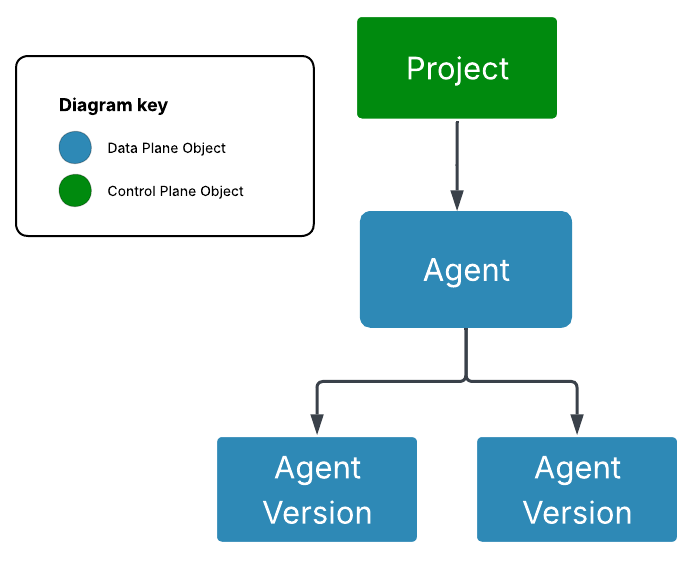
The key shift: creating an agent is the only step needed to get a stable endpoint and unique agent identity. There's no separate publish step for the endpoint. Publishing now refers specifically to distributing the agent through M365 and Teams channels.
Agent types during the transition
During the transition period, you may encounter three types of agents:
| Type | agent.identity |
Description |
|---|---|---|
| New agent | Non-null | Created after the object model update. Has a unique identity and blueprint. All new features are available. |
| Legacy agent | Null | Created before the object model update. Uses the shared project identity and blueprint. Backfilled with the new agent properties (such as protocols, agent_endpoint, and agent_card), but can't be published to Teams/M365 via its stable endpoint unless it has a unique agent identity. |
| Published agents (aka Agent Applications) | N/A (separate resource) | Legacy resource from the old publish flow. Wraps a Deployment that points to an agent version. |
The agent.identity value distinguishes new agents from legacy agents: null means legacy, non-null means new.
What continues to work
- Existing Agent Applications continue to serve traffic through their endpoints.
- Agents published to M365/Teams via Agent Applications continue to work.
- The project endpoint remains available for backward compatibility (though it's no longer the recommended path).
- Legacy agents remain fully functional for development and testing in the Foundry project.
Migration paths
Path 1: New agents (no action needed)
If you create agents after the object model update, they automatically get the new model with unique identity, stable endpoint, and all new features. No migration is required.
Path 2: Upgrade a legacy agent
Legacy agents (created before the update) use the shared project identity and can't be published via the new model. To upgrade:
Check if your agent is a legacy agent:
GET {endpoint}/agents/{agent_name}?api-version=2025-11-15-preview
Authorization: Bearer {{token}}
Foundry-Features: AgentEndpoints=V1Preview
If
instance_identityis null in the response, it's a legacy agent.Create a new agent using the same definition:
Note
There's currently no way to upgrade a legacy agent to a unique identity in place. To get a unique identity, create a new agent using the same definition (instructions, tools, model configuration). The new agent automatically receives a unique identity and stable endpoint. An in-place upgrade path is planned for a future update.
Once the new agent is created, it has a unique identity and you can use all new features including the new publishing experience that uses the agent endpoint.
Path 3: Migrate an existing Agent Application
If you have an Agent Application published to M365/Teams and want to migrate to the new model, follow these steps:
Create a new agent using the same definition as the agent behind your Agent Application (instructions, tools, model configuration). The new agent automatically receives a unique identity and stable endpoint. See Path 2 for details.
Publish the new agent to Microsoft 365 and Teams from the Foundry portal. Publishing is only available through the Foundry portal—there's no public publish API. For steps, see Publish agents to Microsoft 365 Copilot and Microsoft Teams.
Verify the new agent works in M365/Teams with the new stable endpoint.
Decommission the old Agent Application after you confirm the new agent works:
- Delete the Agent Application Azure resource. Deleting the resource doesn't delete your agent versions.
- To keep existing integrations working, update any code that references the old Application endpoint URL to use the new agent stable endpoint URL.
Endpoint URL changes
When migrating, update any code or integrations that reference the old endpoint format:
| Aspect | Legacy endpoint | New endpoint |
|---|---|---|
| Responses | https://{account}.../projects/{project}/applications/{app}/protocols/openai |
https://{account}.../projects/{project}/agents/{agent}/protocols/openai/v1/responses |
| Activity | https://{account}.../projects/{project}/applications/{app}/protocols/activityprotocol |
https://{account}.../projects/{project}/agents/{agent}/protocols/activityprotocol |
Publishing UX during the transition
During the transition, you may see different publishing experiences depending on the agent type:
- New agents (
agent.identity!= null): You see the new publishing UX with stable endpoint selection, version routing, and direct publish to M365/Teams. - Legacy agents (
agent.identity== null): You see the legacy Agent Application publishing UX. A banner may indicate the new experience is available with a link to upgrade.
Timeline and deprecation
| Phase | Status |
|---|---|
| New agent object model available | ✅ Available |
| Legacy Agent Applications continue working | ✅ Supported |
| Legacy agent identity upgrade gesture | 🔄 Coming soon |
| Agent Application deprecation announced | 📅 Planned |
| Agent Application end of support | 📅 TBD |
FAQs
Do I need to migrate immediately?
No. Existing Agent Applications continue to work. However, new features (traffic splitting, multiple protocols, disable/enable, A2A) are only available on the new agent model.
Will my Agent Application stop working?
Not immediately. Agent Applications are deprecated with advance notice and a migration period. They continue to function until the end-of-support date.
Can I have both an Agent Application and a new-model agent for the same underlying agent?
During the transition, yes. The Agent Application and the new agent endpoint can coexist. However, they're separate resources with separate identities and endpoints.
What happens to Azure role-based access control (RBAC) roles I assigned on Agent Application resources?
RBAC on Agent Application resources doesn't transfer to the agent object. You need to assign roles (such as Foundry Agent Consumer) on the agent resource for the new endpoint.
My agent uses tools that authenticate with agent identity. What changes?
With the new model, the agent has a unique identity from creation—so there's no identity change at publish time. However, if you migrate from a legacy agent, the agent gets a new identity that differs from both the shared project identity and any Agent Application identity. You need to reassign RBAC for downstream resources.