Bemærk
Adgang til denne side kræver godkendelse. Du kan prøve at logge på eller ændre mapper.
Adgang til denne side kræver godkendelse. Du kan prøve at ændre mapper.
GitHub Advanced Security (GHAS) integration with Microsoft Defender for Cloud links your source code to your running cloud workloads and vice versa —so security teams can prioritize the vulnerabilities that actually reach production, and engineering teams can fix them without leaving GitHub.
Use this integration to:
Trace runtime vulnerabilities back to the originating repository and code owner.
Prioritize fixes based on code deployment, production exposure and runtime risk.
Coordinate remediation across GitHub code repositories and Cloud environments with shared context and status.
Accelerate fixes with AI-powered (Copilot) remediation.
This overview explains how the integration works and helps you understand its core capabilities before deployment.
Availability and prerequisites
Confirm the following before you onboard:
| Category | Details |
|---|---|
| Environmental requirements | - GitHub account with a connector created in Defender for Cloud - GHAS license - Defender Cloud Security Posture Management (DCSPM) enabled on the subscription - Microsoft Security Copilot (optional for automated remediation) |
| Roles and permissions | - Security Admin permissions - Security Admin on the Azure subscription (to view findings in Defender for Cloud) - GitHub organization owner |
| Cloud environments | - Available in commercial clouds only (not in Azure Government, Azure operated by 21Vianet, or other sovereign clouds) |
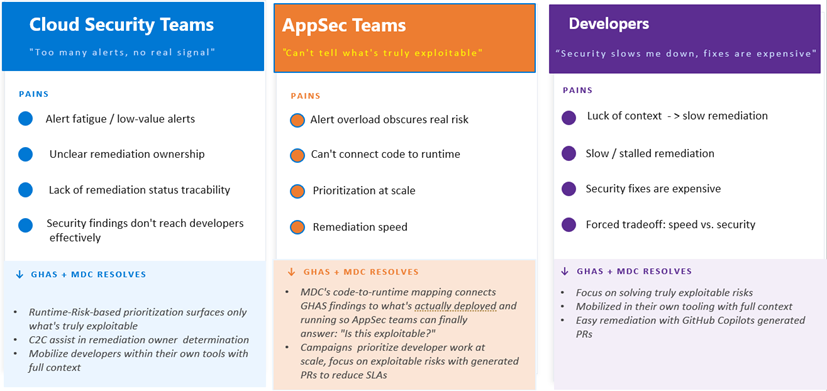
Personas and pain points
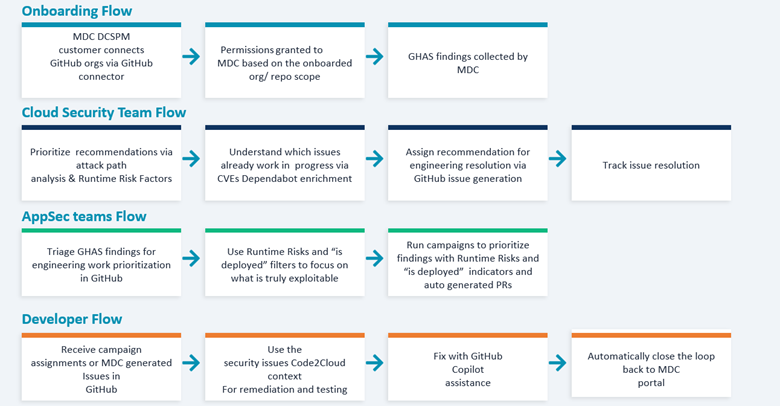
Main flows
Main capabilities
Automatic code-to-runtime mapping
When you connect your GitHub organization or repository to Microsoft Defender for Cloud via GitHub connector, the system automatically maps source repositories to running cloud workloads. It uses Defender for Cloud proprietary code-to-runtime methods to ensure that every workload is tracked to its repository of origin (and vice versa).
This capability gives you instant end-to-end visibility, so you know which code powers each deployed application and which running containerized workloads mapped to which source code repo without time-consuming manual mapping.
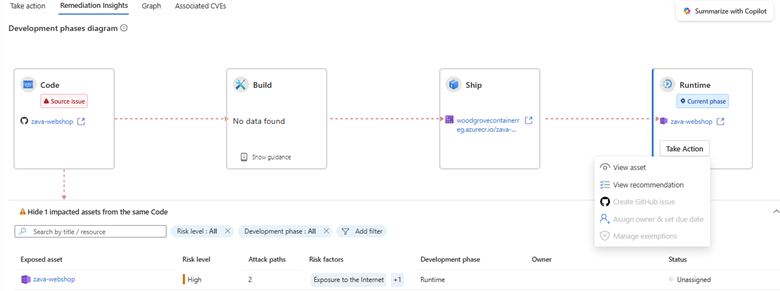
Production-aware alert prioritization
Cut through noisy security alerts and focus on vulnerabilities that truly matter.
GHAS security findings in GitHub are prioritized by real runtime context from Defender for Cloud. They highlight Runtime Risk Factors like Internet Exposure, Sensitive Data, Critical Resources, and Lateral Movement. These risk factors come from Defender CSPM’s attack-path analysis:
- Internet Exposure - workload reachable from the public internet
- Sensitive Data - workload handles regulated or confidential data
- Critical Resources - workload tagged or classified as business-critical
- Lateral Movement - workload sits on a path that an attacker could pivot through
These risks, identified in runtime workloads, are dynamically linked to those workloads’ code repositories of origin and the specific build artifacts in GitHub.
You can filter, triage, and act on only security issues that have actual production impact in both Defender for Cloud and GitHub . This ability helps your team stay efficient and keep your most important applications secure.
In practice
A container image built from the contoso/payments-api repository is deployed to AKS. Defender for Cloud detects internet exposure plus sensitive-data handling on the workload. The CVE inside the image is automatically elevated to Critical in GitHub’s security tab, and a one-click GitHub issue is assigned to the repository’s CODEOWNERS with full runtime and SDLC context attached.
Unified AI-driven remediation
Bridge the gap between security and engineering teams with integrated workflows and relevant context.
Within Defender for Cloud, security managers can see which security issues the engineering team already knows about, along with the status of those issues. Security managers open this view by selecting the View on GitHub link.
Security managers can assign security recommendations for resolution to the relevant engineering teams by generating a GitHub issue assignment.
The assignment is generated on the repository of origin. It provides runtime information and context to facilitate the engineering fix.
Engineering managers can assign an issue to a developer for further resolution. The assignee can use a Copilot coding agent for AI-powered automatic fixes.
AppSec teams can use Runtime Risk factors as part of the GHAS findings, focusing engineering work on findings associated with code that is truly deployed and running.
Those filters can be used to filter GHAS alerts directly or used for continues scheduled prioritization via campaigns.
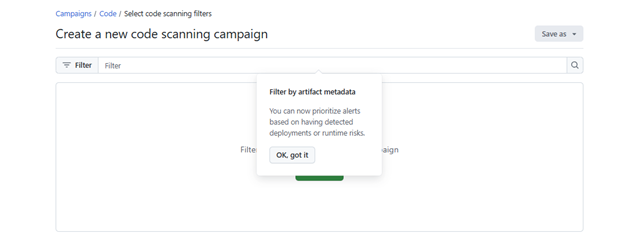
GitHub issue fixes, progress, and campaign advancements are tracked in real time. The statuses are reflected both in GitHub and in Defender for Cloud.
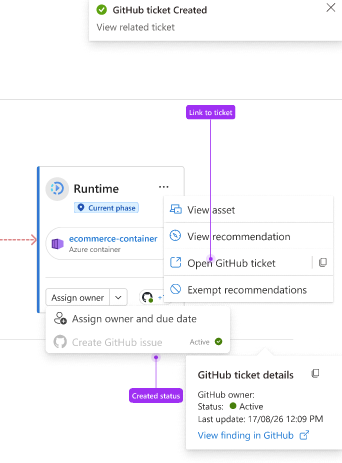
This approach ensures that fixes are delivered rapidly, creates clear accountability, and simplifies collaboration. All these benefits happen inside the tools that your teams already use.