Use the filter stage in a data flow to drop messages that match a condition. When a filter expression evaluates to true, the message is dropped. When the expression evaluates to false, the message passes through to the next stage.
You can define multiple filter rules. Each rule specifies input fields and a boolean expression. The rules use OR logic: if any rule evaluates to true, the message is dropped.
Each filter rule has the following properties:
| Property |
Required |
Description |
inputs |
Yes |
List of field paths to read from the incoming message. Assigned positional variables: the first input is $1, the second is $2, and so on. |
expression |
Yes |
Boolean expression evaluated against each message. If true, the message is dropped. |
description |
No |
Human-readable description of the filter rule. |
Use last known value
Append ? $last to an input to use the last known value when the field is missing from the current message. This approach is useful for sparse data where not every message contains every field.
Examples
Filter by a threshold
Drop messages where temperature is 20 or below:
Under Transform (optional), select Filter > Add.
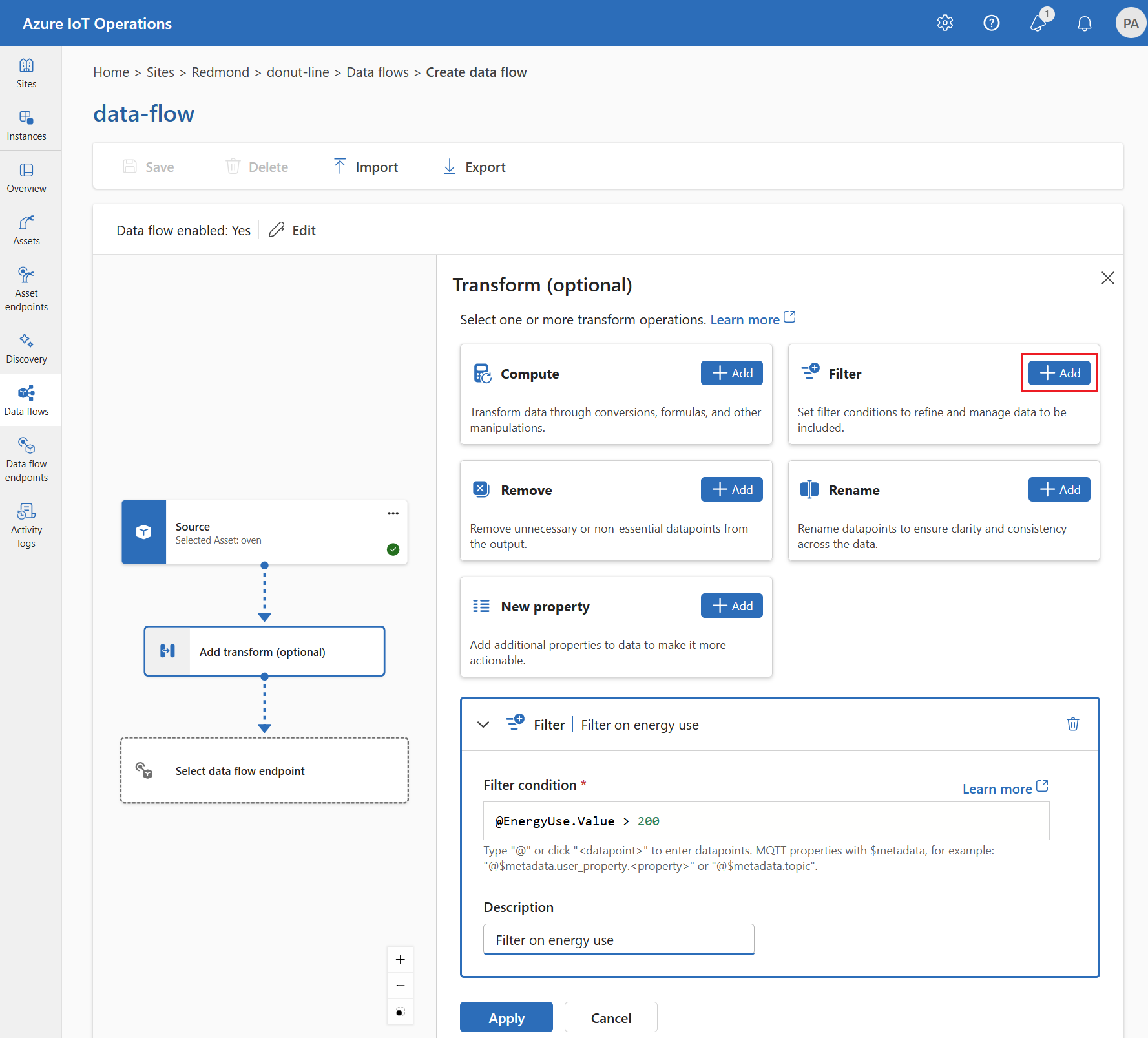
Enter the following settings:
| Setting |
Description |
| Filter condition |
temperature <= 20 |
| Description |
Drop low temperature readings |
In the filter condition field, enter @ or select Ctrl + Space to choose datapoints from a dropdown.
Select Apply.
{
  "operationType": "BuiltInTransformation",
  "builtInTransformationSettings": {
    "filter": [
      {
        "inputs": [
          "temperature"
        ],
        "expression": "$1 <= 20"
      }
    ]
  }
}
builtInTransformationSettings: {
  filter: [
    {
      inputs: [
        'temperature'
      ]
      expression: '$1 <= 20'
    }
  ]
}
Important
The use of Kubernetes deployment manifests isn't supported in production environments and should only be used for debugging and testing.
builtInTransformationSettings:
  filter:
    - inputs:
        - temperature
      expression: "$1 <= 20"
Filter with last known value
Use the last known temperature value if the current message doesn't include it. Drop messages where the last known temperature is 20 or below:
In the filter condition field, enter @temperature ? $last <= 20.
{
  "operationType": "BuiltInTransformation",
  "builtInTransformationSettings": {
    "filter": [
      {
        "inputs": [
          "$source.temperature ? $last"
        ],
        "expression": "$1 <= 20"
      }
    ]
  }
}
builtInTransformationSettings: {
  filter: [
    {
      inputs: [
        'temperature ? $last'
      ]
      expression: '$1 <= 20'
    }
  ]
}
Important
The use of Kubernetes deployment manifests isn't supported in production environments and should only be used for debugging and testing.
builtInTransformationSettings:
  filter:
    - inputs:
        - temperature ? $last
      expression: "$1 <= 20"
Filter with multiple conditions
Drop messages where the product of temperature and humidity is 100,000 or more:
In the filter condition field, enter @temperature * @humidity >= 100000.
{
  "operationType": "BuiltInTransformation",
  "builtInTransformationSettings": {
    "filter": [
      {
        "inputs": [
          "temperature.Value",
          "humidity.Value"
        ],
        "expression": "$1 * $2 >= 100000"
      }
    ]
  }
}
builtInTransformationSettings: {
  filter: [
    {
      inputs: [
        'temperature.Value'
        'humidity.Value'
      ]
      expression: '$1 * $2 >= 100000'
    }
  ]
}
Important
The use of Kubernetes deployment manifests isn't supported in production environments and should only be used for debugging and testing.
builtInTransformationSettings:
  filter:
    - inputs:
        - temperature.Value
        - humidity.Value
      expression: "$1 * $2 >= 100000"
Filter with enriched data
If you configured an enrichment dataset, you can use enriched fields in filter conditions. For example, filter against a device-specific limit from a state store dataset:
Currently, enrichment-based filtering isn't available in the operations experience.
{
  "operationType": "BuiltInTransformation",
  "builtInTransformationSettings": {
    "datasets": [
      {
        "key": "device_limits",
        "inputs": [
          "$source.deviceId",
          "$context(device_limits).deviceId"
        ],
        "expression": "$1 == $2"
      }
    ],
    "filter": [
      {
        "inputs": [
          "temperature",
          "$context(device_limits).maxTemperature"
        ],
        "expression": "$1 <= $2"
      }
    ]
  }
}
builtInTransformationSettings: {
  datasets: [
    {
      key: 'device_limits'
      inputs: [
        '$source.deviceId'
        '$context(device_limits).deviceId'
      ]
      expression: '$1 == $2'
    }
  ]
  filter: [
    {
      inputs: [
        'temperature'
        '$context(device_limits).maxTemperature'
      ]
      expression: '$1 <= $2'
    }
  ]
}
Important
The use of Kubernetes deployment manifests isn't supported in production environments and should only be used for debugging and testing.
builtInTransformationSettings:
  datasets:
    - key: device_limits
      inputs:
        - $source.deviceId
        - $context(device_limits).deviceId
      expression: "$1 == $2"
  filter:
    - inputs:
        - temperature
        - $context(device_limits).maxTemperature
      expression: "$1 <= $2"
This example drops messages where the temperature exceeds the device-specific maximum from the state store.
Multiple filter rules
You can define multiple filter rules. All rules use OR logic: if any rule evaluates to true, the message is dropped:
Under Transform (optional), select Filter > Add multiple times to add additional filter rules.
{
  "operationType": "BuiltInTransformation",
  "builtInTransformationSettings": {
    "filter": [
      {
        "inputs": ["temperature"],
        "expression": "$1 <= 20",
        "description": "Drop low temperatures"
      },
      {
        "inputs": ["humidity"],
        "expression": "$1 >= 80",
        "description": "Drop high humidity readings"
      }
    ]
  }
}
builtInTransformationSettings: {
  filter: [
    {
      inputs: ['temperature']
      expression: '$1 <= 20'
      description: 'Drop low temperatures'
    }
    {
      inputs: ['humidity']
      expression: '$1 >= 80'
      description: 'Drop high humidity readings'
    }
  ]
}
Important
The use of Kubernetes deployment manifests isn't supported in production environments and should only be used for debugging and testing.
builtInTransformationSettings:
  filter:
    - inputs:
        - temperature
      expression: "$1 <= 20"
      description: Drop low temperatures
    - inputs:
        - humidity
      expression: "$1 >= 80"
      description: Drop high humidity readings
Related content
