หมายเหตุ
การเข้าถึงหน้านี้ต้องได้รับการอนุญาต คุณสามารถลอง ลงชื่อเข้าใช้หรือเปลี่ยนไดเรกทอรีได้
การเข้าถึงหน้านี้ต้องได้รับการอนุญาต คุณสามารถลองเปลี่ยนไดเรกทอรีได้
Note
Shared database throughput is not recommended for most workloads. While it can simplify provisioning in some scenarios, sharing throughput across multiple containers can lead to unpredictable and undesirable performance and scale behaviors. Because containers in the same database share partitions, scaling database throughput to support a large or growing container may trigger repartitioning of smaller, co‑located containers, spreading them overly thin across too many partitions. We recommend configuring throughput at the container level. Customers with advanced scenarios who understand these tradeoffs can still create and manage shared database throughput programmatically using the Azure Cosmos DB SDKs.
If you are using a different API, see API for MongoDB, API for Cassandra, API for Gremlin articles to provision the throughput.
Provision throughput using Azure portal
Sign in to the Azure portal.
Create a new Azure Cosmos DB account, or select an existing Azure Cosmos DB account.
Open the Data Explorer pane, and select New Database. Provide the following details:
- Enter a database ID.
- Enter a throughput that you want to provision (for example, 1000 RU/s). RU/s (Request Units per second) represent the amount of reserved capacity for your database operations.
- Enter a name for your container under Container ID
- Enter a Partition key
- Select OK.
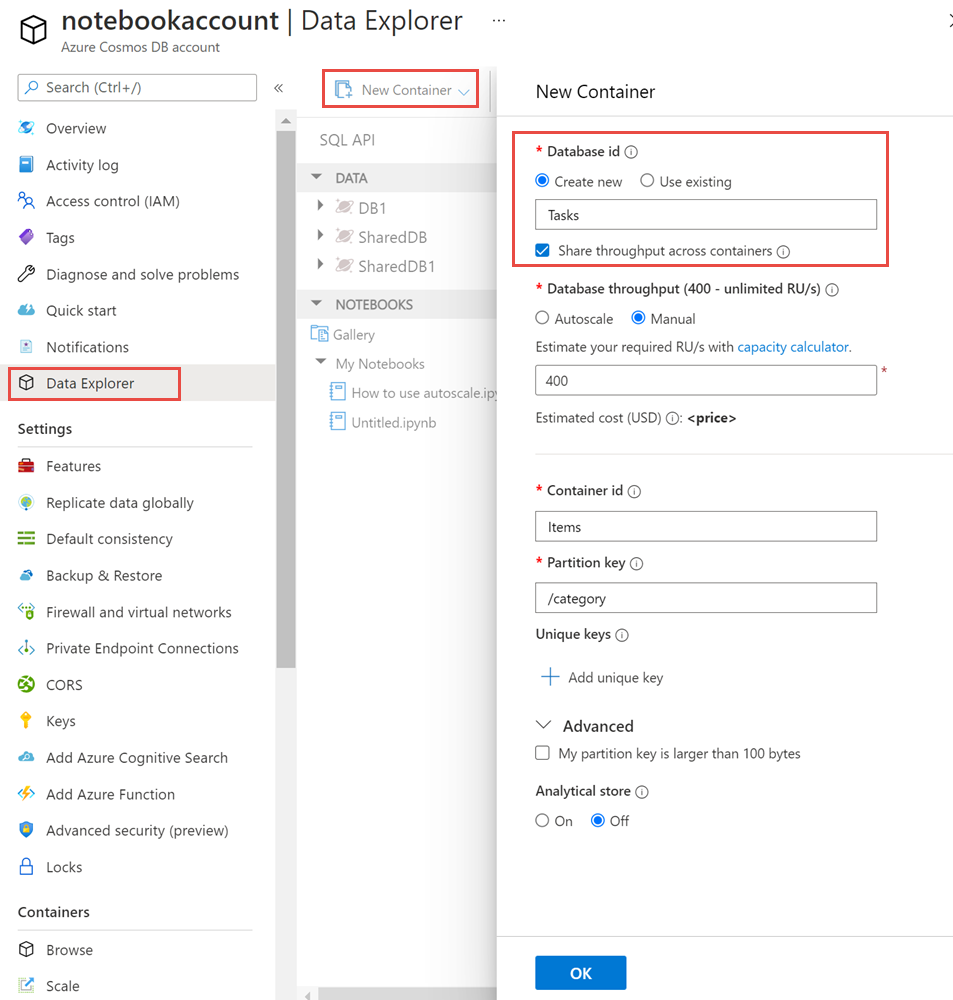
Note
The portal previously included a Share throughput across containers option. For most workloads, we recommend provisioning throughput on individual containers instead. If you have an advanced scenario that requires shared throughput, you can create it programmatically using the Azure Cosmos DB SDKs.
Provision throughput using Azure CLI or PowerShell
To create a database with shared throughput see,
Provision throughput using .NET SDK
Note
You can use Azure Cosmos DB SDKs for API for NoSQL to provision throughput for all APIs. You can optionally use the following example for API for Cassandra as well.
//set the throughput for the database
RequestOptions options = new RequestOptions
{
    OfferThroughput = 500
};

//create the database
await client.CreateDatabaseIfNotExistsAsync(
    new Database {Id = databaseName},
    options);
Next steps
See the following articles to learn about provisioned throughput in Azure Cosmos DB: