Observação
O acesso a essa página exige autorização. Você pode tentar entrar ou alterar diretórios.
O acesso a essa página exige autorização. Você pode tentar alterar os diretórios.
Note
Community interest groups have now moved from Yammer to Microsoft Viva Engage. To join a Viva Engage community and take part in the latest discussions, fill out the Request access to Finance and Operations Viva Engage Community form and choose the community you want to join.
When you design ER model mapping and ER format components, use the data sources of the User input parameter type to get the necessary values at runtime before the execution of an ER format begins. You can programmatically turn off this dialog box when another page provides the required parameters or when an ER format runs in unattended (batch) mode. When the ER dialog box is turned off, you must initialize the data source values of the User input parameter type from source code.
Format components for outgoing electronic documents
You can configure an ER format to generate an outbound document. When you configure the format, select an ER data model as the data source to fill the outbound document. Configure an ER model mapping to specify how the selected data model is filled by application data at runtime. When you design your model mapping, specify data sources to collect the desired values from different sources and populate them to your data model. Among other data sources, you might use data sources of the User input parameter type to fill your data model with values that users enter on the ER user dialog box that appears when you first run an ER format.
For an ER format that you configure to generate an outbound document, you can programmatically turn off the ER dialog box by using the _showPromptDialog parameter of the createFormatMappingRunByFormatMappingId() method of the ERObjectsFactory class. When you turn off the ER dialog box, you need to initialize values of data sources of the User input parameter type from the source code. To do this, use the following pattern.
ERModelDefinitionInputParametersAction Obj = new ERModelDefinitionInputParametersAction();
Obj.addParameter(<path to an ER data source>, <data source value>);
ERObjectsFactory::createFormatMappingRunByFormatMappingId(formatMappingID, fileName, false)
            .withParameter(Obj)
            .run();
For ER formats that you configure to generate an outbound document, the path to an ER data source is constructed from the prefix and the suffix that are separated by a slash ( / ) character. The prefix represents the name of a data source of the Model type that resides in the running ER format. The suffix represents the path to a data source of the User input parameter type that resides in a model mapping that the running ER format uses as the implementation of the relevant data model.
Tip
The nodes of a data source path are separated by a slash ( / ) character. Use the ERPath::Combine() method to construct a path.
For more information, review the source code of the BankPaymBalanceXML application class that you can use as an example. From the Global repository, import the BLWI format (BE) ER format configuration that this application class calls to your Finance instance. The base BLWI model configuration is imported automatically with the imported ER format configuration.
    /// <summary>
    /// Runs export via ER solution.
    /// </summary>
    [Microsoft.Dynamics.BusinessPlatform.SharedTypes.InternalUseOnlyAttribute]
    protected void runER()
    {
        const str erParmEmail = 'model/parameters.Email';
        const str erParmFromDate = 'model/parameters.FromDate';
        const str erParmToDate = 'model/parameters.ToDate';
        const str erParmSurveyCode = 'model/parameters.SurveyCode';

        ERModelDefinitionInputParametersAction modelDefinitionInputParametersAction = new ERModelDefinitionInputParametersAction();

        modelDefinitionInputParametersAction.addParameter(erParmEmail, email)
            .addParameter(erParmFromDate, fromDate)
            .addParameter(erParmToDate, toDate)
            .addParameter(erParmSurveyCode, BankPaymBalanceSurvey::find(surveyCodeRecId).SurveyCode);

        ERObjectsFactory::createFormatMappingRunByFormatMappingId(tradeBLWIParameters.ERFormatMappingID, fileName)
            .withFileDestination(fileDestination)
            .withParameter(modelDefinitionInputParametersAction)
            .run();
    }
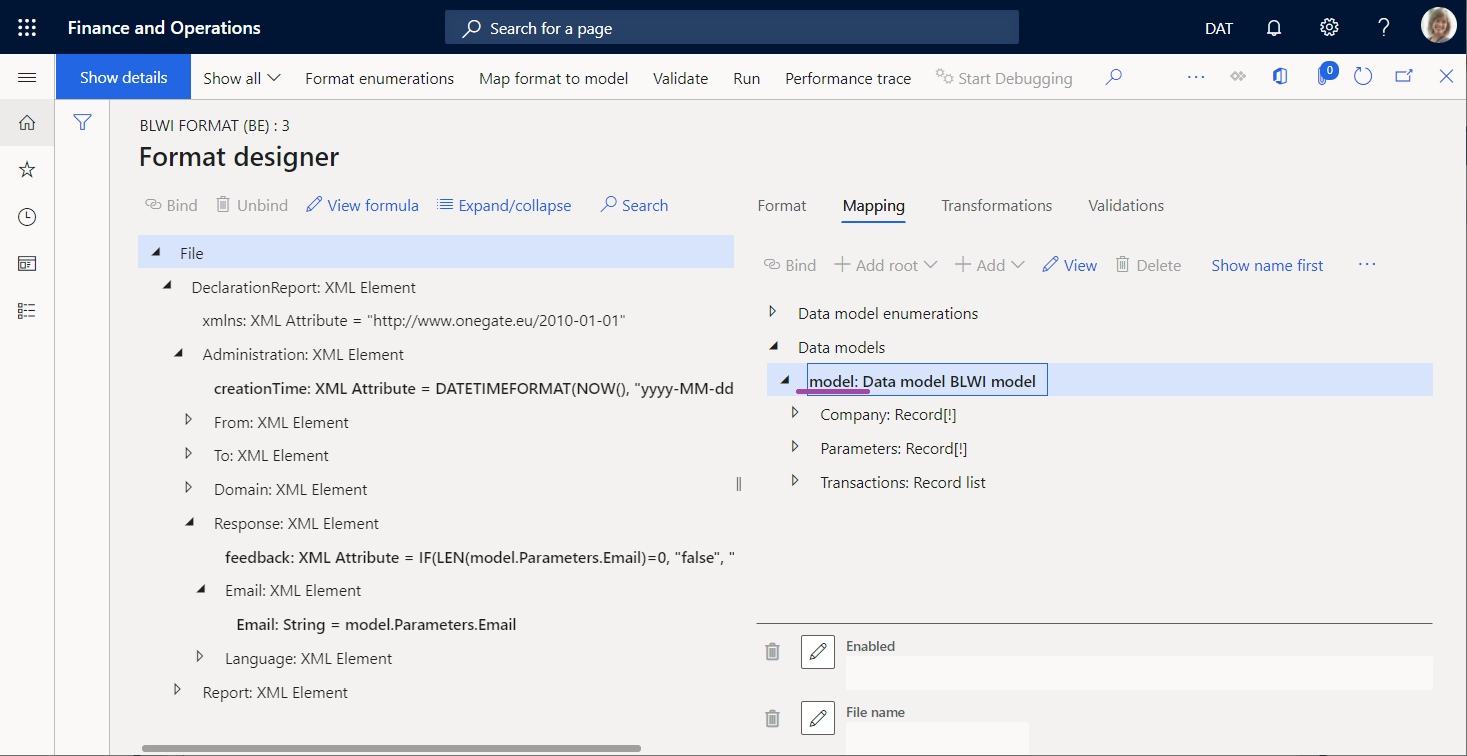
The email, fromDate, and toDate variables store values that users enter on other pages before an ER format is called. The runER() method of this class runs an ER format mapping that uses these variables to initialize values of several data sources. The prefix of every path of such a data source (such as erParmEmail, erParmFromDate, or erParmToDate constants in the sample code) is defined as the name of a format data source of the Model type (model value).
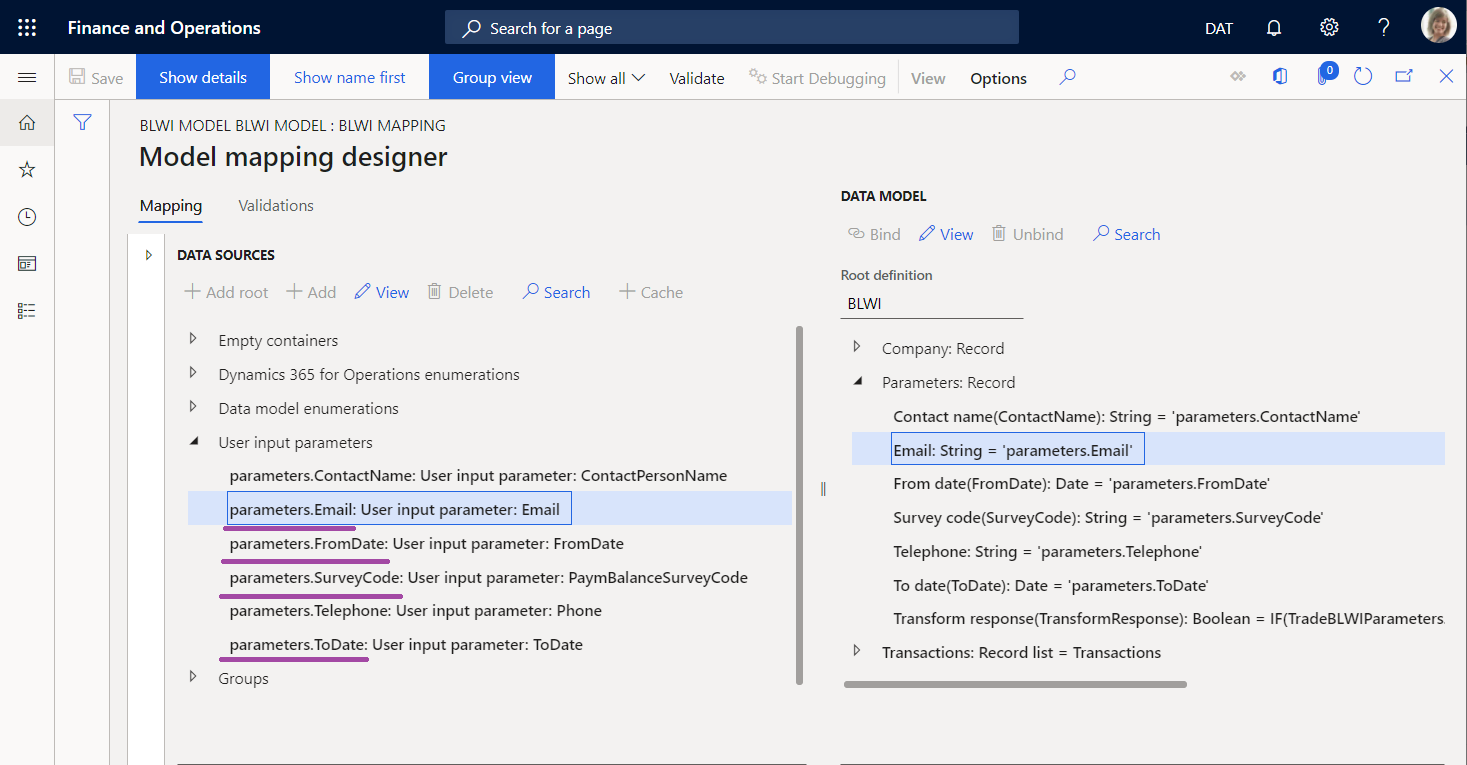
The suffix of every path of such a data source is defined as the path to the relevant data source of a model mapping that is used at runtime. In the sample code, this path can include parameters.Email, parameters.FromDate, or parameters.ToDate.
Format components for inbound electronic documents
You can also configure an ER format that can be run to parse an inbound document and update application data. This format must contain a format mapping that refers to a model mapping of the To destination type that is used to update application data based on the content of an inbound document. In this type of model mapping, you can also use data sources of the User input parameter type to get values at runtime from the ER user dialog box and then use them for application data update.
When an ER format is executed to parse an inbound document, you can turn off the ER dialog box programmatically by using the _showPromptDialog parameter of the createMappingDestinationRunByImportFormatMappingId() method of the ERObjectsFactory class.
For ER formats that are configured to parse an inbound document, the path to an ER data source is constructed as the path to a data source of the User input parameter type that resides in a model mapping of the To destination type that the running ER format calls to update application data.
For more information, review the source code of the BankStatementImportBatch application class that you can use as an example.
        var integrationPoint = classStr(ERTableDestination) + '#' + tableStr(BankStatementDocumentEntity);
        ERmodelDefinitionInputParametersAction inputParameters = new ERmodelDefinitionInputParametersAction();
        inputParameters.addParameter('$ExecutionID', _executionID)
            .addParameter('$gerConfigName', _gerConfigName)
            .addParameter('$AccountId', bankAccount);

        var runner = ERObjectsFactory::createMappingDestinationRunByImportFormatMappingId(_erModelMappingId, integrationPoint);
        runner.withParameter(inputParameters);
        runner.init();

        if (runner.promptsContractedModelMapping())
        {
            var parameters = runner.getParameters();
            var traverser = new ERModelDefinitionParametersTraverser(parameters);
            while (traverser.moveNext())
            {
                ERIImportFormatDataSourceContract current = ERCast::asObject(traverser.current()) as ERIImportFormatDataSourceContract;
                if (current)
                {
                    current.parmInputDataStream(File::UseFileFromURL(DMFStagingWriter::getDownloadURLFromFileId(_uploadedStatement)));
                }
            }
        }

        runner.runUnattended();
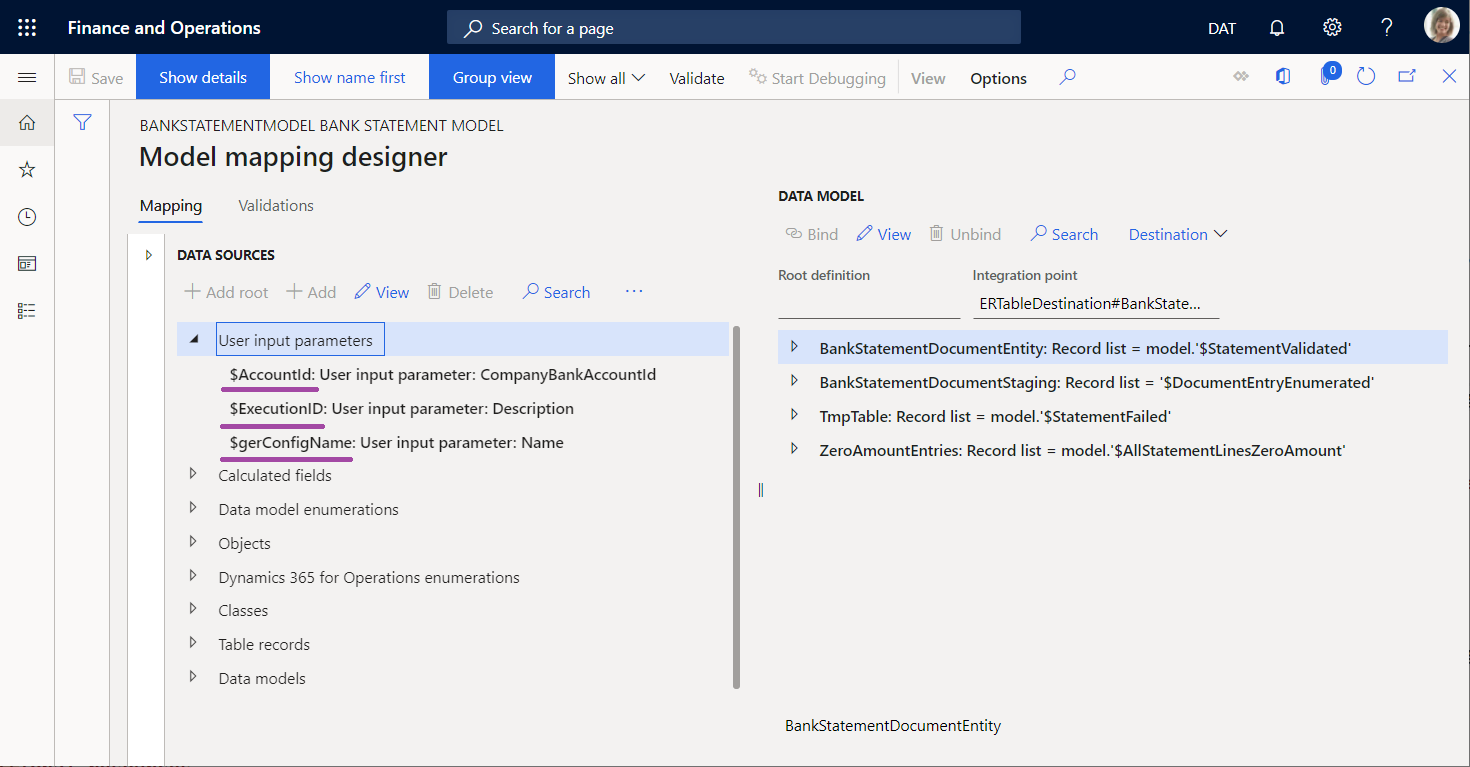
Pay attention to the _executionID, _gerConfigName, and bankAccount variables that are used to initiate the values of the $ExecutionID, $gerConfigName, and $AccountId data sources.
From the Global repository, import the Camt.053 Format ER format configuration that this application class calls to your Finance instance. The Bank statement model configuration is imported automatically with the imported ER format configuration. Additionally, import the Bank statement mapping to destination ER configuration that contains a model mapping used to update application data.
Limitations
You can only initiate data source values of the User input parameter type that you configure in an ER model mapping that is used at runtime. You can't initiate data source values of the User input parameter type that you configure in an ER format from the source code.