Merk
Tilgang til denne siden krever autorisasjon. Du kan prøve å logge på eller endre kataloger.
Tilgang til denne siden krever autorisasjon. Du kan prøve å endre kataloger.
Memory lets AI agents remember information from earlier in the conversation or from previous conversations. This lets agents provide context-aware responses and build personalized experiences over time. Use Databricks Lakebase, a fully-managed Postgres OLTP database, to manage conversation state and history.
Requirements
- Enable Databricks Apps in your workspace. See Set up your Databricks Apps workspace and development environment.
- A Lakebase instance, see Create and manage a database instance.
Short-term vs. long-term memory
Short-term memory captures context in a single conversation session while long-term memory extracts and stores key information across multiple conversations. You can build your agent with either or both types of memory.
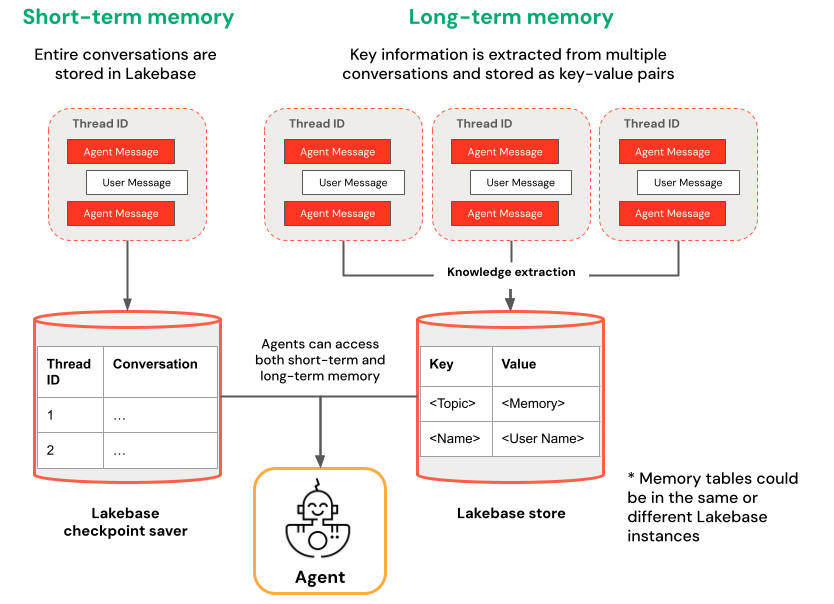
| Short-term memory | Long-term memory |
|---|---|
| Capture context in a single conversation session using thread IDs and checkpointing Maintain context for follow-up questions within a session |
Automatically extract and store key insights across multiple sessions Personalize interactions based on past preferences Build a knowledge base about users that improves responses over time |
Get started
To create an agent with memory on Databricks Apps, clone a pre-built app template and follow the development workflow described in Author an AI agent and deploy it on Apps. The following templates demonstrate how to add short-term and long-term memory to agents using popular frameworks.
LangGraph
Clone the agent-langgraph-advanced template to build a LangGraph agent with both short-term and long-term memory. The template uses LangGraph's built-in checkpointing with Lakebase for durable state management, including thread-based conversation context and persistent user insights across sessions.
git clone https://github.com/databricks/app-templates.git
cd app-templates/agent-langgraph-advanced
OpenAI Agents SDK
Clone the agent-openai-advanced template to build an agent using the OpenAI Agents SDK with short-term memory. The template uses Lakebase for durable state management, enabling stateful multi-turn conversations with automatic conversation history management.
git clone https://github.com/databricks/app-templates.git
cd app-templates/agent-openai-advanced
Deploy and query your agent
After you configure your agent with memory, follow the steps in Author an AI agent and deploy it on Apps to run your agent locally, evaluate it, and deploy it to Databricks Apps.