メモ
コミュニティの関心グループが Yammer から Microsoft Viva Engage に移行されました。 Viva Engage コミュニティに参加し、最新のディスカッションに参加するには、「 Finance and Operations Viva Engage Community へのアクセスを要求する 」フォームに入力し、参加するコミュニティを選択します。
この記事では、Dynamics 365 Finance + Operations (on-premises) 展開用に複数の Microsoft SQL Server Reporting Services (SSRS) ノードを構成する方法について説明します。
Windows フェールオーバー クラスターによる高可用性
このシナリオでは、Windows フェールオーバー クラスターを使用します。 そのため、すべての要求を受信するアクティブ ノードが 1 つと、アイドル状態のパッシブ ノードが 1 つ存在します。 アクティブ ノードが使用できなくなった場合、クラスターはこのイベントを検出し、パッシブ ノードはすべてのネットワーク トラフィックの受信を開始します。
この記事では、Windows フェールオーバー クラスターの設定についてカバーしていません。 詳細については、「 フェールオーバー クラスターの作成」を参照してください。
クラスターを設定したら、インストールを構成できます。 次の例は、次の図に表示される情報に基づいています。
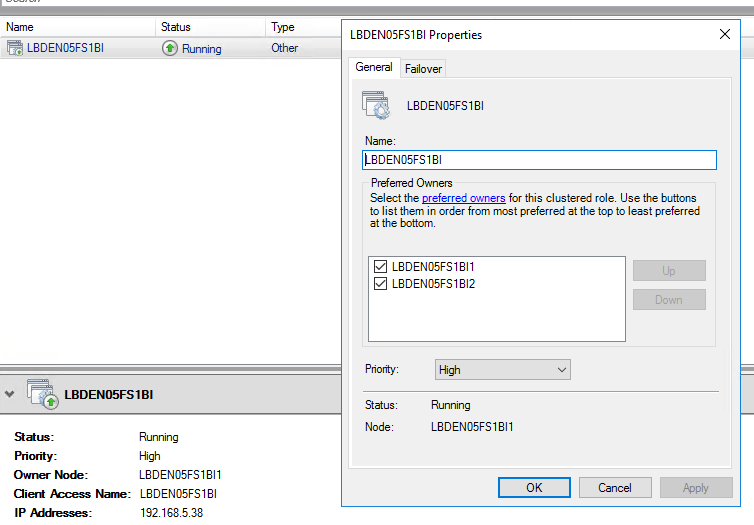
構成ファイル (ConfigTemplate.xml) を更新します。
レポート サービス ブートストラッパー サービスの ADServiceAccount を更新します。
<ADServiceAccount type="gMSA" name="svc-ReportSvc$" refName="gmsaSSRS">
    <DNSHostName>svc-ReportSvc.contosoen05.com</DNSHostName>
</ADServiceAccount>
ServiceFabricCluster セクションの ReportServerType で、すべてのサーバーがリストされていることを確認します。
<NodeType name="ReportServerType" primary="false" namePrefix="Rep" purpose="BI">
    <VMList>
        <VM name="LBDEN05FS1BI1" ipAddress="10.179.108.10" faultDomain="fd:/fd1" updateDomain="ud1"/>
        <VM name="LBDEN05FS1BI2" ipAddress="10.179.108.11" faultDomain="fd:/fd2" updateDomain="ud2"/>
    </VMList>
</NodeType>
SSRSHTTPS 証明書の設定を更新します。
この例では、前に示したスクリーンショットを使用します。 サブジェクト属性をクライアント アクセス名に設定します。 便宜上、名前とファイル名を同じ値に設定します。 DNSName には、優先する各所有者のエントリとクライアント アクセス名を追加します。
<Certificate type="SSRSHTTPS" exportable="true" generateSelfSignedCert="false" generateADCSCert="true">
    <!-- Specify the friendly name of the certificate during import operations. -->
    <Name>LBDEN05FS1BI</Name>
    <!-- Specify the file name of the pfx that will be used in export and import operations. If not specified, the name property will be used -->
    <FileName>LBDEN05FS1BI</FileName>
    <!-- Specify the DNS names for the listener, and of each of the report nodes in the cluster. -->
    <!-- The FQDNS will only be accessed from within the environment so it's not necessary to create external DNS entries for them. -->
    <DNSName>LBDEN05FS1BI;LBDEN05FS1BI1;LBDEN05FS1BI2</DNSName>
    <Subject>LBDEN05FS1BI</Subject>
    <Thumbprint></Thumbprint>
    <ProtectTo></ProtectTo>
</Certificate>
重要
証明書の生成に提供されているインフラストラクチャ スクリプトを使用しない場合でも、他のスクリプトはその情報に依存するため、証明書情報を入力します。
セットアップ ガイドに従って、通常の方法で設定を完了します。
重要
Azure Service Fabric クラスターを既に作成している場合は、必ずノードを追加してください。
Export-Certificates.ps1 スクリプトを再実行し、適切なコンピューターで Complete-Prereqs.ps1 スクリプトを再実行して、SSRS Web サーバーの証明書がすべての ReportServer ノードに配布されるようにします。
ロードバランサーの高可用性
このシナリオでは、使用可能なさまざまなノード間で要求を分散するようにロード バランサーを構成します。 これらの要求には、すべてのレポート生成要求が含まれます。
この構成を設定するときは、セッション アフィニティを設定する必要があります。 選択したソリューションは、この要件をサポートしている必要があります。 必要なセッション アフィニティのタイプはクライアントによって異なります。 アプリケーション オブジェクト サーバー (AOS) ノードが要求を行うと、ロード バランサーは、その AOS ノードのすべての要求を同じ SSRS ノードに転送します。
この記事には、特定のソフトウェア ロード バランサーまたはハードウェア ロード バランサーを設定するための手順は含まれていません。
このシナリオの一般的な概要を次に示します。
- 負荷分散戦略または製品を選択します。
- ネットワーク トポロジに従って戦略または製品を構成します。
- クライアント (ソース IP) アフィニティを設定していることを確認します。
- ConfigTemplate.xml ファイルを更新します。 前の例をガイドとして使用してください。
- 通常の方法でクラスターの設定を続行します。
重要
Service Fabric クラスターを既に作成している場合は、追加のノードを追加してください。
Export-Certificates.ps1 スクリプトを再実行し、適切なコンピューターで Complete-Prereqs.ps1 スクリプトを再実行して、SSRS Web サーバーの証明書がすべての ReportServer ノードに配布されるようにします。
基本配置が Platform update 41 より前の配置環境
メモ
この構成は、Platform update 41 以降の配置でのみサポートされます。
既存の環境で SSRS ノードの高可用性を有効にする場合は、デプロイ前スクリプトを使用します。 配置前スクリプトの詳細については、ローカル エージェントの配置前スクリプトと配置後スクリプトを参照してください。
配置前スクリプト
コマンド例の呼び出し
Configure-SSRSHA.ps1 -AgentShare "\\servername\D365FFOAgent" -Listener "LBDEN05FS1BI" -MachinesList "LBDEN05FS1BI1,LBDEN05FS1BI2" -TLSCertificateThumbprint "<cert thumbprint>" -ServiceAccount "contosoen05\svc-ReportSvc$"
メモ
これらの値の例は、「Windows フェールオーバー クラスターを使用した高可用性」セクションの ConfigTemplate.xml ファイルで使用される値に基づいています。
Configure-SSRSHA.ps1 スクリプト
メモ
このスクリプトは、アプリケーション バージョン 10.0.32 で動作し、以前のバージョンのアプリケーションでも動作します。
param (
    [Parameter(Mandatory=$true)]
    [string]
    $AgentShare,

    [Parameter(Mandatory=$true)]
    [string]
    $Listener,

    [Parameter(Mandatory=$true)]
    [string]
    $MachinesList,

    [Parameter(Mandatory=$true)]
    [string]
    $TLSCertificateThumbprint,

    [Parameter(Mandatory=$true)]
    [string]
    $ServiceAccount,

    [string]
    $ssrsServicePort = "443"
)

$ErrorActionPreference = "Stop"

$basePath = Get-ChildItem $AgentShare\wp\*\StandaloneSetup-*\ |
    Select-Object -First 1 -Expand FullName

if(!(Test-Path $basePath))
{
    Write-Error "Basepath: $basePath , not found" -Exception InvalidOperation
}

$configJsonPath = "$basePath\config.json"

$configJson = Get-Content $configJsonPath | ConvertFrom-Json

$updatedComponents = @()
foreach ($component in $configJson.components)
{
    if($component.name -eq "AOS")
    {
        $component.parameters.biReporting.persistentVirtualMachineIPAddressSSRS.value = $Listener
        $component.parameters.biReporting.reportingServers.value = $MachinesList
        $component.parameters.biReporting.ssrsUseHttps.value = "True"
        $component.parameters.biReporting.ssrsHttpsPort.value = $ssrsServicePort
    }
    elseif($component.name -eq "ReportingServices")
    {
        $component.parameters.enableSecurity.value = "True"
        $component.parameters.ssrsSslCertificateThumbprint.value = $TLSCertificateThumbprint
        $component.parameters.ssrsServerFqdn.value = $Listener
        if($component.parameters.infrastructure)
        {
            $component.parameters.infrastructure.principalUserAccountType.value = "ManagedServiceAccount"
            $component.parameters.infrastructure.principalUserAccountName.value = $ServiceAccount
        }
        else
        {
            $component.parameters.principalUserAccountType.value = "ManagedServiceAccount"
            $component.parameters.principalUserAccountName.value = $ServiceAccount
        }

        $component.parameters.reportingServers.value = $MachinesList
        $component.parameters.ssrsHttpsPort.value = $ssrsServicePort
    }

    $updatedComponents += $component
}

$configJson.components = $updatedComponents

$configJson | ConvertTo-Json -Depth 100 | Out-File $configJsonPath

Write-Host "Successfully updated the configuration for SSRS HA."