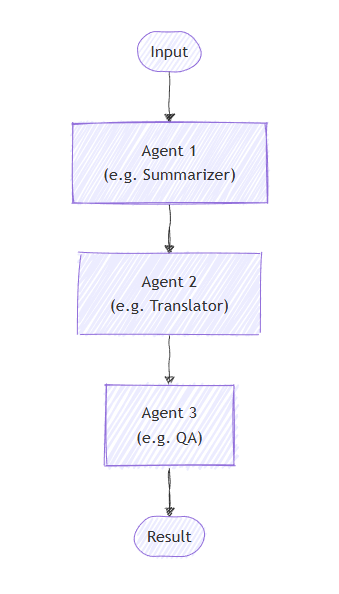
順次オーケストレーションでは、エージェントはパイプラインに編成されます。 各エージェントはタスクを順番に処理し、その出力をシーケンス内の次のエージェントに渡します。 これは、ドキュメント レビュー、データ処理パイプライン、マルチステージ推論など、各ステップが前の手順に基づいて構築されるワークフローに最適です。
Important
既定では、シーケンス内の各エージェントは、前のエージェントの完全な会話 (前のエージェントに提供された入力メッセージとその応答メッセージの両方) を使用します。 代わりに、前のエージェントの応答メッセージのみを使用するようにエージェントを構成できます。 詳細については、 エージェント間のコンテキストの制御 を参照してください。
ここでは、次の内容について学習します
- エージェントのシーケンシャル パイプラインを作成する方法
- 前の出力に基づいて各エージェントをチェーンする方法
- 機密性の高いツール呼び出しに対する人間のループ内承認を追加する方法
- 特殊なタスク用のカスタム Executor とエージェントを混在させる方法
- パイプラインを介して会話フローを追跡する方法
エージェントの定義
順次オーケストレーションでは、各エージェントが順番にタスクを処理し、シーケンス内の次のエージェントに出力を渡すパイプラインにエージェントが編成されます。
Azure OpenAI クライアントを設定する
using System;
using System.Collections.Generic;
using System.Linq;
using System.Threading.Tasks;
using Azure.AI.Projects;
using Azure.Identity;
using Microsoft.Agents.AI.Workflows;
using Microsoft.Extensions.AI;
using Microsoft.Agents.AI;

// 1) Set up the Azure OpenAI client
var endpoint = Environment.GetEnvironmentVariable("AZURE_OPENAI_ENDPOINT") ??
    throw new InvalidOperationException("AZURE_OPENAI_ENDPOINT is not set.");
var deploymentName = Environment.GetEnvironmentVariable("AZURE_OPENAI_DEPLOYMENT_NAME") ?? "gpt-4o-mini";
var client = new AIProjectClient(new Uri(endpoint), new DefaultAzureCredential())
    .GetProjectOpenAIClient()
    .GetProjectResponsesClient()
    .AsIChatClient(deploymentName);
Warnung
DefaultAzureCredential は開発には便利ですが、運用環境では慎重に考慮する必要があります。 運用環境では、待機時間の問題、意図しない資格情報のプローブ、フォールバック メカニズムによる潜在的なセキュリティ リスクを回避するために、特定の資格情報 ( ManagedIdentityCredential など) を使用することを検討してください。
順番に動作する特殊なエージェントを作成します。
// 2) Helper method to create translation agents
static ChatClientAgent GetTranslationAgent(string targetLanguage, IChatClient chatClient) =>
    new(chatClient,
        $"You are a translation assistant who only responds in {targetLanguage}. Respond to any " +
        $"input by outputting the name of the input language and then translating the input to {targetLanguage}.");

// Create translation agents for sequential processing
var translationAgents = (from lang in (string[])["French", "Spanish", "English"]
                         select GetTranslationAgent(lang, client));
シーケンシャル オーケストレーションを設定する
AgentWorkflowBuilderを使用してワークフローを構築します。
// 3) Build sequential workflow
var workflow = AgentWorkflowBuilder.BuildSequential(translationAgents);
シーケンシャル ワークフローの実行
ワークフローを実行し、イベントを処理します。
// 4) Run the workflow
var messages = new List<ChatMessage> { new(ChatRole.User, "Hello, world!") };

await using StreamingRun run = await InProcessExecution.RunStreamingAsync(workflow, messages);
await run.TrySendMessageAsync(new TurnToken(emitEvents: true));

string? lastExecutorId = null;
List<ChatMessage> result = [];
await foreach (WorkflowEvent evt in run.WatchStreamAsync())
{
    if (evt is AgentResponseUpdateEvent e)
    {
        if (e.ExecutorId != lastExecutorId)
        {
            lastExecutorId = e.ExecutorId;
            Console.WriteLine();
            Console.Write($"{e.ExecutorId}: ");
        }

        Console.Write(e.Update.Text);
    }
    else if (evt is WorkflowOutputEvent outputEvt)
    {
        result = outputEvt.As<List<ChatMessage>>()!;
        break;
    }
}

// Display final result
Console.WriteLine();
foreach (var message in result)
{
    Console.WriteLine($"{message.Role}: {message.Text}");
}
サンプル出力
French_Translation: User: Hello, world!
French_Translation: Assistant: English detected. Bonjour, le monde !
Spanish_Translation: Assistant: French detected. ¡Hola, mundo!
English_Translation: Assistant: Spanish detected. Hello, world!
Human-in-the-Loop を使用したシーケンシャル オーケストレーション
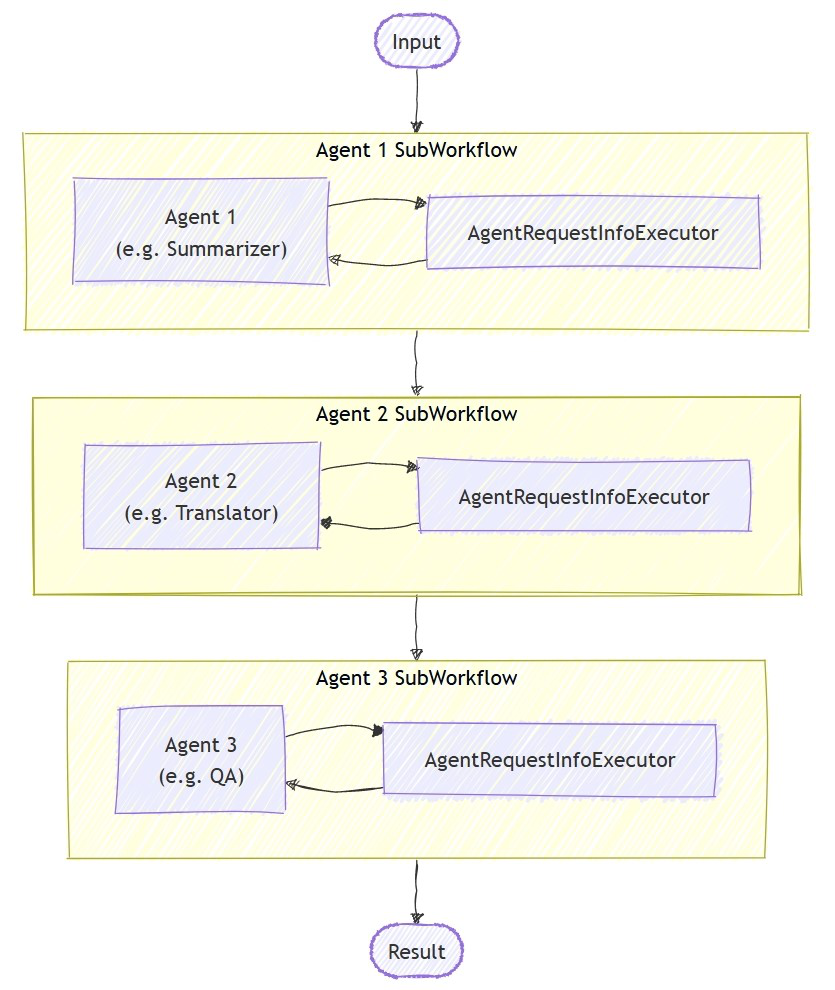
シーケンシャル オーケストレーションは、ツールの承認を通じて、人間とループ内の対話をサポートします。 エージェントがApprovalRequiredAIFunctionでラップされたツールを使用すると、ワークフローは一時停止し、RequestInfoEventを含むToolApprovalRequestContentを出力します。 外部システム (人間のオペレーターなど) は、ツールの呼び出しを検査したり、承認または拒否したりすることができ、それに応じてワークフローが再開されます。
ヒント
要求と応答モデルの詳細については、「 Human-in-the-Loop」を参照してください。
承認が必要なツールを使ってエージェントを定義する
機密性の高いツールを ApprovalRequiredAIFunctionでラップするエージェントを作成します。
ChatClientAgent deployAgent = new(
    client,
    "You are a DevOps engineer. Check staging status first, then deploy to production.",
    "DeployAgent",
    "Handles deployments",
    [
        AIFunctionFactory.Create(CheckStagingStatus),
        new ApprovalRequiredAIFunction(AIFunctionFactory.Create(DeployToProduction))
    ]);

ChatClientAgent verifyAgent = new(
    client,
    "You are a QA engineer. Verify that the deployment was successful and summarize the results.",
    "VerifyAgent",
    "Verifies deployments");
承認処理を使用したビルドと実行
通常どおりシーケンシャル ワークフローを構築します。 承認フローは、イベント ストリームを介して処理されます。
var workflow = AgentWorkflowBuilder.BuildSequential([deployAgent, verifyAgent]);

await foreach (WorkflowEvent evt in run.WatchStreamAsync())
{
    if (evt is RequestInfoEvent e &&
        e.Request.TryGetDataAs(out ToolApprovalRequestContent? approvalRequest))
    {
        await run.SendResponseAsync(
            e.Request.CreateResponse(approvalRequest.CreateResponse(approved: true)));
    }
}
注
AgentWorkflowBuilder.BuildSequential() は、ツールの承認をすぐにサポートします。追加の構成は必要ありません。 エージェントが ApprovalRequiredAIFunctionでラップされたツールを呼び出すと、ワークフローは自動的に一時停止し、 RequestInfoEventを出力します。
ヒント
この承認フローの完全な実行可能な例については、 GroupChatToolApproval サンプルを参照してください。 同じ RequestInfoEvent 処理パターンが他のオーケストレーションに適用されます。
主な概念
- 順次処理: 各エージェントは、前のエージェントの出力を順番に処理します。
- AgentWorkflowBuilder.BuildSequential(): エージェントのコレクションからパイプライン ワークフローを作成します
- ChatClientAgent: 特定の手順を使用してチャット クライアントによってサポートされるエージェントを表します
-
InProcessExecution.RunStreamingAsync(): ワークフローを実行し、リアルタイム イベント ストリーミングの
StreamingRunを返します -
イベント処理:
AgentResponseUpdateEventを通じてエージェントの進行状況を監視し、WorkflowOutputEventを通じて完了を監視する -
ツールの承認: 機密性の高いツールを
ApprovalRequiredAIFunctionでラップし、実行前に人間の承認を要求する -
RequestInfoEvent: ツールで承認が必要な場合に出力されます。には、ツール呼び出しの詳細を含む
ToolApprovalRequestContentが含まれています
順次オーケストレーションでは、各エージェントがタスクを順番に処理し、出力は次のタスクに送られます。 まず、2 段階プロセスのエージェントを定義します。
import os
from agent_framework.foundry import FoundryChatClient
from azure.identity import AzureCliCredential

# 1) Create agents using FoundryChatClient
chat_client = FoundryChatClient(
    project_endpoint=os.environ["FOUNDRY_PROJECT_ENDPOINT"],
    model=os.environ["FOUNDRY_MODEL"],
    credential=AzureCliCredential(),
)

writer = chat_client.as_agent(
    instructions=(
        "You are a concise copywriter. Provide a single, punchy marketing sentence based on the prompt."
    ),
    name="writer",
)

reviewer = chat_client.as_agent(
    instructions=(
        "You are a thoughtful reviewer. Give brief feedback on the previous assistant message."
    ),
    name="reviewer",
)
シーケンシャル オーケストレーションを設定する
SequentialBuilder クラスは、エージェントがタスクを順番に処理するパイプラインを作成します。 各エージェントは、会話の完全な履歴を確認し、応答を追加します。
from agent_framework.orchestrations import SequentialBuilder

# 2) Build sequential workflow: writer -> reviewer
workflow = SequentialBuilder(participants=[writer, reviewer]).build()
シーケンシャル ワークフローの実行
ワークフローを実行し、最終的な出力を収集します。 ターミナル出力は、最後のエージェントの応答メッセージを含む AgentResponse です。
from agent_framework import AgentResponse

# 3) Run and print the last agent's response
events = await workflow.run("Write a tagline for a budget-friendly eBike.")
outputs = events.get_outputs()

if outputs:
    print("===== Final Response =====")
    final: AgentResponse = outputs[0]
    for msg in final.messages:
        name = msg.author_name or "assistant"
        print(f"[{name}]\n{msg.text}")
サンプル出力
===== Final Response =====
[reviewer]
This tagline clearly communicates affordability and the benefit of extended travel, making it
appealing to budget-conscious consumers. It has a friendly and motivating tone, though it could
be slightly shorter for more punch. Overall, a strong and effective suggestion!
上級: エージェントとカスタムエグゼキューターの混在
シーケンシャル オーケストレーションでは、特殊な処理のためのカスタム Executor とエージェントの混在がサポートされています。 これは、LLM を必要としないカスタム ロジックが必要な場合に便利です。
カスタム Executor を定義する
注
カスタム Executor がシーケンス内のエージェントに従うと、そのハンドラーは AgentExecutorResponse を受け取ります (エージェントは AgentExecutorによって内部的にラップされるため)。
agent_response.full_conversationを使用して、会話の完全な履歴にアクセスします。
最後の参加要素 (ターミネータ) として使用されるカスタム Executor は、ctx.yield_output(AgentResponse(...))を呼び出して、その出力がワークフローのターミナル出力になるようにする必要があります。
from agent_framework import AgentExecutorResponse, AgentResponse, Executor, WorkflowContext, handler
from agent_framework import Message
from typing_extensions import Never

class Summarizer(Executor):
    """Terminator custom executor: consumes full conversation and yields a summary as the workflow's final answer."""

    @handler
    async def summarize(
        self,
        agent_response: AgentExecutorResponse,
        ctx: WorkflowContext[Never, AgentResponse]
    ) -> None:
        if not agent_response.full_conversation:
            await ctx.yield_output(AgentResponse(messages=[Message("assistant", ["No conversation to summarize."])]))
            return

        users = sum(1 for m in agent_response.full_conversation if m.role == "user")
        assistants = sum(1 for m in agent_response.full_conversation if m.role == "assistant")
        summary = Message("assistant", [f"Summary -> users:{users} assistants:{assistants}"])
        await ctx.yield_output(AgentResponse(messages=[summary]))
混合シーケンシャル ワークフローの作成
# Create a content agent
content = chat_client.as_agent(
    instructions="Produce a concise paragraph answering the user's request.",
    name="content",
)

# Build sequential workflow: content -> summarizer
summarizer = Summarizer(id="summarizer")
workflow = SequentialBuilder(participants=[content, summarizer]).build()
カスタム Executor を使用したサンプル出力
===== Final Summary =====
Summary -> users:1 assistants:1
エージェント間のコンテキストの制御
既定では、 SequentialBuilder ワークフロー内の各エージェントは、前のエージェントの完全な会話 (入力 + 応答メッセージ) を使用します。
chain_only_agent_responses=True設定すると、シーケンス内のすべてのエージェントが、代わりに前のエージェントの応答メッセージのみを使用するように構成されます。
workflow = SequentialBuilder(
    participants=[writer, translator, reviewer],
    chain_only_agent_responses=True,
).build()
これは、翻訳パイプライン、プログレッシブ絞り込み、および各エージェントが以前の会話ターンの影響を受けることなく、前のエージェントの出力の変換のみに集中する必要があるその他のシナリオに役立ちます。
完全な例については、Agent Framework リポジトリの sequential_chain_only_agent_responses.py を参照してください。
ヒント
カスタム フィルター関数を含むコンテキスト フローをよりきめ細かく制御する方法については、Agent Executor リファレンスの コンテキスト モード を参照してください。
中間出力
既定では、SequentialBuilderは最後の参加要素をターミナル出力ソース (final_output_from) として指定します。 その参加者の出力だけが "output" イベントとして現れます。
以前の参加者の出力も表示するには、中間ソースとして指定する参加者を指定して intermediate_output_from を渡します。 これにより、既定の最終セットからそれらの参加者が暗黙的に降格され、"intermediate"イベントではなく"output"イベントが出力されます。
workflow = SequentialBuilder(
    participants=[writer, reviewer, editor],
    intermediate_output_from=[writer, reviewer],
).build()
ストリーミング モードでは、 "intermediate" イベントと "output" イベントの両方をリアルタイムで処理できます。
from agent_framework import AgentResponseUpdate

# Track the last author to format streaming output.
last_author: str | None = None

async for event in workflow.run("Write a tagline for a budget-friendly eBike.", stream=True):
    if event.type in ("output", "intermediate") and isinstance(event.data, AgentResponseUpdate):
        update = event.data
        author = update.author_name
        if author != last_author:
            if last_author is not None:
                print()  # Newline between different authors
            label = "FINAL" if event.type == "output" else "intermediate"
            print(f"[{label}] {author}: {update.text}", end="", flush=True)
            last_author = author
        else:
            print(update.text, end="", flush=True)
Human-in-the-Loop を使用したシーケンシャル オーケストレーション
シーケンシャル オーケストレーションでは、2 つの方法で人間とループ内の対話がサポートされます。機密性の高いツール呼び出しを制御するためのツール 承認 と、フィードバックを収集するために各エージェントの応答後に一時停止するための 情報を要求 します。
ヒント
要求と応答モデルの詳細については、「 Human-in-the-Loop」を参照してください。
シーケンシャル ワークフローでのツール承認
@tool(approval_mode="always_require")を使用して、実行前に人間の承認が必要なツールをマークします。 エージェントがツールを呼び出そうとすると、ワークフローは request_info イベントを一時停止して出力します。
@tool(approval_mode="always_require")
def execute_database_query(query: str) -> str:
    return f"Query executed successfully: {query}"


database_agent = Agent(
    client=chat_client,
    name="DatabaseAgent",
    instructions="You are a database assistant.",
    tools=[execute_database_query],
)

workflow = SequentialBuilder(participants=[database_agent]).build()
イベント ストリームを処理し、承認要求を処理します。
async def process_event_stream(stream):
    responses = {}
    async for event in stream:
        if event.type == "request_info" and event.data.type == "function_approval_request":
            responses[event.request_id] = event.data.to_function_approval_response(approved=True)
    return responses if responses else None

stream = workflow.run("Check the schema and update all pending orders", stream=True)

pending_responses = await process_event_stream(stream)
while pending_responses is not None:
    stream = workflow.run(stream=True, responses=pending_responses)
    pending_responses = await process_event_stream(stream)
ヒント
実行可能な完全な例については、 sequential_builder_tool_approval.pyを参照してください。 ツールの承認は、追加のビルダー構成なしで SequentialBuilder で機能します。
エージェント フィードバックの情報を要求する
.with_request_info()を使用して、特定のエージェントが応答した後に一時停止し、次のエージェントが開始される前に外部入力 (人間によるレビューなど) を許可します。
drafter = Agent(
    client=chat_client,
    name="drafter",
    instructions="You are a document drafter. Create a brief draft on the given topic.",
)

editor = Agent(
    client=chat_client,
    name="editor",
    instructions="You are an editor. Review and improve the draft. Incorporate any human feedback.",
)

finalizer = Agent(
    client=chat_client,
    name="finalizer",
    instructions="You are a finalizer. Create a polished final version.",
)

# Enable request info for the editor agent only
workflow = (
    SequentialBuilder(participants=[drafter, editor, finalizer])
    .with_request_info(agents=["editor"])
    .build()
)

async def process_event_stream(stream):
    responses = {}
    async for event in stream:
        if event.type == "request_info":
            responses[event.request_id] = AgentRequestInfoResponse.approve()
    return responses if responses else None

stream = workflow.run("Write a brief introduction to artificial intelligence.", stream=True)

pending_responses = await process_event_stream(stream)
while pending_responses is not None:
    stream = workflow.run(stream=True, responses=pending_responses)
    pending_responses = await process_event_stream(stream)
主な概念
- 共有コンテキスト: 既定では、各エージェントは、入力メッセージと応答メッセージを含む、前のエージェントの完全な会話を使用します
-
コンテキスト制御:
chain_only_agent_responses=Trueを使用して、前のエージェントの応答メッセージのみを使用するようにエージェントを構成する -
AgentResponse 出力: ワークフローのターミナル出力は、(完全な会話ではなく) 最後のエージェントの応答を含む
AgentResponseです。 -
順序が重要です: エージェントは
participantsリストで指定された順序で厳密に実行します - 柔軟な参加者: エージェントとカスタム Executor を任意の順序で混在させることができます
-
カスタム ターミネータ コントラクト: 最後の参加者として使用されるカスタム Executor は、ターミナル出力を生成するために
ctx.yield_output(AgentResponse(...))を呼び出す必要があります -
中間出力: 最後の参加者だけでなく、すべての参加者の出力をワークフロー
intermediate_outputs=Trueイベントとして表示するようにoutputを設定します。 -
ツールの承認: 人によるレビューを必要とする機密性の高い操作に
@tool(approval_mode="always_require")を使用する -
要求情報:
.with_request_info(agents=[...])を使用して、外部フィードバック用の特定のエージェントの後に一時停止する