Nota
L'accesso a questa pagina richiede l'autorizzazione. È possibile provare ad accedere o modificare le directory.
L'accesso a questa pagina richiede l'autorizzazione. È possibile provare a modificare le directory.
Action commands allow you to present your users with a modal pop-up called a dialog in Teams. The dialog collects or displays information, processes the interaction, and sends the information back to Teams compose box.
Action command invocation locations
There are three different areas action commands can be invoked from:
- Compose Area
- Compose Box
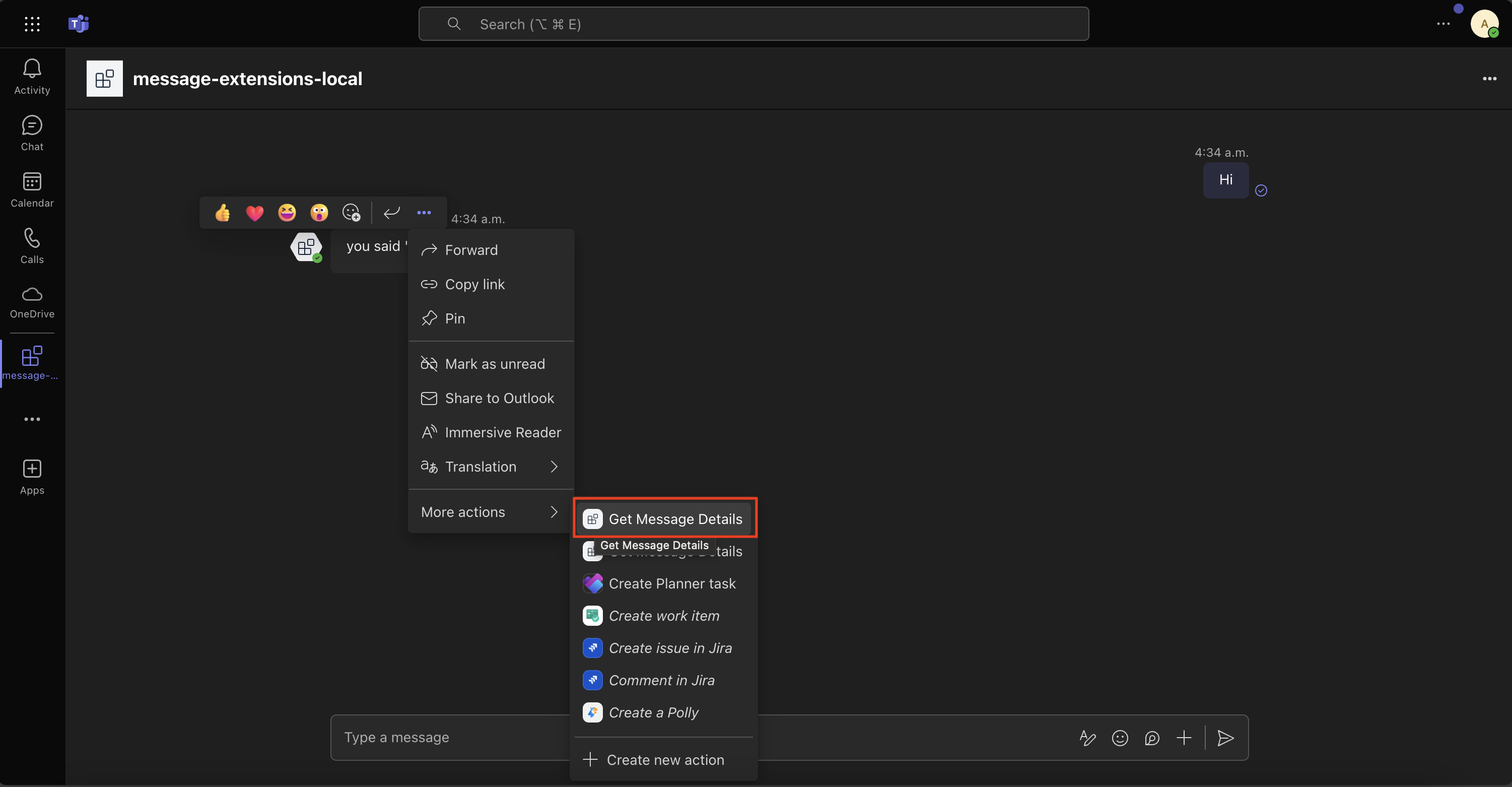
- Message
Compose Area and Box

Message action command

Tip
See the Invoke Locations guide to learn more about the different entry points for action commands.
Setting up your Teams app manifest
To use action commands you have define them in the Teams app manifest. Here is an example:
"composeExtensions": [
    {
        "botId": "${{BOT_ID}}",
        "commands": [
            {
            "id": "createCard",
            "type": "action",
            "context": [
                "compose",
                "commandBox"
            ],
            "description": "Command to run action to create a card from the compose box.",
            "title": "Create Card",
            "parameters": [
                {
                    "name": "title",
                    "title": "Card title",
                    "description": "Title for the card",
                    "inputType": "text"
                },
                {
                    "name": "subTitle",
                    "title": "Subtitle",
                    "description": "Subtitle for the card",
                    "inputType": "text"
                },
                {
                    "name": "text",
                    "title": "Text",
                    "description": "Text for the card",
                    "inputType": "textarea"
                }
            ]
            },
            {
                "id": "getMessageDetails",
                "type": "action",
                "context": [
                    "message"
                ],
                "description": "Command to run action on message context.",
                "title": "Get Message Details"
            },
            {
                "id": "fetchConversationMembers",
                "description": "Fetch the conversation members",
                "title": "Fetch Conversation Members",
                "type": "action",
                "fetchTask": true,
                "context": [
                    "compose"
                ]
            },
        ]
    }
]
Here we have defining three different commands:
createCard- that can be invoked from either thecomposeorcommandBoxareas. Upon invocation a dialog will popup asking the user to fill thetitle,subTitle, andtext.

getMessageDetails- It is invoked from themessageoverflow menu. Upon invocation the message payload will be sent to the app which will then return the details likecreatedDate, etc.
fetchConversationMembers- It is invoked from thecomposearea. Upon invocation the app will return an adaptive card in the form of a dialog with the conversation roster.

Handle submission
Handle submission when the createCard or getMessageDetails actions commands are invoked.
Handle submission when the createCard or getMessageDetails action commands are invoked.
using System.Text.Json;
using Microsoft.Teams.Api.Activities.Invokes.MessageExtensions;
using Microsoft.Teams.Api.MessageExtensions;
using Microsoft.Teams.Apps.Annotations;

//...

[MessageExtension.SubmitAction]
public Response OnMessageExtensionSubmit(
    [Context] SubmitActionActivity activity,
    [Context] IContext.Client client,
    [Context] ILogger log)
{
    log.Info("[MESSAGE_EXT_SUBMIT] Action submit received");

    var commandId = activity.Value?.CommandId;
    var data = activity.Value?.Data as JsonElement?;

    log.Info($"[MESSAGE_EXT_SUBMIT] Command: {commandId}");
    log.Info($"[MESSAGE_EXT_SUBMIT] Data: {JsonSerializer.Serialize(data)}");

    switch (commandId)
    {
        case "createCard":
            return HandleCreateCard(data, log);

        case "getMessageDetails":
            return HandleGetMessageDetails(activity, log);

        default:
            log.Error($"[MESSAGE_EXT_SUBMIT] Unknown command: {commandId}");
            return CreateErrorActionResponse("Unknown command");
    }
}
from microsoft_teams.api import AdaptiveCardAttachment, MessageExtensionSubmitActionInvokeActivity, card_attachment
from microsoft_teams.api.models import AttachmentLayout, MessagingExtensionActionInvokeResponse, MessagingExtensionAttachment, MessagingExtensionResult, MessagingExtensionResultType
from microsoft_teams.apps import ActivityContext
# ...

@app.on_message_ext_submit
async def handle_message_ext_submit(ctx: ActivityContext[MessageExtensionSubmitActionInvokeActivity]):
    command_id = ctx.activity.value.command_id

    if command_id == "createCard":
        card = create_card(ctx.activity.value.data or {})
    elif command_id == "getMessageDetails" and ctx.activity.value.message_payload:
        card = create_message_details_card(ctx.activity.value.message_payload)
    else:
        raise Exception(f"Unknown commandId: {command_id}")

    main_attachment = card_attachment(AdaptiveCardAttachment(content=card))
    attachment = MessagingExtensionAttachment(
        content_type=main_attachment.content_type, content=main_attachment.content
    )

    result = MessagingExtensionResult(
        type=MessagingExtensionResultType.RESULT, attachment_layout=AttachmentLayout.LIST, attachments=[attachment]
    )

    return MessagingExtensionActionInvokeResponse(compose_extension=result)
import { cardAttachment } from '@microsoft/teams.api';
import { App } from '@microsoft/teams.apps';
import { IAdaptiveCard } from '@microsoft/teams.cards';
// ...

app.on('message.ext.submit', async ({ activity }) => {
  const { commandId } = activity.value;
  let card: IAdaptiveCard;

  if (commandId === 'createCard') {
    // The activity.value.commandContext == "compose" here because it was from
    // the compose box
    card = createCard(activity.value.data);
  } else if (commandId === 'getMessageDetails' && activity.value.messagePayload) {
    // The activity.value.commandContext == "message" here because it was from
    // the message context
    card = createMessageDetailsCard(activity.value.messagePayload);
  } else {
    throw new Error(`Unknown commandId: ${commandId}`);
  }

  return {
    composeExtension: {
      type: 'result',
      attachmentLayout: 'list',
      attachments: [cardAttachment('adaptive', card)],
    },
  };
});
Create card
HandleCreateCard() method
using System.Text.Json;
using Microsoft.Teams.Api.MessageExtensions;
using Microsoft.Teams.Cards;
using Microsoft.Teams.Common;

//...

private static Response HandleCreateCard(JsonElement? data, ILogger log)
{
    var title = GetJsonValue(data, "title") ?? "Default Title";
    var description = GetJsonValue(data, "description") ?? "Default Description";

    log.Info($"[CREATE_CARD] Title: {title}, Description: {description}");

    var card = new AdaptiveCard
    {
        Schema = "http://adaptivecards.io/schemas/adaptive-card.json",
        Body = new List<CardElement>
        {
            new TextBlock("Custom Card Created")
            {
                Weight = TextWeight.Bolder,
                Size = TextSize.Large,
                Color = TextColor.Good
            },
            new TextBlock(title)
            {
                Weight = TextWeight.Bolder,
                Size = TextSize.Medium
            },
            new TextBlock(description)
            {
                Wrap = true,
                IsSubtle = true
            }
        }
    };

    var attachment = new Microsoft.Teams.Api.MessageExtensions.Attachment
    {
        ContentType = ContentType.AdaptiveCard,
        Content = card
    };

    return new Response
    {
        ComposeExtension = new Result
        {
            Type = ResultType.Result,
            AttachmentLayout = Layout.List,
            Attachments = new List<Microsoft.Teams.Api.MessageExtensions.Attachment> { attachment }
        }
    };
}
create_card() method
from typing import Dict
from microsoft_teams.cards import AdaptiveCard
# ...

def create_card(data: Dict[str, str]) -> AdaptiveCard:
    """Create an adaptive card from form data."""
    return AdaptiveCard.model_validate(
        {
            "type": "AdaptiveCard",
            "version": "1.4",
            "body": [
                {"type": "Image", "url": IMAGE_URL},
                {
                    "type": "TextBlock",
                    "text": data.get("title", ""),
                    "size": "Large",
                    "weight": "Bolder",
                    "color": "Accent",
                    "style": "heading",
                },
                {
                    "type": "TextBlock",
                    "text": data.get("subTitle", ""),
                    "size": "Small",
                    "weight": "Lighter",
                    "color": "Good",
                },
                {"type": "TextBlock", "text": data.get("text", ""), "wrap": True, "spacing": "Medium"},
            ],
        }
    )
createCard() function
import { AdaptiveCard, TextBlock, Image } from '@microsoft/teams.cards';
// ...

interface IFormData {
  title: string;
  subtitle: string;
  text: string;
}

export function createCard(data: IFormData) {
  return new AdaptiveCard(
    new Image(IMAGE_URL),
    new TextBlock(data.title, {
      size: 'Large',
      weight: 'Bolder',
      color: 'Accent',
      style: 'heading',
    }),
    new TextBlock(data.subtitle, {
      size: 'Small',
      weight: 'Lighter',
      color: 'Good',
    }),
    new TextBlock(data.text, {
      wrap: true,
      spacing: 'Medium',
    })
  );
}
Create message details card
HandleGetMessageDetails() method
using Microsoft.Teams.Api;
using Microsoft.Teams.Api.Activities.Invokes.MessageExtensions;
using Microsoft.Teams.Api.MessageExtensions;
using Microsoft.Teams.Cards;

//...

private static Response HandleGetMessageDetails(SubmitActionActivity activity, ILogger log)
{
    var messageText = activity.Value?.MessagePayload?.Body?.Content ?? "No message content";
    var messageId = activity.Value?.MessagePayload?.Id ?? "Unknown";

    log.Info($"[GET_MESSAGE_DETAILS] Message ID: {messageId}");

    var card = new AdaptiveCard
    {
        Schema = "http://adaptivecards.io/schemas/adaptive-card.json",
        Body = new List<CardElement>
        {
            new TextBlock("Message Details")
            {
                Weight = TextWeight.Bolder,
                Size = TextSize.Large,
                Color = TextColor.Accent
            },
            new TextBlock($"Message ID: {messageId}")
            {
                Wrap = true
            },
            new TextBlock($"Content: {messageText}")
            {
                Wrap = true
            }
        }
    };

    var attachment = new Microsoft.Teams.Api.MessageExtensions.Attachment
    {
        ContentType = new ContentType("application/vnd.microsoft.card.adaptive"),
        Content = card
    };

    return new Response
    {
        ComposeExtension = new Result
        {
            Type = ResultType.Result,
            AttachmentLayout = Layout.List,
            Attachments = new List<Microsoft.Teams.Api.MessageExtensions.Attachment> { attachment }
        }
    };
}
create_message_details_card() method
from typing import Dict, List, Union
from microsoft_teams.api.models.message import Message
from microsoft_teams.cards import AdaptiveCard
# ...

def create_message_details_card(message_payload: Message) -> AdaptiveCard:
    """Create a card showing message details."""
    body: List[Dict[str, Union[str, bool]]] = [
        {
            "type": "TextBlock",
            "text": "Message Details",
            "size": "Large",
            "weight": "Bolder",
            "color": "Accent",
            "style": "heading",
        }
    ]

    if message_payload.body and message_payload.body.content:
        content_blocks: List[Dict[str, Union[str, bool]]] = [
            {"type": "TextBlock", "text": "Content", "size": "Medium", "weight": "Bolder", "spacing": "Medium"},
            {"type": "TextBlock", "text": message_payload.body.content},
        ]
        body.extend(content_blocks)

    if message_payload.attachments:
        attachment_blocks: List[Dict[str, Union[str, bool]]] = [
            {"type": "TextBlock", "text": "Attachments", "size": "Medium", "weight": "Bolder", "spacing": "Medium"},
            {
                "type": "TextBlock",
                "text": f"Number of attachments: {len(message_payload.attachments)}",
                "wrap": True,
                "spacing": "Small",
            },
        ]
        body.extend(attachment_blocks)

    if message_payload.created_date_time:
        date_blocks: List[Dict[str, Union[str, bool]]] = [
            {"type": "TextBlock", "text": "Created Date", "size": "Medium", "weight": "Bolder", "spacing": "Medium"},
            {"type": "TextBlock", "text": message_payload.created_date_time, "wrap": True, "spacing": "Small"},
        ]
        body.extend(date_blocks)

    if message_payload.link_to_message:
        link_blocks: List[Dict[str, Union[str, bool]]] = [
            {"type": "TextBlock", "text": "Message Link", "size": "Medium", "weight": "Bolder", "spacing": "Medium"}
        ]
        body.extend(link_blocks)

        actions = [{"type": "Action.OpenUrl", "title": "Go to message", "url": message_payload.link_to_message}]
    else:
        actions = []

    return AdaptiveCard.model_validate({"type": "AdaptiveCard", "version": "1.4", "body": body, "actions": actions})
createMessageDetailsCard() function
import { Message } from '@microsoft/teams.api';
import {
  AdaptiveCard,
  CardElement,
  TextBlock,
  ActionSet,
  OpenUrlAction,
} from '@microsoft/teams.cards';
// ...

export function createMessageDetailsCard(messagePayload: Message) {
  const cardElements: CardElement[] = [
    new TextBlock('Message Details', {
      size: 'Large',
      weight: 'Bolder',
      color: 'Accent',
      style: 'heading',
    }),
  ];

  if (messagePayload?.body?.content) {
    cardElements.push(
      new TextBlock('Content', {
        size: 'Medium',
        weight: 'Bolder',
        spacing: 'Medium',
      }),
      new TextBlock(messagePayload.body.content)
    );
  }

  if (messagePayload?.attachments?.length) {
    cardElements.push(
      new TextBlock('Attachments', {
        size: 'Medium',
        weight: 'Bolder',
        spacing: 'Medium',
      }),
      new TextBlock(`Number of attachments: ${messagePayload.attachments.length}`, {
        wrap: true,
        spacing: 'Small',
      })
    );
  }

  if (messagePayload?.createdDateTime) {
    cardElements.push(
      new TextBlock('Created Date', {
        size: 'Medium',
        weight: 'Bolder',
        spacing: 'Medium',
      }),
      new TextBlock(messagePayload.createdDateTime, {
        wrap: true,
        spacing: 'Small',
      })
    );
  }

  if (messagePayload?.linkToMessage) {
    cardElements.push(
      new TextBlock('Message Link', {
        size: 'Medium',
        weight: 'Bolder',
        spacing: 'Medium',
      }),
      new ActionSet(
        new OpenUrlAction(messagePayload.linkToMessage, {
          title: 'Go to message',
        })
      )
    );
  }

  return new AdaptiveCard(...cardElements);
}
Handle opening adaptive card dialog
Handle opening adaptive card dialog when the fetchConversationMembers command is invoked.
using Microsoft.Teams.Api.Activities.Invokes.MessageExtensions;
using Microsoft.Teams.Api.MessageExtensions;
using Microsoft.Teams.Apps.Annotations;

//...

[MessageExtension.FetchTask]
public async Task<ActionResponse> OnMessageExtensionFetchTask(
    [Context] FetchTaskActivity activity,
    [Context] ILogger log)
{
    log.Info("[MESSAGE_EXT_FETCH_TASK] Fetch task received");

    var commandId = activity.Value?.CommandId;
    log.Info($"[MESSAGE_EXT_FETCH_TASK] Command: {commandId}");

    return CreateFetchTaskResponse(commandId, log);
}
from microsoft_teams.api import AdaptiveCardAttachment, MessageExtensionFetchTaskInvokeActivity, card_attachment
from microsoft_teams.api.models import CardTaskModuleTaskInfo, MessagingExtensionActionInvokeResponse, TaskModuleContinueResponse
from microsoft_teams.apps import ActivityContext
# ...

@app.on_message_ext_open
async def handle_message_ext_open(ctx: ActivityContext[MessageExtensionFetchTaskInvokeActivity]):
    conversation_id = ctx.activity.conversation.id
    members = await ctx.api.conversations.members(conversation_id).get_all()
    card = create_conversation_members_card(members)

    card_info = CardTaskModuleTaskInfo(
        title="Conversation members",
        height="small",
        width="small",
        card=card_attachment(AdaptiveCardAttachment(content=card)),
    )

    task = TaskModuleContinueResponse(value=card_info)

    return MessagingExtensionActionInvokeResponse(task=task)
import { cardAttachment } from '@microsoft/teams.api';
import { App } from '@microsoft/teams.apps';
// ...

app.on('message.ext.open', async ({ activity, api }) => {
  const conversationId = activity.conversation.id;
  const members = await api.conversations.members(conversationId).get();
  const card = createConversationMembersCard(members);

  return {
    task: {
      type: 'continue',
      value: {
        title: 'Conversation members',
        height: 'small',
        width: 'small',
        card: cardAttachment('adaptive', card),
      },
    },
  };
});
Create conversation members card
CreateFetchTaskResponse() method
using Microsoft.Teams.Api;
using Microsoft.Teams.Api.MessageExtensions;
using Microsoft.Teams.Api.TaskModules;
using Microsoft.Teams.Cards;
using Microsoft.Teams.Common;

//...

private static ActionResponse CreateFetchTaskResponse(string? commandId, ILogger log)
{
    log.Info($"[CREATE_FETCH_TASK] Creating task for command: {commandId}");

    // Create an adaptive card for the task module
    var card = new AdaptiveCard
    {
        Body = new List<CardElement>
        {
            new TextBlock("Conversation Members is not implemented in C# yet :(")
            {
                Weight = TextWeight.Bolder,
                Color = TextColor.Accent
            },
        }
    };

    return new ActionResponse
    {
        Task = new ContinueTask(new TaskInfo
        {
            Title = "Fetch Task Dialog",
            Height = new Union<int, Size>(Size.Small),
            Width = new Union<int, Size>(Size.Small),
            Card = new Microsoft.Teams.Api.Attachment(card)
        })
    };
}

// Helper method to extract JSON values
private static string? GetJsonValue(JsonElement? data, string key)
{
    if (data?.ValueKind == JsonValueKind.Object && data.Value.TryGetProperty(key, out var value))
    {
        return value.GetString();
    }
    return null;
}

// Helper method to create error responses
private static Response CreateErrorActionResponse(string message)
{
    return new Response
    {
        ComposeExtension = new Result
        {
            Type = ResultType.Message,
            Text = message
        }
    };
}
create_conversation_members_card() method
from typing import List
from microsoft_teams.api import Account
from microsoft_teams.cards import AdaptiveCard
# ...

def create_conversation_members_card(members: List[Account]) -> AdaptiveCard:
    """Create a card showing conversation members."""
    members_list = ", ".join(member.name for member in members if member.name)

    return AdaptiveCard.model_validate(
        {
            "type": "AdaptiveCard",
            "version": "1.4",
            "body": [
                {
                    "type": "TextBlock",
                    "text": "Conversation members",
                    "size": "Medium",
                    "weight": "Bolder",
                    "color": "Accent",
                    "style": "heading",
                },
                {"type": "TextBlock", "text": members_list, "wrap": True, "spacing": "Small"},
            ],
        }
    )
createConversationMembersCard() function
import { Account } from '@microsoft/teams.api';
import { AdaptiveCard, TextBlock } from '@microsoft/teams.cards';
// ...

export function createConversationMembersCard(members: Account[]) {
  const membersList = members.map((member) => member.name).join(', ');

  return new AdaptiveCard(
    new TextBlock('Conversation members', {
      size: 'Medium',
      weight: 'Bolder',
      color: 'Accent',
      style: 'heading',
    }),
    new TextBlock(membersList, {
      wrap: true,
      spacing: 'Small',
    })
  );
}