Nota:
El acceso a esta página requiere autorización. Puede intentar iniciar sesión o cambiar directorios.
El acceso a esta página requiere autorización. Puede intentar cambiar los directorios.
Follow these steps to discover and deploy modular agents that automate tasks like triage, remediation, and enrichment across Microsoft Security products.
Prerequisites
- A Contributor or Owner role on the Azure billing subscription. For more information about required roles, see Roles and permissions.
- A Security Copilot owner or contributor role to set up the agent.
- Possibly, a Microsoft Entra Global Administrator role to grant the agent permissions.
Get an agent
Go to the Security Store portal.
Select Explore agents from the Security agents card on the Security Store portal.
Search for agents by typing a search query or filter by Microsoft Security product, publisher, ratings, or other criteria.
To view details, select an agent.
Review the agent details page to understand what the agent does and what it requires. To start the purchase and deployment flow, select Get solution.
Select the Azure billing subscription, resource group, and name for the agent purchase information.
Select Next to view the agent's deployment resource information. If the agent has Microsoft Sentinel data lake resources, you can select the Microsoft Sentinel workspace.
Select Next to review the order and deployment details. You can view the publisher's Terms of use and Privacy policy.
Select Place order to start the purchase and deployment process.
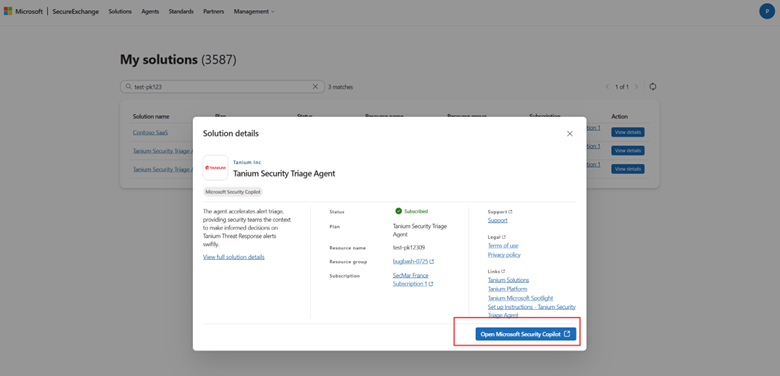
Wait for the purchase and deployment process to complete. This process creates billing resources and resources needed to run the agent, including the agent instance in Copilot, applicable Microsoft Sentinel data lake notebook jobs, and Azure resources. After it completes, select Open Microsoft Security Copilot to open Security Copilot and configure the agent.
Note
Setting up the agent requires a Security Copilot owner or contributor role and potentially a Microsoft Entra Global Administrator to grant the agent permissions.

If you choose to work with this agent later, you can go to Management > My solutions, find your deployed agent, and select View details.
You can work with the agent in Security Copilot by selecting Open Microsoft Security Copilot.
You can also go to any Sentinel data lake notebook jobs by selecting Manage in Defender.