Describe Copilot in Microsoft Defender XDR
Microsoft Security Copilot is embedded in the Microsoft Defender portal to enable security teams to quickly and efficiently investigate and respond to incidents, hunt for threats, and protect their organization with relevant threat intelligence.
The brief video that follows shows a few of the Copilot capabilities embedded in Microsoft Defender and how they can help security analysts be more productive.
Note
The list of Copilot capabilities embedded in Microsoft Defender is continually growing. This unit provides just a sampling of some of those Copilot capabilities. For more information, see the documentation on Microsoft Security Copilot in Microsoft Defender.
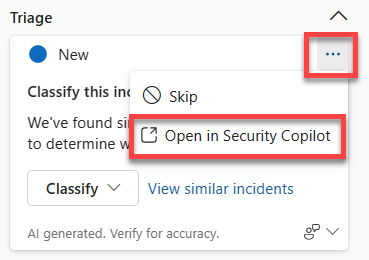
There are also some options that are common across all these features, including the ability to provide feedback on prompt responses and seamlessly moving to the standalone experience.
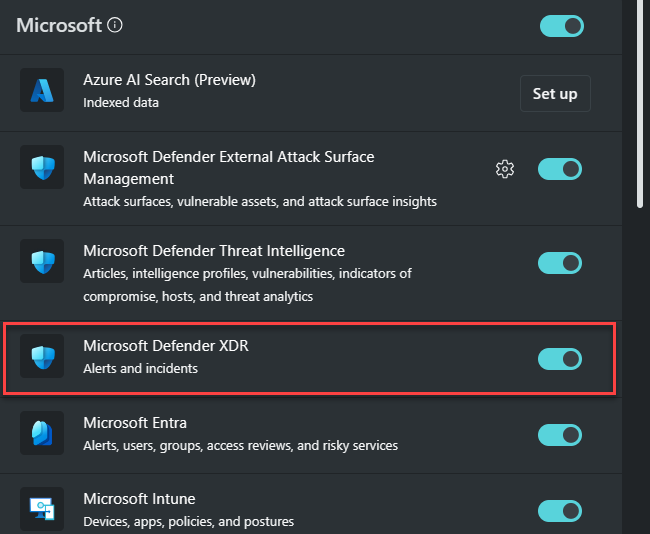
As described in the introduction unit, in the embedded experience Copilot is able to invoke the product specific capabilities directly, providing processing efficiency. To ensure access to these Microsoft Security Copilot features, the Microsoft Defender XDR plugin needs to be enabled and this is done through the standalone experience. To learn more, refer to Describe the features available in the standalone experience of Microsoft Security Copilot.
Summarize incidents
Copilot automatically creates a summary when you navigate to an incident's page, providing an overview of the attack containing essential information including what transpired, what assets are involved, the timeline of the attack, indicators of compromise (IOCs), and the names of threat actors involved. Incidents containing up to 100 alerts can be summarized into one incident summary.

Copilot also suggests follow-up prompts about related identities, devices, and IP addresses to help you understand the assets involved and how to act.
Guided responses
Copilot uses AI and machine learning to contextualize an incident and learn from previous investigations to generate appropriate response actions. Guided responses recommend actions in the following categories:
- Triage - includes a recommendation to classify incidents as informational, true positive, or false positive.
- Containment - includes recommended actions to contain an incident.
- Investigation - includes recommended actions for further investigation.
- Remediation - includes recommended response actions to apply to specific entities involved in an incident.

Each card contains information about the recommended action, including why the action is recommended. Administrators can also upload organization-specific response guidelines to tailor the recommendations to their environment. Guided responses are available for incident types such as phishing, business email compromise, and ransomware.
Script and command-line analysis
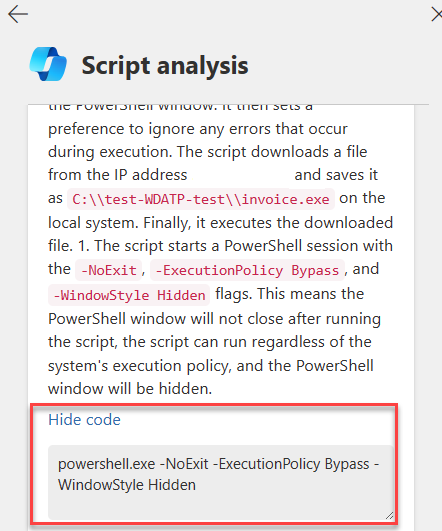
Sophisticated attacks commonly evade detection by using obfuscated scripts and command lines. The script analysis capability enables security teams to inspect scripts and code without using external tools, quickly assessing whether a script is malicious or benign.

Copilot analyzes the script and displays the results in a script analysis card, including a plain-language explanation of what the script does, whether it's malicious, and which MITRE ATT&CK techniques it employs. Users can select Show code to see specific lines of code related to the analysis. You can access script analysis in the alert timeline within an incident, for a timeline entry consisting of script or code.
Note
Script analysis functions are continuously in development. Analysis of scripts in languages other than PowerShell, batch, and bash are being evaluated.
Generate KQL queries
Copilot in Microsoft Defender includes a query assistant capability in advanced hunting that converts natural-language questions into ready-to-run KQL queries. This feature reduces the time it takes to write a hunting query from scratch, enabling threat hunters and security analysts to focus on hunting and investigating threats.

Using the prompt bar, analysts can ask for a threat hunting query using natural language, such as "Give me all the devices that signed in within the last 10 minutes." The generated query can then be run automatically, added to the query editor for further tweaks, or copied for use elsewhere.
Create incident reports
Copilot enables security teams to instantly create an extensive incident report within the portal. While an incident summary provides an overview of what happened, an incident report consolidates incident information from various data sources available in Microsoft Sentinel and Microsoft Defender XDR.
The incident report includes timestamps for key management actions, the analysts involved, incident classification with analyst comments, investigation and remediation actions (both manual and automated including Microsoft Sentinel playbooks), and follow-up actions noted by analysts.

Analyze files
Copilot enables security teams to quickly identify malicious and suspicious files through AI-powered file analysis capabilities. When an analyst opens a file page, Copilot can generate a summary that includes detection information, related file certificates, a list of API calls, and strings found in the file. Files can be accessed from an incident's evidence and response tab, the incident graph, or the search feature.


Summarize devices and identities
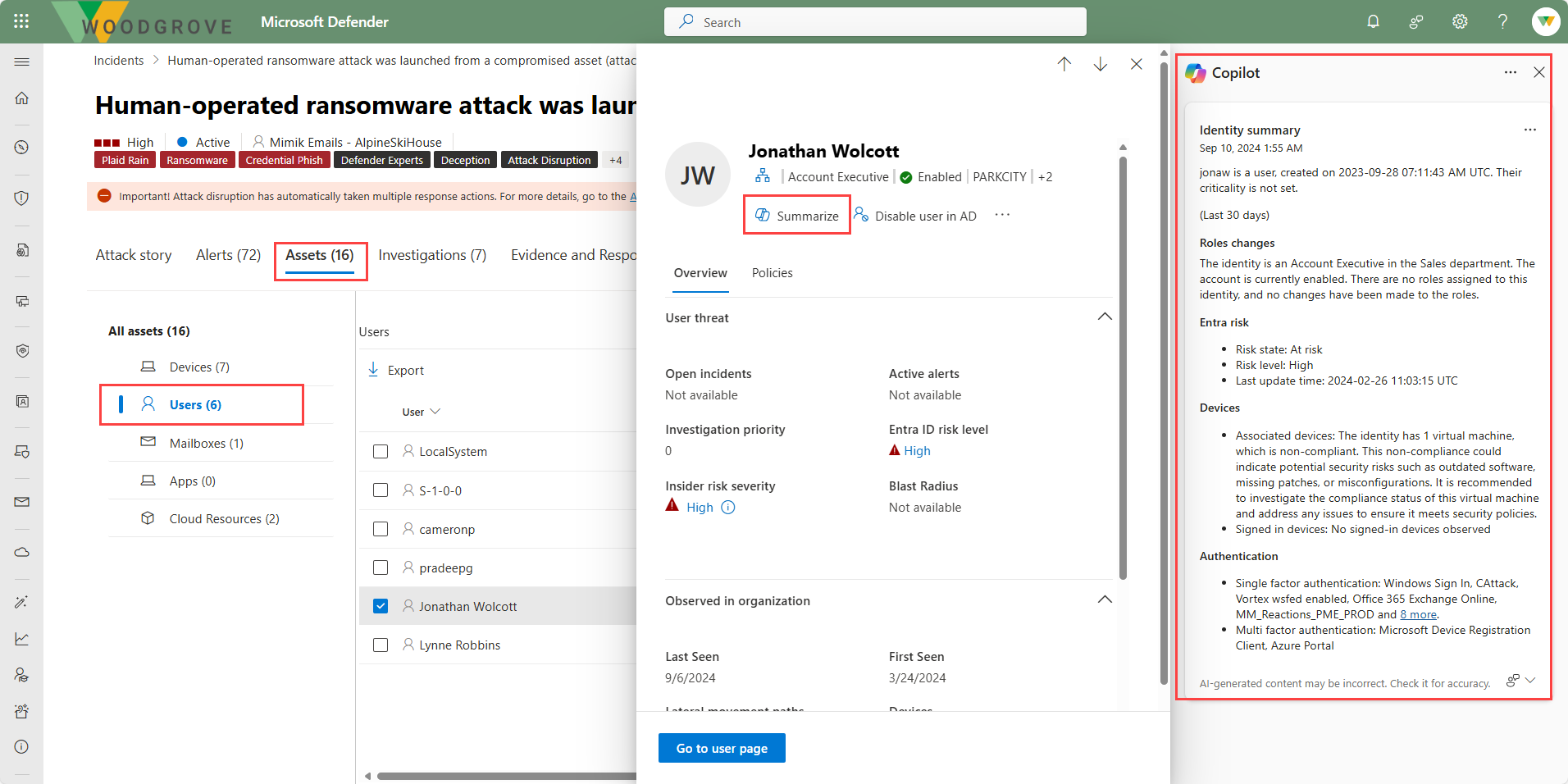
Copilot in Defender can generate summaries for devices and identities to help security teams quickly assess their security posture during an investigation.
Device summaries include the device's security posture with information about the status of protection capabilities such as attack surface reduction and tamper protection, any unusual user activity, a list of vulnerable software, firewall settings, and relevant Microsoft Intune information.
Identity summaries provide a contextual overview of a user identity, including account creation date, criticality level, role and role changes, sign-in behaviors and patterns, authentication methods, risks from Microsoft Entra ID, and contact information.

Threat intelligence
Copilot is embedded in the threat intelligence section of the Microsoft Defender portal, helping security teams make informed decisions by consolidating and summarizing threat intelligence data. You can ask Copilot to summarize the relevant threats impacting your environment, prioritize threats based on your organization's exposure levels, or find threat actors that might be targeting your industry. Copilot uses the Microsoft Defender Threat Intelligence plugin to surface summaries of threat analytics reports, intel profiles, and vulnerability disclosures—all in natural language.
Common functionality across key features
There are some options that are common across the features of Copilot for Microsoft Defender.
Providing feedback
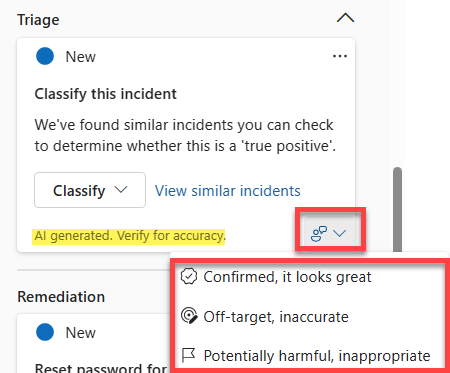
As with the standalone experience, the embedded experience provides users a mechanism to provide feedback on the accuracy of the AI-generated response. For any AI-generated content, you can select the feedback prompt on the bottom right of the content window and select from the available options.
Move to the standalone experience
Investigators who start in the Defender portal can easily transition to the standalone experience for a more detailed, cross-product investigation that brings to bear all the Copilot capabilities enabled for their role. To move to the standalone experience, select the ellipses within the generated content window then choose Open in Security Copilot.