Describe Microsoft Security Copilot agents
Microsoft Security Copilot provides a range of agents designed to enhance security workflows and streamline operations. These agents assist security engineers by automating tasks, providing insights, and integrating with other Microsoft security tools.
Define agents in Microsoft Security Copilot
Agents in Microsoft Security Copilot help automate repetitive tasks, reduce manual workloads, and optimize security operations. Agents consist of predefined workflows and capabilities tailored to address particular security challenges. They're designed to perform specific tasks, such as analyzing threats, triaging phishing incidents, or optimizing conditional access policies.
Agents utilize security compute units (SCUs) to operate just like other features in Security Copilot. They integrate seamlessly with Microsoft Security solutions and the broader supported partner ecosystem and fit naturally into existing workflows. Agents learn based on feedback and keep you in control on the actions it takes.
Agent terminology in Microsoft Security Copilot
To effectively use Security Copilot agents, it's essential to understand the terminology used when working with agents.
| Term | Description |
|---|---|
| Trigger | An event or condition that tells an agentic system to initiate an action or series of actions. |
| Permissions | The level of authorization an AI agent is given by an admin during configuration that enables it to access specific information or carry out its tasks. |
| Identity | An agent needs an identity to authenticate and securely access resources when it runs. During the agent setup process, you choose from two types of identity: (1) Create an agent identity—Creates a dedicated identity for the agent using the Microsoft Entra Agent ID capability, keeping access scoped, secure, and easier to manage. Currently, this option is only available for Microsoft-built agents. (2) Connect with an existing user account—Lets the agent use your credentials to run, inheriting your access and permissions while it's active. |
| Plugins | A component that extends what an agent can do by giving it access to capabilities in Microsoft and non-Microsoft services and public websites through APIs. While some plugins may be required to run an agent, some agents may employ optional plugins that can enhance its functionality by providing access to more data sources or tools. |
| Role-based access control (RBAC) | Determines who can view and manage the outputs generated by agents in Microsoft Security Copilot, and ensures that sensitive information is accessible only to authorized users. |
Agents in Microsoft Security Copilot
You can discover Microsoft Security Copilot agents through the standalone and embedded experiences. Copilot agents are also available from partners. Depending on your role, you can either set them up or access the agent to run it.
To access the full list of available agents, select Active agents from the home menu. Copilot displays the list of available Microsoft and partner agents.
Note
The list of Microsoft and Partner agents is continually growing. The agents covered in this module represent only a sample of the available agents.
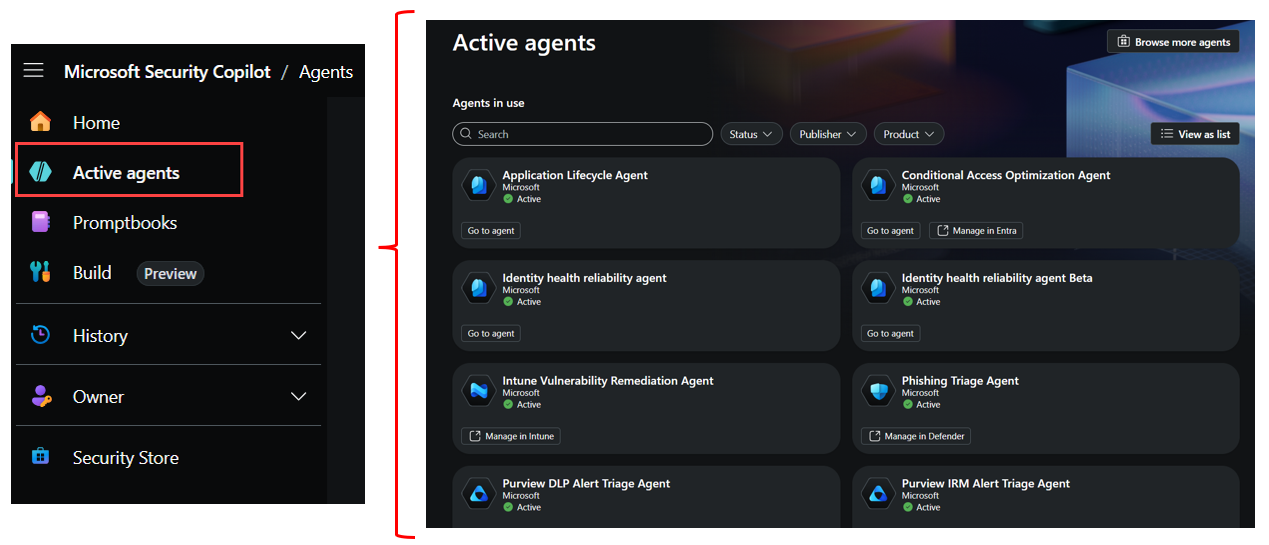
Microsoft Agents
Security Copilot includes agents that are seamlessly integrated with Microsoft security solutions.
Agents in the standalone experience
- Threat Intelligence Briefing Agent: Automatically curates relevant and timely threat intelligence based on an organization’s unique attributes and threat exposure.
Agents embedded in Microsoft Entra
- Conditional Access Optimization Agent: Monitors for new users or apps not covered by existing policies, identifies necessary updates to close security gaps, and recommends quick fixes for identity teams to apply with a single click.
- Access Review Agent: Configured in Microsoft Entra and available in Microsoft Teams, the agent delivers insights and recommendations so reviewers can make fast, accurate access decisions through a simple conversation.
Agents embedded in Microsoft Defender
- Phishing Triage Agent: Helps security operations analysts triage and classify user-submitted phishing incidents autonomously, providing transparent rationale for classification verdicts in natural language.
- Threat Intelligence Briefing Agent: Also available in the Defender portal, this agent gathers and synthesizes threat intelligence data to deliver concise and actionable insights to security operations teams.
- Threat Hunting Agent: Enables threat hunting using natural language, generates KQL queries, interprets results, and guides analysts through full hunting sessions.
- Dynamic Threat Detection Agent (preview): An always-on adaptive service that uncovers hidden threats across Defender and Microsoft Sentinel environments by correlating alerts, events, and threat intelligence.
Agents embedded in Microsoft Purview (preview)
- Alert Triage Agent in Data Loss Prevention: Evaluates DLP alerts based on sensitivity risk, exfiltration risk, and policy risk, then sorts them into prioritized categories.
- Triage Agent in Insider Risk Management: Evaluates IRM alerts based on user risk, file risk, and activity risk, then sorts them into prioritized categories.
- Data Security Posture Management Agent: Helps identify and address data security posture risks by providing proactive insights and recommendations.
Agents embedded in Microsoft Intune
- Vulnerability Remediation Agent: Uses Defender data to identify vulnerabilities on managed devices, prioritize remediation, and provide step-by-step guidance.
- Change Review Agent: Evaluates the effect of Multi Admin Approval requests in Intune and makes recommendations for actions to take.
- Device Offboarding Agent: Identifies stale or misaligned devices across Intune and Microsoft Entra ID, providing actionable insights before offboarding.
- Policy Configuration Agent: Converts plain-language documents and industry baselines into recommended Intune settings and policies.
Partner agents
Organizations are increasingly using AI-powered agents to enhance their security operations. While Microsoft Security Copilot agents provide robust solutions, integrating partner agents can offer other benefits and provides you with the flexibility to use tools you're already familiar with. These agents offer unique capabilities, from privacy breach response to network supervision and alert triage, ensuring you can address diverse security challenges effectively.
There's a growing ecosystem of partner-built agents in Security Copilot. To find the most up-to-date list of agent offerings and how to deploy them, see Security Store, which you can also access from the Security Copilot portal (the standalone experience) directly.
