Note
Access to this page requires authorization. You can try signing in or changing directories.
Access to this page requires authorization. You can try changing directories.
Question nodes let you reprompt when the agent doesn't get usable input. You can set how many reprompts happen and add custom reprompt messages. By using the Randomize variant selection option, you can choose between randomized message selection, which is the default option, and ordered, predictable message selection.
When Randomize variant selection is turned on, the system randomly picks one of the configured message variants on each reprompt attempt.
When Randomize variant selection is turned off, the system plays message variants in order. The first reprompt plays the first message variant. The second reprompt plays the second message variant, and so on.
When Randomize variant selection is turned off, it creates a consistent, predictable end-user experience. It also lets you intentionally escalate guidance. For example, a gentle reminder on the first reprompt and a more explicit instruction on the second.
Configure Randomize variant selection
Set Randomize variant selection in three places within the Question node properties:
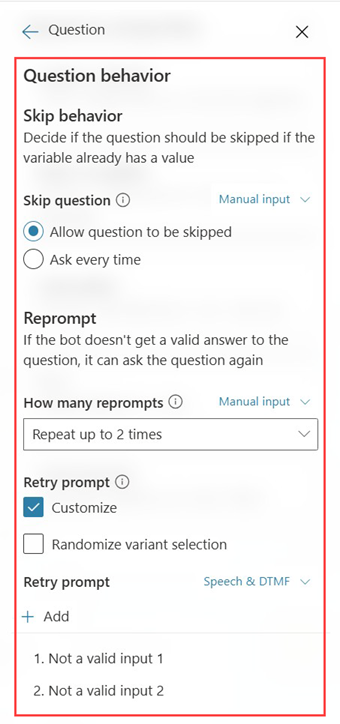
Question behavior → Retry prompt
Use this prompt when the user responds but the input isn't valid. The retry prompt supports multiple variants and includes Randomize variant selection.
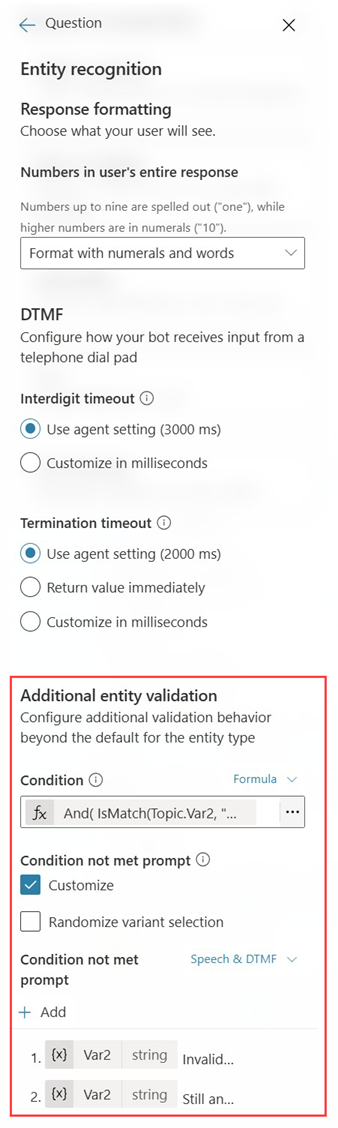
Entity recognition → Condition not met prompt
Use this prompt when other entity validation fails. The condition not met prompt supports multiple variants and includes Randomize variant selection.
Voice → Reprompt message (silence detection)
Use this prompt when the agent detects silence in voice experiences. The reprompt message supports multiple variants and includes Randomize variant selection.


Configure the number of reprompts
In the relevant area (Question behavior, Entity recognition, or Voice), set the reprompt count (for example, "Repeat up to 1 time" or "Repeat up to two times").
Add reprompt message variants
For ordered (sequential) behavior, turn off Randomize variant selection. Add the same number of variants as the number of reprompts you configured. If reprompt is one time, add one variant (played on the first reprompt). If reprompt is two times, add two variants (played on the first and second reprompt).
For randomized behavior, turn on Randomize variant selection. Add multiple variants (two or more recommended) so messages are rotated.
Choose the selection behavior
Turn on Randomize variant selection to randomly pick from your variants on each reprompt attempt.
Turn off Randomize variant selection to play variants in order (reprompt 1 → variant 1, reprompt 2 → variant 2, and so on).