Note
Access to this page requires authorization. You can try signing in or changing directories.
Access to this page requires authorization. You can try changing directories.
Voice-enabled agents often need to perform backend actions after a call ends, such as updating CRM records, triggering workflows, or logging call outcomes.
You can configure post‑call action topics that run automatically when a conversation ends. The conversation end event triggers these actions. This event provides a reliable and deterministic signal to indicate the conversation is complete and why it ended. This signal enables accurate backend processing, consistent reporting, and predictable automation behavior.
Post-call actions
Post‑call actions help you perform an action, such as calling an API to update an external system (customer backend datastore), after callers disconnect but before reaching the end of the flow.
By providing a clear conversation‑end signal, Copilot Studio ensures post‑call automation runs at the correct point in the conversation lifecycle.
End of conversation event
When a voice conversation ends, Copilot Studio sends an End of conversation activity. This activity is a clear signal that the voice interaction is complete.
This event happens regardless of how the call ended. It includes customer hang-up, transfer to an external phone number, or escalation to Dynamics 365 Contact Center.
Use this activity to trigger post-call action topics. These topics can handle backend processing like updating CRM records, logging call outcomes, or starting workflows.
To act on this event, configure a topic with an activity-based trigger. Set the activity type to End of conversation. You can also add optional conditions by using the system property Conversation.EndReason to control whether post-call actions run for specific conversation end scenarios.
No conditional ending
If you don't define a condition for an End of conversation trigger, the post-call action topic runs for all conversation end reasons.
This default behavior includes customer hang-up, external phone number transfer, and escalation to Dynamics 365 Contact Center.
No other condition is required.
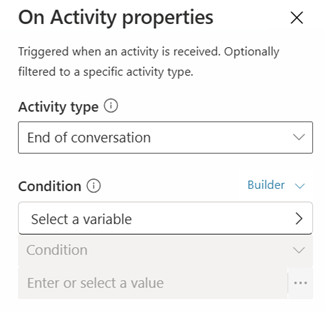
Conditional ending
You can limit post-call actions to specific conversation end reasons by explicitly defining a condition.
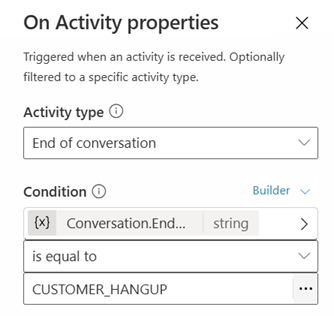
For example, a conditional ending could be: Conversation.EndReason is equal to CUSTOMER_HANGUP.
When you apply this condition, the topic only runs for customer hang-ups and doesn't run for transfers or escalations.
Backend CRM update example
In the following scenario, you update a CRM case only when the customer hangs up.
When the customer hangs up:
- Update the CRM case status.
- Store the call end time and end reason.
When the call is transferred or escalated:
- Don't update the CRM case.
Build a post-call action topic
To run backend actions when a voice conversation ends, you must explicitly construct a topic that listens for the End of conversation activity.
Create a dedicated post-call action topic
Create a new topic for post-call processing. For example, create a new topic called Post-call actions.
Change the trigger to an activity-based trigger
Select the Trigger node in the topic.
Select Change trigger (or Edit).
Select An activity occurs.
Configure the trigger to use End of conversation
Select the three dots (…) of the Trigger node, and then select Properties.
Select Activity type and then select End of conversation.
Note
Optionally, add conditions based on reason the conversation ended. Add a condition by using the system property Conversation.EndReason. For example, Conversation.EndReason is equal to CUSTOMER_HANGUP.
Add post-call backend actions
Configure backend actions such as the following examples:
- Update CRM records.
- Log call end time and end reason.
- Trigger workflows or automations.
When you configure this topic, it runs automatically when the voice conversation ends and the End of conversation signal is activated.
Conversation end reasons
The End of conversation activity exposes the system property Conversation.EndReason, which indicates why the conversation ended.
Supported Conversation.EndReason values
| Conversation end reason string | Description |
|---|---|
| CUSTOMER_HANGUP | The caller disconnects the call. |
| BLIND_TRANSFER | The voice agent transfers the call to an external phone number. In a Transfer conversation node, set Transfer type to External phone number transfer. |
| CCAAS_TRANSFER | The voice agent escalates the call to Dynamics 365 Contact Center. In a Transfer conversation node, set Transfer type to Transfer to agent. |
Design guidance
Don't use a condition when the same post-call processing applies to all conversation endings.
Add explicit conditions only when different end reasons require different post call actions.
For guidance on using APIs to update backend systems like CRM records and best practices on the safe run pattern for AI-driven actions, learn more in Tools, knowledge, MCP, and API and FAQ for voice optimization.