Note
Access to this page requires authorization. You can try signing in or changing directories.
Access to this page requires authorization. You can try changing directories.
You can collaborate with other users or a team of users in the organization for responses by using tasks. In this tutorial, you create a task to collaborate on Corporate Sustainability Reporting Directive (CSRD) E4 Biodiversity and ecosystems requirements.
This tutorial shows you how to:
Prerequisite
- Power Apps environment with external reporting in Sustainability Manager installed. For more information about deploying, see Deploy external reporting in Sustainability Manager.
Create and assign a task
In this task, you create a task for collaborating on CSRD E4 Biodiversity and ecosystems requirements, and then you assign it to another person.
On the left navigation under Settings, select Tasks, and then select New.
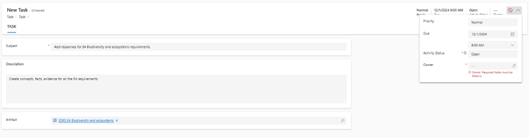
In the Subject field, enter Add responses for E4 Biodiversity and ecosystems requirements.
In the Description field, enter Create concepts, facts, evidence for all the E4 requirements.
In the Artifact field, search for ESRS E4 Biodiversity and ecosystems, and then select it.
At the top right corner, select the chevron beside Owner. Add 12/1/2024 as the due date, and then select a user to assign this task to.
Select Save & close.
This task appears in My Tasks views for the user who you assigned this task to. You can switch the view to All Tasks so you can view the progress of this task.