Note
Access to this page requires authorization. You can try signing in or changing directories.
Access to this page requires authorization. You can try changing directories.
Applies To: Project Operations integrated deployments.
This article provides an overview of how inventory consumption works for projects in Dynamics 365 Project Operations integrated deployments. During the project execution lifecycle, there are instances where inventory needs to be drawn from existing stock instead of being procured from suppliers.
This functionality enables project teams to consume materials directly from available stock, ensuring accurate cost tracking, seamless synchronization with Dynamics 365 Finance, and proper inventory control throughout the project lifecycle.
Material usage
In Dynamics 365 Project Operations, a material usage log provides a way to record material consumption so that the project manager can approve it and eventually invoice the customer. When you activate the stocked product feature, users can create material usage entries for stocked products. These entries can be created for either a specific product or a project variant. Based on the item and required inventory dimensions, users must specify details such as the site, the warehouse, and, as applicable, the batch or serial number. It's essential to ensure that inventory is consumed only when enough stock that has the relevant inventory dimensions is available.
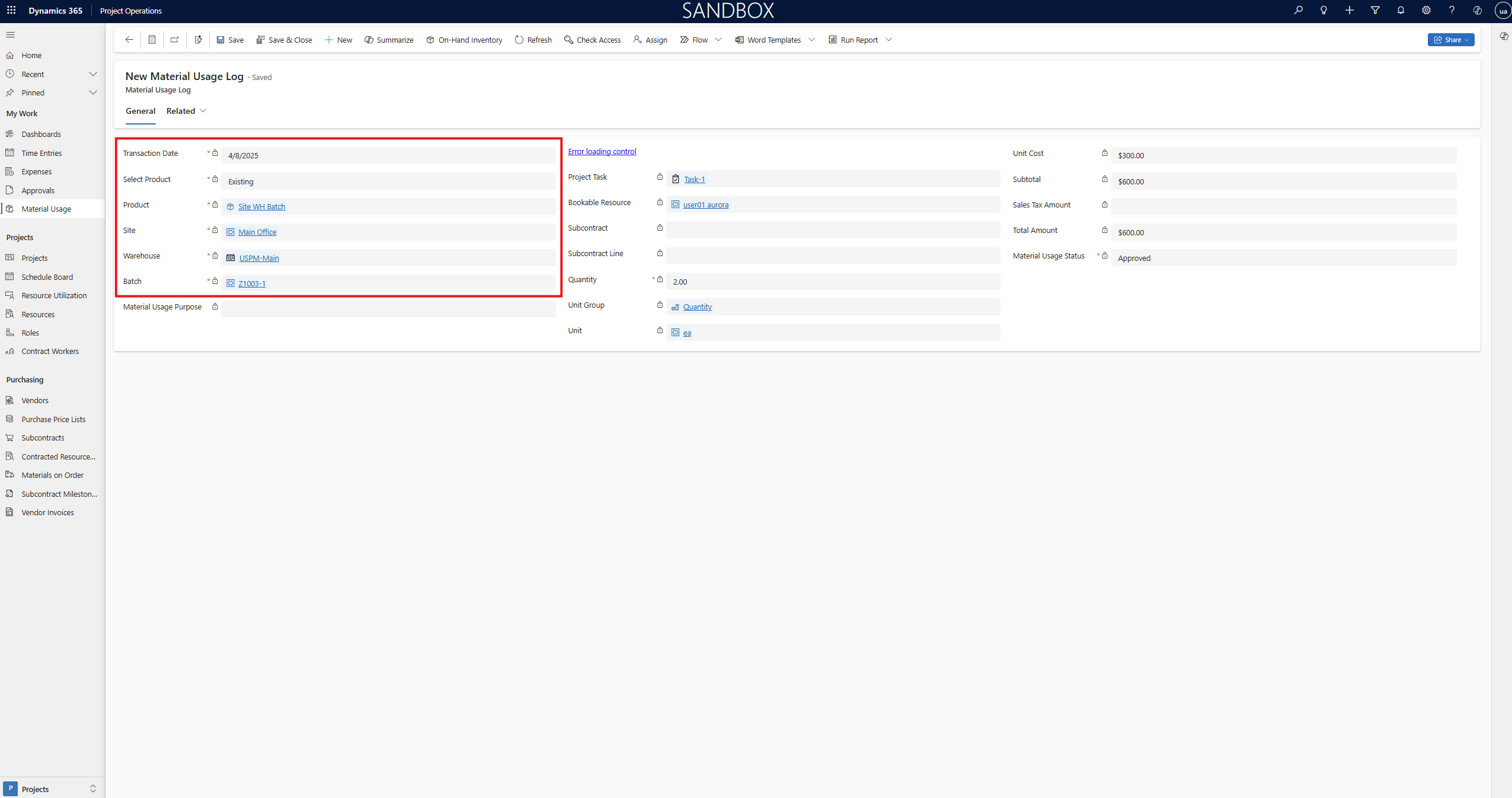
Learn about project material usage in Record material usage on projects and project tasks.
Validations for on-hand inventory
When a user tries to submit material usage for a stocked product, the system validates whether the product is available in stock. If the stock is unavailable, the system shows an error message and prevents submission of the material usage.
In a similar way, when an approver tries to approve material usage, the system validates whether the product is available in stock. If the stock is unavailable, the system shows an error message and blocks approval of the material usage.
Inventory cost for material usage
When an approver approves material usage, the system generates cost and unbilled sales actuals based on the associated cost and sales price lists.
Cost actuals come from the cost price list. However, the weighted average cost of the material might differ. When you post the integration journal for the cost transaction in Dynamics 365 Finance, if the actual cost amount differs from the material's weighted average cost, the system treats the difference as an adjustment. The system synchronizes this adjustment back to Dynamics 365 Project Operations, where it enters the adjustment in a new field named Adjustment Value. The extended amount is updated accordingly.
Note
In Dynamics 365 Finance, the system always uses the weighted average cost to post inventory consumption that uses inventory journals, regardless of the costing method that you assign to the material. To align the inventory cost of a transaction with the assigned inventory model group, you must run the Inventory Closing and adjustment job.
Journals
Entry journals record actuals directly in Dynamics 365 Project Operations. When you use Entry journals, you don't have to enter time, expense, and material usage logs in Project Operations. When you activate the stocked product feature, users can create material consumption entries for stocked products. These entries can be created for either a specific product or a project variant. Based on the item and required inventory dimensions, users must specify details such as the site, the warehouse, and, as applicable, the batch or serial number. It's essential to ensure that inventory is consumed only when enough stock that has the relevant inventory dimensions is available.

Learn about project journals in Create and confirm Entry journals.
Validations for on-hand inventory
When a user tries to confirm the journal for a stocked product line, the system validates whether the product is available in stock. If the stock is unavailable, the system shows an error message and prevents confirmation of the journal entry.
Inventory reservations
When you approve the material usage or confirm the journals, Dynamics 365 Project Operations generates project actuals of type Cost. After the actuals are created, you can reserve the inventory until the Project Operations integration journal is posted in Dynamics 365 Finance. This process ensures that the inventory remains reserved and isn't consumed by other transactions such as sales orders, production orders, or material usage for other projects.
The inventory reservation functionality is based on the Supply Chain Inventory Blocking feature. A new record is created in inventory blocking for each project cost actual recorded for stocked products, reserving the inventory specifically for that project.
When you post the Project Operations integration journal, you record the actual inventory consumption in Dynamics 365 Finance for the projects, and you release the material reservation by clearing the corresponding inventory blocking records.
To reserve the inventory, complete the following prerequisites.
Prerequisites
Features
To use this functionality, activate the following features:
- Enable stocked products usage for project operations integrated deployments in Dynamics 365 Finance
- Enable stocked products usage for project operations integrated deployments in Dynamics 365 Project Operations
Minimum versions required
To use this feature for Project Operations integrated deployments, you must have the following versions:
- Project Operations Dataverse version 4.161.0.x or later
- Dynamics 365 Finance version 10.0.46 or later
Run Dual-write maps
This section provides information about the specific maps that are required for inventory reservations.
| Dual-write map | Version |
|---|---|
| Project operations integration actuals (msdyn_actuals) | 1.0.0.22 |