Note
Access to this page requires authorization. You can try signing in or changing directories.
Access to this page requires authorization. You can try changing directories.
Note
Community interest groups have now moved from Yammer to Microsoft Viva Engage. To join a Viva Engage community and take part in the latest discussions, fill out the Request access to Finance and Operations Viva Engage Community form and choose the community you want to join.
You can master customer data in more than one Dynamics 365 application. For example, you can create a customer row through sales activity in Dynamics 365 Sales (a customer engagement app), or you can create a customer row through retail activity in Dynamics 365 Commerce (a finance and operations app). No matter where the customer data originates, it's integrated behind the scenes. Integrated customer master gives you the flexibility to master customer data in any Dynamics 365 application and provides a comprehensive view of the customer across the Dynamics 365 application suite.
Customer data flow
Customer is a well-defined concept in applications. Therefore, the integration of customer data just involves harmonizing the customer concept between the two applications. The following illustration shows the customer data flow.
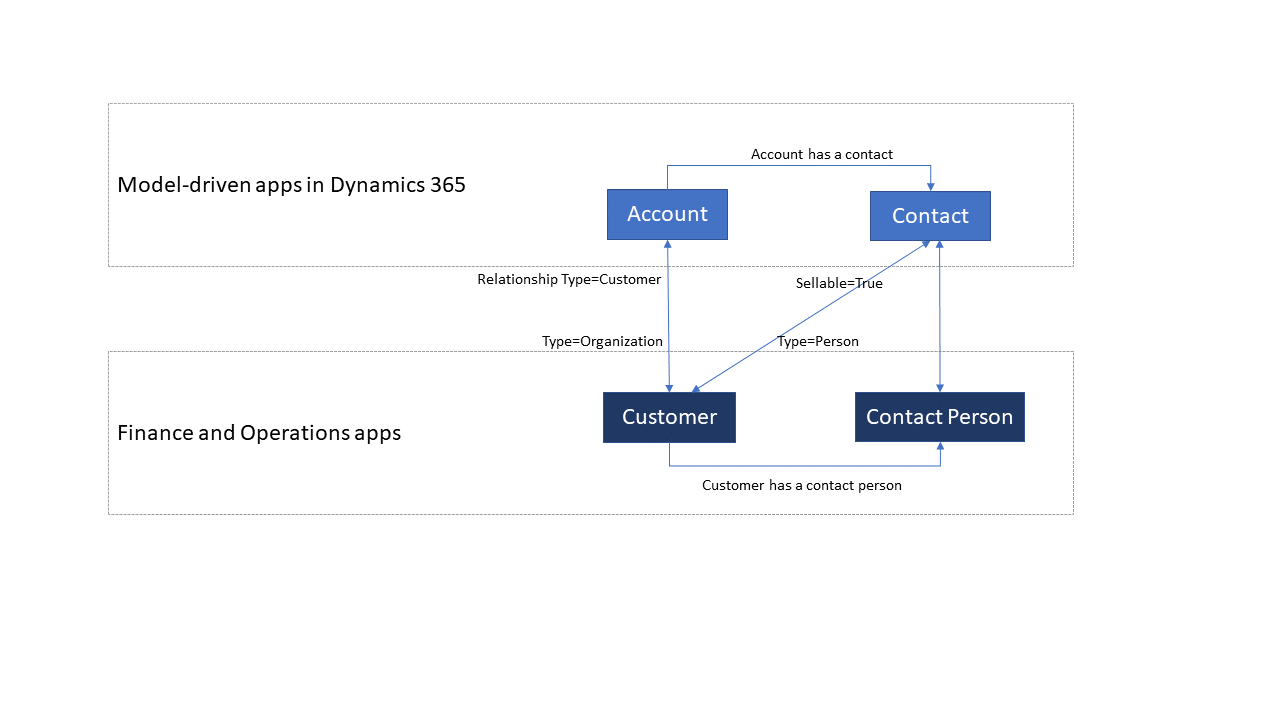
You can broadly classify customers into two types: commercial or organizational customers and consumers or end users. Finance and operations and Dataverse store and handle these two types of customers differently.
In finance and operations, both commercial or organizational customers and consumers or end users are mastered in a single table named CustTable (CustCustomerV3Entity), and they're classified based on the Type attribute. If you set Type to Organization, the customer is a commercial or organizational customer. If you set Type to Person, the customer is a consumer or end user. The SMMContactPersonEntity table handles the primary contact person information.
In Dataverse, you master commercial or organizational customers in the Account table and identify them as customers when you set the RelationshipType attribute to Customer. The Contact table represents both consumers or end users and the contact person. To provide a clear separation between a consumer or end user and a contact person, the Contact table has a Boolean flag named Sellable. When Sellable is True, the contact is a consumer or end user, and you can create quotations and orders for that contact. When Sellable is False, the contact is just a primary contact person of a customer.
When a non-sellable contact participates in a quotation or order process, set Sellable to True to flag the contact as a sellable contact. A contact that becomes a sellable contact remains a sellable contact.
Templates
Customer data includes all information about the customer, such as the customer group, addresses, contact information, payment profile, invoice profile, and loyalty status. A collection of table maps works together during customer data interaction, as shown in the following table.
| Finance and operations apps | Customer engagement apps | Description |
|---|---|---|
| CDS Contacts V2 | contacts | This template synchronizes all primary, secondary, and tertiary contact information, for both customers and vendors. |
| Customer groups | msdyn_customergroups | This template synchronizes customer group information. |
| Customer payment method | msdyn_customerpaymentmethods | This template synchronizes customer payment method information. |
| Customers V3 | accounts | This template synchronizes customer master information for commercial and organizational customers. |
| Customers V3 | contacts | This template synchronizes customer master data for consumers and end users. |
| Name affixes | msdyn_nameaffixes | This template synchronizes name affixes reference data, for both customers and vendors. |
| Payment day lines CDS V2 | msdyn_paymentdaylines | This template synchronizes payment day lines reference data, for both customers and vendors. |
| Payment days CDS | msdyn_paymentdays | This template synchronizes payment days reference data, for both customers and vendors. |
| Payment schedule lines | msdyn_paymentschedulelines | Syncs payment schedule lines reference data, for both customers and vendors. |
| Payment schedule | msdyn_paymentschedules | This template synchronizes payment schedule reference data, for both customers and vendors. |
| Terms of payment | msdyn_paymentterms | This template synchronizes payment terms (terms of payment) reference data, for both customers and vendors. |