Note
Access to this page requires authorization. You can try signing in or changing directories.
Access to this page requires authorization. You can try changing directories.
This topic provides details on how to import booking recurrences and how to change ownership of an agreement.
Import booking recurrences
Note
Use this section if you need to reuse or migrate existing booking recurrence data. If you’re creating a new agreement from scratch, you don’t need to import booking recurrences.
You can import a booking recurrence pattern for an agreement booking setup (ABS) or agreement invoice setup (AIS). The recurrence dialog, when saved, populates a field on the ABS or AIS records. The field is called Recurrence Settings and isn't displayed on the form by default. To import a recurrence with one or more ABS or AIS records through CSV, perform the following steps.
Get a representative string from an ABS or AIS that is set up similarly to how you would like the imported records configured.
In that string, identify the values that determine the record's behavior, such as the start and end dates or the frequency in months.
Use these sample strings to populate the agreement booking and invoice setup records into a spreadsheet and use it to import fully configured records.
For example, see a recurrence in the following screenshot, and related XML.
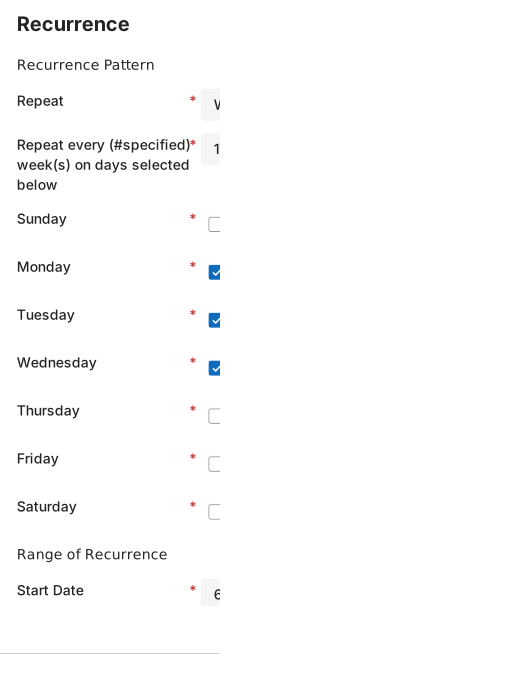
<root><pattern><period>weekly</period><option>every</option><weeks every='1'><days>1</days><days>2</days><days>3</days></weeks></pattern><range><start>08/01/2020</start><option>endAfter</option><end>10</end></range><datas/></root>
Change the owner of an agreement
Important
Changing the owner can affect whether work orders or invoices are created successfully.
As agreement automation runs using the permissions of the agreement owner, do the following steps to change owner of an agreement:
Change the agreement System Status to Estimate and select Save. Wait five minutes to allow all asynchronous processes to run.
Update the Owner for the agreement.
Set the agreement System Status back to Active and select Save & Close.