Note
Access to this page requires authorization. You can try signing in or changing directories.
Access to this page requires authorization. You can try changing directories.
Security Compute Units (SCUs) are the compute resources that power Microsoft Security Copilot experiences. This article explains how SCU capacity works, compares provisioned, overage, and Microsoft 365 E5 inclusion models, and covers billing and monitoring so you can choose the right setup for your organization.
Security compute units
Security Compute Units (SCUs) represent the compute capacity required to run Security Copilot workloads. SCUs are the units of compute resources needed to deliver dependable and consistent performance across Security Copilot experiences.
You consume SCUs in the following scenarios:
- Using the Security Copilot standalone portal
- Running embedded Security Copilot experiences
- Invoking Security Copilot through Microsoft‑developed agents
- Invoking Security Copilot through partner‑developed agents
- Running other Security Copilot features and capabilities
Depending on your scenario and licenses, you might need to provision or purchase SCUs to use Security Copilot.
Capacity
Security Copilot operates by using capacity, an Azure resource that contains SCUs. Depending on the capacity type you use, you can provision SCUs, consume them on demand, or include them through licensing.
You can manage capacity by increasing or decreasing provisioned SCUs in the Azure portal or the Security Copilot portal. Security Copilot has a usage dashboard for Copilot owners so they can track usage over time and make informed decisions about setting up capacity.
You can easily manage capacity by increasing or decreasing provisioned SCUs within the Azure portal or the Security Copilot portal. Security Copilot provides a usage monitoring dashboard for Copilot owners, so they can track usage over time and make informed decisions about capacity provisioning. For more information, see Managing usage.
Capacity models
Security Copilot supports three capacity models, each tuned for different usage patterns:
Provisioned capacity model (Default)
This model is the original billing model introduced when Security Copilot became generally available and is considered the default model.
Provisioned capacity is preallocated SCU capacity that guarantees a fixed number of SCUs every hour.
Key characteristics
- SCUs are provisioned in advance (minimum of one SCU)
- Capacity refreshes every full billing hour (for example, 9:00–10:00)
- Unused SCUs expire at the end of the hour and don't roll over
- Example: If you set up a capacity plan with three SCUs, you get three SCUs each full hour. Refresh happens on fixed clock-hour blocks (9:00–10:00, 10:00–11:00), not rolling blocks (11:05–12:05).
- If provisioned SCUs run out, Security Copilot requests stop unless another capacity type is available
Provisioned capacity is billed per hour and is best for steady, predictable usage.
For more information, see How provisioned and overage SCUs are billed.
Overage capacity model
This billing model lets you purchase SCUs to use when you want without pre-provisioning. SCUs aren't hourly based. This model provides a "bucket" to consume from. Because it doesn't pre-provision, the cost is higher.
Example: When you create an overage capacity, you can use it as Security Copilot activities are invoked as a standalone capacity. Or, use it to provide extra SCUs if the default provisioned capacity plan exceeds during a specific hour.
Key characteristics
- SCUs are consumed as used (not pre-provisioned hourly)
- Capacity is consumed as Security Copilot activity occurs
- Can be used standalone or as overflow when other capacity is exhausted
- Can be configured with a maximum limit or set to unlimited
Overage capacity helps absorb unexpected usage spikes without requiring extra hourly provisioning.
For more information, see How provisioned and overage SCUs are billed.
Inclusion capacity (Microsoft 365 E5) model
This billing model is included in the Microsoft 365 E5 license as a "bucket" across the entire tenant that refreshes monthly with no rollover to the next month.
What is Default Security Copilot Capacity?
Default Security Copilot Capacity is the automatically created inclusion capacity that appears in your tenant when Security Copilot inclusion is enabled through Microsoft 365 E5.
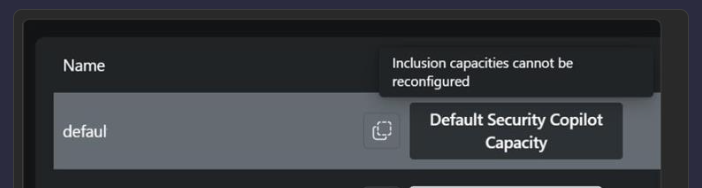
It's created automatically with a default workspace
It represents tenant‑wide Security Copilot compute
It cannot be modified
It's shared across all users and experiences in the tenant
It isn't billed hourly (SCUs come from the monthly Microsoft 365 E5 inclusion bucket)
UI cost values shown for this capacity are informational only, not charges
Important
This capacity is included at no additional charge. Although the UI might show SCU quantities or dollar values, these values are placeholders. The Default Security Copilot Capacity represents SCUs included with Microsoft 365 E5 and doesn't indicate hourly billing.
If you see a capacity named Default Security Copilot Capacity, you're using Inclusion capacity model.
Key characteristics
- Each Microsoft 365 E5 license contributes SCUs to a tenant‑wide monthly capacity
- The capacity refreshes monthly
- Unused SCUs don't roll over to the next month
- Available only to Microsoft 365 E5 customers
When inclusion capacity is exhausted, Security Copilot requests stop unless overage capacity is configured.
For more information, see Learn about Security Copilot inclusion in Microsoft 365 E5 subscription.
How provisioned and overage SCUs are billed
Security Copilot operates on a provisioned and overage capacity. Provisioned capacity is billed by the hour while the overage capacity is billed on usage.
You can flexibly provision Security Compute Units (SCUs) to accommodate regular workloads and adjust them anytime without long-term commitments.
To manage unexpected demand spikes, you can set an overage amount to ensure that extra SCUs are available when initially provisioned units are depleted during unexpected workload spikes. Overage units are billed on-demand and can be set as unlimited or a maximum amount. This approach enables predictable billing while providing the flexibility to handle both regular and unexpected usage.
Provisioned capacity billing
Billing is calculated on hourly blocks based on provisioned capacity rather than by 60-minute increments and has a minimum of one hour. Any usage consumed within the same hour is billed as a full SCU for provisioned capacity, regardless of start or end times within that hour.
For more information, see Microsoft Security Copilot pricing and the Pricing calculator page.
Overage capacity billing
For overage units, SCUs are billed up to one decimal increments for the exact consumed units. Consumed units aren't rounded up to whole numbers. This means that you're charged precisely based on your usage (to one decimal place).
For instance, if you provision an SCU at 9:05 a.m., then deprovision it at 9:35 am, and then provision another SCU at 9:45 am, you are charged for two units within the 9:00 a.m. to 10:00 a.m. hour. To maximize usage, make SCU provisioning changes at the beginning of the hour. For more information, see Manage usage.
For more information, see Microsoft Security Copilot pricing and the Pricing calculator page.
Example billing scenarios for overages
This section provides some scenarios to illustrate how overages are billed.
An enterprise company provisioned four SCUs and set an overage limit of six SCUs to stay within the monthly budget.
Scenario 1:
- A user runs a prompt consuming 3 SCUs and uses the incident summarization in Defender consuming 0.5 SCU.
- The total consumption is calculated as 3.5 SCUs. However, the charge for that hour will be based on four provisioned SCUs.
Activity SCU consumed Runs a prompt 3.0 SCUs Uses incident feature 0.5 SCU Total Consumption 3.5 SCUs Scenario 2:
- Building on Scenario 1, a user also runs a promptbook consuming an additional 3.7 SCUs, bringing the total to 7.2 SCUs for the hour.
- The charge for that hour will now be based on four provisioned SCUs, and 3.2 overage SCUs.
Activity SCU consumed Runs a prompt 3.0 SCUs Uses incident feature 0.5 SCU Runs a promptbook 3.7 SCUs Total Consumption 7.2 SCUs
Managing and monitoring capacity
You can manage Security Copilot capacity by increasing or decreasing provisioned SCUs through the Azure portal or the Security Copilot portal. Security Copilot also provides a usage monitoring dashboard for tracking consumption over time.
For more information, see Managing usage.