Note
Access to this page requires authorization. You can try signing in or changing directories.
Access to this page requires authorization. You can try changing directories.
Azure Web PubSub Service is a fully managed, real-time messaging service that enables bi-directional communication between servers and clients by using the WebSocket protocol. A single Web PubSub resource can scale to one million concurrent WebSocket connections. The service supports several messaging patterns, including server-to-client broadcasting, messaging to named groups, client-to-client pub/sub, and AI token streaming.
When you use Azure, reliability is a shared responsibility. Microsoft provides a range of capabilities to support resiliency and recovery. You're responsible for understanding how those capabilities work within all of the services you use, and selecting the capabilities you need to meet your business objectives and uptime goals.
This article describes how to make Azure Web PubSub Service resilient to a variety of potential outages and problems, including transient faults, availability zone failures, and region-wide failures. It also describes how the service handles maintenance and highlights key information about the Azure Web PubSub Service service-level agreement (SLA).
Production deployment recommendations for reliability
For production workloads, follow these recommendations:
- Use the Premium tier. The premium tier is resilient to availability zone failures in supported regions, and enables you to configure geo-replication.
- Use the Azure Web PubSub Client SDK when building client applications, or follow transient fault handling guidance by safely reconnecting. Zone failovers, region failovers, and transient faults all drop active connections.
- Enable geo-replication to protect against region-wide failures. Size each replica with enough units to handle your full expected traffic load during a failover event.
Reliability architecture overview
This section describes some of the important aspects of how the service works that are most relevant from a reliability perspective. The section introduces the logical architecture, which includes some of the resources and features that you deploy and use. It also discusses the physical architecture, which provides details on how the service works under the covers.
Logical architecture
The resource you create is a Web PubSub resource. You configure a resource with a number of units, which represents the capacity of the resource, including the maximum number of concurrent connections. For more information, see Performance guide for Azure Web PubSub Service.
A Web PubSub resource has a globally unique endpoint similar to contoso.webpubsub.azure.com. Clients establish WebSocket connections to this endpoint. Application servers connect to the same endpoint to send messages and receive events from clients.
For more information, see Azure Web PubSub service internals.
Physical architecture
Azure Web PubSub Service manages WebSocket connection state and message routing across a set of compute resources. Microsoft manages the underlying infrastructure. You don't directly see or interact with individual VMs that the service uses, or other infrastructure components.
Resilience to transient faults
Transient faults are short, intermittent failures in components. They occur frequently in a distributed environment like the cloud, and they're a normal part of operations. Transient faults correct themselves after a short period of time. It's important that your applications can handle transient faults, usually by retrying affected requests.
All cloud-hosted applications should follow the Azure transient fault handling guidance when they communicate with any cloud-hosted APIs, databases, and other components. For more information, see Recommendations for handling transient faults.
WebSocket is a long-lived connection protocol. Transient network events, back-end infrastructure restarts, and service maintenance operations can drop an active connection. A basic reconnect restores the connection, but without additional logic the client loses messages that were in flight or queued during the outage.
Azure Web PubSub Service addresses this issue through reliable subprotocols that sit on top of the raw WebSocket connection. The subprotocols track message sequence and connection state so that, when a connection drops, the client renegotiates with the service and resumes from where it left off.
Typically there's no message loss after a connecton drops and reconnects. However, there are some situations where message loss might occur. For example, if the client disconnects for more than one minute and then reconnects with the same connection ID, the reconnect operation shows a failure status to indicate message loss may happen.
To take advantage of the reliable subprotocols, follow these recommendations:
Where possible, use an Azure Web PubSub client SDK. The SDK implements the reliable subprotocol automatically. No additional configuration is required. For more information, see:
If you can't use the SDK, implement one of the reliable subprotocols directly in your WebSocket client code. For the full specification and implementation guidance, see Create reliable WebSocket clients.
Resilience to availability zone failures
Availability zones are physically separate groups of datacenters within an Azure region. When one zone fails, services can fail over to one of the remaining zones.
Azure Web PubSub Service supports zone-redundant deployments when you use the Premium tier. When you create or upgrade a Premium tier Web PubSub resource in a region that supports availability zones, zone redundancy is automatically enabled. The service distributes its infrastructure across multiple availability zones in the region. If one zone fails, the service routes traffic to infrastructure in a the healthy zone.

Requirements
Region support: Zone redundancy is supported in most regions where both of these conditions apply:
- Azure Web PubSub Service is available. For a list of regions where the service is available, see Product Availability by Region.
- The region supports availability zones. For a list of regions with availability zones, see Azure regions list.
However, Japan West doesn't currently support zone redundancy for Azure Web PubSub.
Tier: Zone redundancy is available on the Premium tier.
Cost
Zone redundancy doesn't add cost, and you pay the standard Premium tier rate. For more information, see Azure Web PubSub service pricing.
Configure availability zone support
Zone redundancy requires no configuration beyond selecting the Premium tier. It's automatically enabled in both of these cases:
Create a new zone-redundant Web PubSub resource. Select a Premium tier SKU when you create the resource. For more information, see Create an Azure Web PubSub resource.
Upgrade an existing resource to Premium tier. Zone redundancy is automatically enabled when you upgrade an existing resource to a Premium tier SKU. Upgrading from Standard to Premium doesn't cause service downtime. For more information, see Scale an Azure Web PubSub Service instance.
Behavior when all zones are healthy
This section describes what to expect when you configure an Azure Web PubSub resource for zone redundancy and all availability zones are operational.
Cross-zone operation: Azure Web PubSub Service automatically manages how connections and operations are distributed across availability zones. Infrastructure in multiple zones process traffic in an active-active model. You don't need to configure anything to take advantage of this behavior. The service routes messages between instances across zones automatically, so a message sent by a client in one zone is delivered to clients connected in any other zone.
Cross-zone data replication: Azure Web PubSub Service doesn't persist customer data. The service does maintain session metadata, such as connection state and message sequence information for active connections. This metadata is synchronously replicated across availability zones.
Behavior during a zone failure
This section describes what to expect when you configure an Azure Web PubSub resource for zone redundancy and there's an outage in one of the availability zones.
- Detection and response: The Azure Web PubSub Service platform is responsible for detecting a failure in an availability zone. You don't need to take any action to initiate a zone failover.
- Notification: Microsoft doesn't automatically notify you when a zone is down. However, you can use Azure Resource Health to monitor for the health of an individual resource, and you can set up Resource Health alerts to notify you of problems. You can also use Azure Service Health to understand the overall health of the service, including any zone failures, and you can set up Service Health alerts to notify you of problems.
Active requests: During a zone failure, active WebSocket connections to infrastructure in the affected zone are dropped. If your clients handle transient faults appropriately, such as by reconnecting after a short period of time, they typically avoid significant impact.
Expected data loss: Azure Web PubSub Service doesn't persist messages, so a zone failure isn't expected to cause data loss within the Azure Web PubSub service. However, any active connections are dropped during a zone-down event and so any data that's actively being transmitted might be lost.
If publishers use an Azure Web PubSub Client SDK or implement the reliable subprotocols, their messages are acknowledged by the service after the service receives them. When a message is acknowledged, it's replicated across all availability zones, so the publisher's zone failing doesn't cause the message to be lost. However, if a subscriber doesn't receive the message before it's dropped, it might not receive the message.
Expected downtime: The reconnect of dropped active connections typically takes a few seconds. Clients that implement reconnect logic experience minimal disruption.
Redistribution: Azure Web PubSub Service detects the loss of the zone and automatically redistributes traffic across the healthy zones. You don't need to take any action.
Zone recovery
When an availability zone recovers, Azure Web PubSub Service automatically reintegrates it into the active service topology. You don't need to take any action for zone recovery.
After a zone recovers, new connections might be directed to infrastructure in the recovered zone. Any existing connections won't be moved or rebalanced to the recovered zone, but they'll be gradually rebalanced as the existing connections drop and reconnect over time. Connection imbalance across zones doesn't have any impact on your workload.
Test for zone failures
Azure Web PubSub Service manages traffic routing, failover, and zone recovery automatically for zone-redundant Premium tier resources. You don't need to initiate anything. Because zone redundancy is fully managed, you don't need to validate availability zone failure processes.
Resilience to region-wide failures
Azure Web PubSub Service is a single-region service. If the region becomes unavailable, your Web PubSub resource is also unavailable.
To protect your application against a region-wide failure, you can use geo-replication, which is available in the Premium tier. Alternatively, you can build a custom multiregion solution by deploying multiple Web PubSub resources in different regions.
Geo-replication
Geo-replication enables you to add replicas of your Web PubSub resource in other Azure regions. All replicas share a single endpoint (contoso.webpubsub.azure.com). Behind this endpoint, Azure Traffic Manager uses DNS-based routing to direct each client to the nearest healthy regional replica. If a region fails, the Traffic Manager detects the failure through health checks and stops directing clients to that replica. New client connections are automatically routed to the nearest healthy replica.
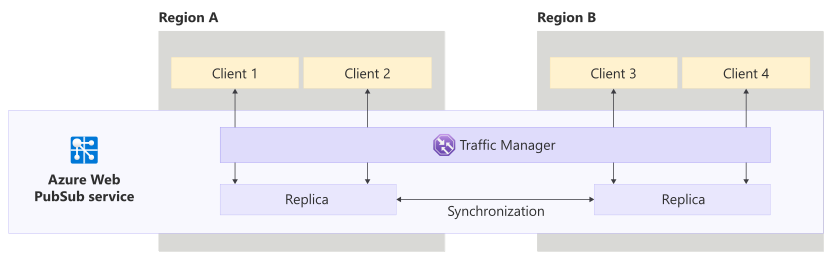
The region you created the Web PubSub resource in is called the primary region, and its replica is the primary replica. The control plane of the primary resource manages the configuration of your Web PubSub resource.
Requirements
- Region support: You can add replicas in any region where Azure Web PubSub Service is available.
- Tier: You must use the Premium tier to enable geo-replication.
- Replica limit: Each primary Web PubSub resource supports up to eight replicas.
Considerations
Configuration inheritance: Replicas inherit most configuration settings from the primary resource. Certain settings must be configured separately on each replica. For the complete list of settings that aren't inherited, see Geo-replication in Azure Web PubSub.
Configuration changes: The primary control plane, in the primary region, processes any configuration changes to the Web PubSub resource. If the primary control plane is unavailable, you will be unable to update the resource configuration, though existing replicas will continue to process data traffic without interruption.
Cost
Each replica is billed separately based on its own unit count and outbound message volume. If a message is transferred between replicas and then delivered to a client or server in another region, it's billed as an outbound message. For more information, see Azure Web PubSub service pricing.
Configure geo-replication
To add or remove a replica to a Web PubSub resource, see Geo-replication in Azure Web PubSub.
Capacity planning and management
Each replica handles traffic independently. During a regional failover, clients from the failed region reconnect to the nearest healthy replica. To ensure that the surviving replicas have enough capacity to absorb this extra load, configure each replica with units that can handle the full expected traffic of the workload, not just the portion it normally serves.
Alternatively, enable autoscaling on each replica so units can scale out automatically in response to higher load. Autoscaling continues to work when a secondary replica is unavailable, but autoscaling doesn't work if the primary control plane is unavailable. For more information about autoscaling, see Automatically scale units of an Azure Web PubSub service.
For general guidance on overprovisioning as a strategy, see Manage capacity by overprovisioning.
Behavior when all regions are healthy
This section describes what to expect when you configure Azure Web PubSub Service for geo-replication and all regions are operational.
Cross-region operation: Azure Traffic Manager routes each client to the nearest healthy regional replica. Clients in different geographic areas might connect to different replicas. Web PubSub Service synchronizes messages across replicas so that clients connected to any replica can communicate with each other.
Cross-region data replication: When a message is sent to a replica, the service synchronously transfers that message to other replicas so that clients connected elsewhere can receive it. The synchronization overhead is minimal for most common messaging patterns, such as broadcasting to large groups or messaging a single connection. Messaging to small groups (fewer than 10 members) might produce a slightly higher synchronization overhead.
Azure Web PubSub Service doesn't persist messages; only active delivery is synchronized across replicas.
Behavior during a region failure
This section describes what to expect when you configure Azure Web PubSub Service for geo-replication and there's an outage in one of the replica regions.
- Detection and response: Web PubSub Service is responsible for detecting a failure in a region and automatically rerouting incoming traffic to a replica in one of the other regions that you configure.
Notification: Microsoft doesn't automatically notify you when a region is down. However:
You can use Azure Resource Health to monitor for the health of an individual resource, and you can set up Resource Health alerts to notify you of problems.
You can use Azure Service Health to understand the overall health of the service, including any region failures, and you can set up Service Health alerts to notify you of problems.
Active requests: Active WebSocket connections to the replica in the failed region are dropped. Clients must reconnect after the replica fails over.
Expected data loss: Azure Web PubSub Service doesn't persist messages. Messages that were in transit to clients in the failed region at the time of the failure might be lost. No persistent data loss is expected because the service doesn't store customer data.
Expected downtime: Azure Traffic Manager performs health checks against each replica. When a region outage causes a replica to fail its health check, the Traffic Manager removes that replica's endpoint from its DNS resolution results. After removing the endpoint, the DNS TTL of 90 seconds must elapse before clients see updated DNS records. In total, the transition typically takes a few minutes. Well-designed clients that implement reconnect logic can resume normal operation after reconnecting to the healthy replica.
If the primary control plane is unavailable, you can't make any changes to the configuration of your Web PubSub resource or its replicas. However, WebSocket connections continue to work in healthy replicas.
Redistribution: Azure Traffic Manager directs incoming request to healthy replicas. However, if a client attempts to reconnect before Azure Traffic Manager has detected the replica failover and the updated DNS entries have propagated to the client, then a client's reconnect attempt might continue to target the unavailable region and could fail.
After the DNS update propagates, reconnecting clients are automatically routed to the nearest healthy replica.
Region recovery
When the failed region recovers, the Traffic Manager health check detects the restored replica and includes its endpoint in DNS resolution again. Clients currently connected to other replicas aren't affected and remain connected until they disconnect. New connections are again routed to the recovered region's replica when it is the nearest healthy replica.
Test for region failures
To simulate a region failover and test your client application's reconnect behavior, you can disable a replica's endpoint. This action causes Traffic Manager to stop routing traffic to that replica, which lets you observe how your clients behave when the replica they connect to becomes unavailable. For detailed steps, see Disable or enable the replica endpoint.
Custom multiregion solutions for resiliency
If you need cross-region resiliency but aren't using geo-replication, you can deploy and manage separate Web PubSub resources in multiple regions and implement your own failover logic in your application server. This approach is more complex than geo-replication and doesn't support zero-downtime failover for client-to-client connectivity. For a detailed architecture overview, failover patterns, and testing guidance, see Resiliency and disaster recovery in Azure Web PubSub Service.
Backup and restore
Azure Web PubSub Service is a stateless messaging service. It doesn't persist customer messages and has no backup or restore capability.
To protect your resource configuration, define your Web PubSub resources using infrastructure as code (such as Bicep or ARM templates) and store those definitions in source control. If you need to recreate a resource, redeploy it from the stored configuration.
Resilience to service maintenance
Microsoft regularly applies service updates and performs other maintenance. The Azure platform handles these activities automatically, ensuring that maintenance is seamless and transparent to you. No downtime is expected during maintenance events unless you've been advised through Azure Service Health planned maintenance.
Service-level agreement
The service-level agreement (SLA) for Azure services describes the expected availability of each service and the conditions that your solution must meet to achieve that availability expectation. For more information, see SLAs for online services.