Note
Access to this page requires authorization. You can try signing in or changing directories.
Access to this page requires authorization. You can try changing directories.
Overview
Defender for Cloud is evolving its posture management model. During this transition, customers may see two recommendation models side by side:
- Grouped recommendations (also known as sub-assessment)
- Individual recommendations
This change improves the way grouped recommendations are presented, prioritized, and managed.
Operationally, customers should expect workflow adjustments while both models are available.
This article explains what is changing, and outlines the recommended best practices to operate effectively during the transition period.
Grouped vs. individual recommendations
The following table summarizes the behavioral and operational differences between grouped and individual recommendations.
| Aspect | Grouped recommendations | Individual recommendations |
|---|---|---|
| Availability | Available in the Azure portal | Available in Azure and Defender portals |
| Structure | Aggregates multiple findings under a single parent recommendation (for example, multiple vulnerabilities on virtual machine rolled up into one recommendation) | Flat list where each finding appears as a separate recommendation |
| Management scope | Managed, exempted, and tracked at the grouped recommendation level | Managed and tracked per finding (governance), exempted, and export |
| Prioritization behavior | Prioritization is applied at the grouped level | Prioritization is applied at the individual finding level |
| Secure Score impact | Currently contributes to Secure Score | Currently does not affect Secure Score (as it preview) |
| Lifecycle status | Set for deprecation during the transition period | Represents the posture model that Defender for Cloud is moving toward |
Modeling changes examples:
- VM vulnerabilities → Recommendation per software update.
- Secrets → Recommendation per key/secret type.
- SQL VA rules → Each rule becomes an independent recommendation.
Adopting individual recommendations
Best practice: Start using individual recommendations as your primary model for investigation and remediation. Grouped recommendations will be set to deprecation soon.
The new individual recommendations are now the best‑practice posture model in Defender for Cloud. They provide clear benefits:
Granular & accurate prioritization – Each finding is scored individually, helping you focus on what reduces risk fastest.
Improved clarity & governance – Ownership, exemptions, and workflows can be applied at the right level (per finding).
Consistency across Defender – A single, unified model going forward.
Future‑proof – This is the model that will continue to evolve and be fully supported.
What is changing
- Each finding appears as a separate recommendation
- Recommendation volume may increase
- Prioritization becomes risk-based at the individual finding level
Where to start
- Begin reviewing and triaging individual recommendations for day-to-day security work
- Use individual recommendations to drive investigation, remediation, ownership, and exemptions
- Expect a more detailed and actionable queue compared to grouped recommendations
Managing the side-by-side experience
During the transition, both recommendation models may appear simultaneously.
Best practice: Actively control which model your teams work with to reduce confusion and duplicate effort.
Keeping views manageable
- Use recommendation tags to filter your experience:
- New version for individual recommendations
- Set for deprecation for grouped recommendations
- Filter views based on the model your team is currently using
- Avoid leaving both models unfiltered unless explicitly required

Secure Score during the transition
Secure Score behavior does not yet fully align with the individual recommendation model.
What Secure Score reflects today
- Secure Score currently applies only to grouped (GA) recommendations
- Remediating grouped recommendations affects Secure Score
- Individual recommendations do not currently contribute to Secure Score
Best practice:
- Use individual recommendations for investigation and risk reduction
- Continue monitoring Secure Score for compliance and reporting needs
Investigating and prioritizing at scale
Individual recommendations introduce increased granularity. To help you focus on the issues that matter most and handle the increased granularity of individual recommendations, Defender for Cloud provides several tools and views designed to assist you with effective investigation.
Category tabs
- Start investigations within the security category most relevant to your team's ownership or risk domain
- Use categories to reduce noise and focus effort
Available categories include:
- All – Full posture view
- Misconfigurations – Configuration-based risks
- Vulnerabilities – Software and platform vulnerabilities
- Secrets – Exposed keys and secrets
Prioritizing high-impact issues
Best practice: Make Critical and High risk levels your default operating view.
- Filter recommendations by risk level
- Address high-impact issues first to reduce risk quickly
Using aggregation views effectively
Aggregated views help align remediation to your workflow:
- View by title
- Show all assets for a single recommendation
- Suitable for bulk remediation across multiple resources
- View by resource
- Shows all recommendations for a single asset
- Suitable for asset-level investigation or isolating high-risk machines
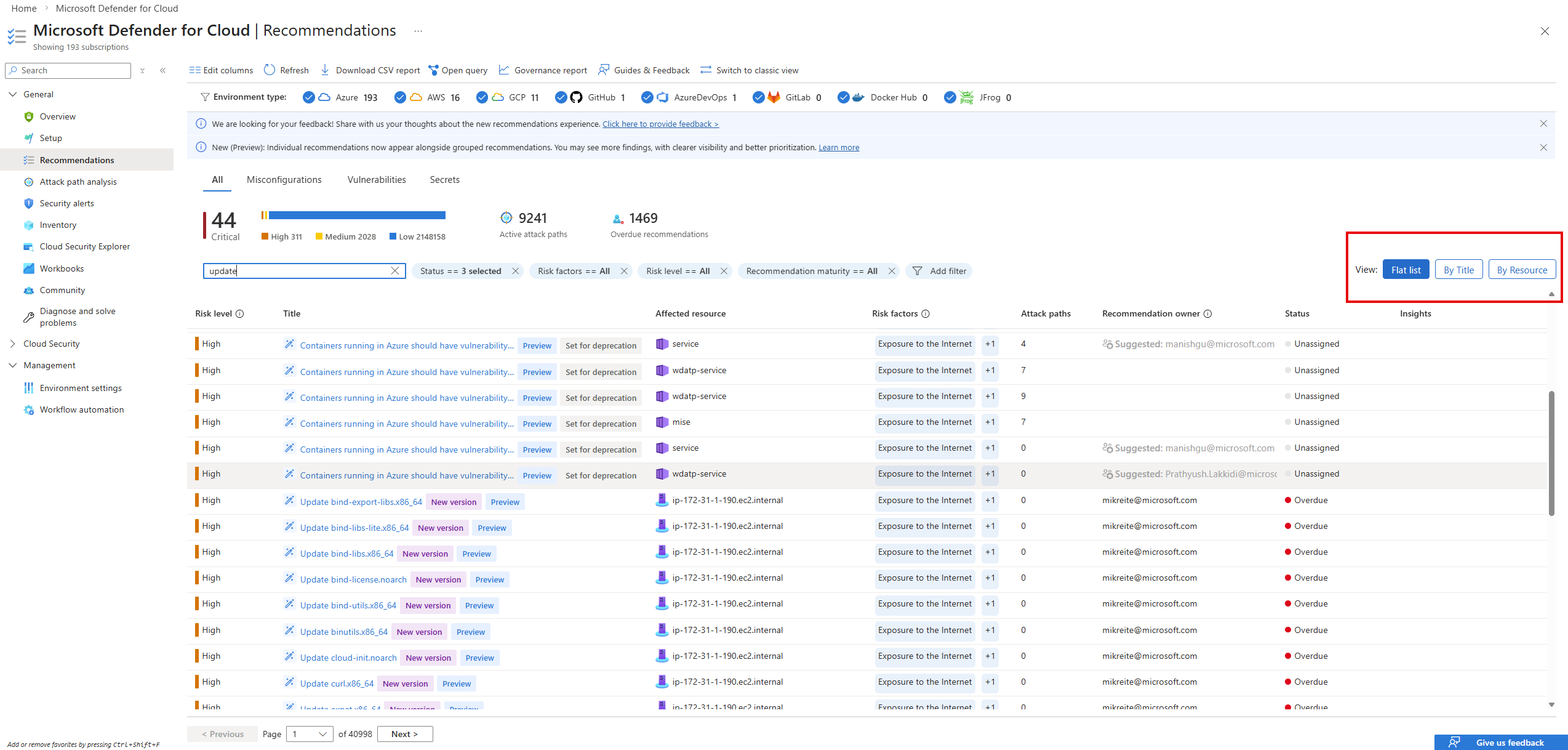
Choose the aggregation that matches the task:
- Widespread issue remediation: View by title
- Asset investigation: View by resource
How to manage the new individual recommendations
With the transition to individual recommendations, all Microsoft Defender for Cloud experiences continue to support Governance rules, Continuous export, and Exemptions. The main change is how these actions are scoped.
Individual recommendations are created per software update, secret, or issue type. Because they are generated according to your resources' current state, actions are no longer applied to a single static recommendation. Instead, management actions are now applied at the security category level.
Governance rules, Continuous export, and Exemptions continue to work as they do today, but instead of targeting a grouped recommendation key, you now target a security category. Each category automatically includes all current and future individual recommendations of that type.
The updated management experience is available in Environment settings, under Governance rules and Exemption rules, where you can apply ownership, automation, or exemptions consistently across an entire category of individual recommendations.

What you should do now
- Adopt individual recommendations for investigation and remediation
- Define a clear internal operating model for the transition period
- Use filters and tags to limit views to the model your team is actively using
- Prioritize Critical and High risk individual recommendations in daily operations
- Use aggregation views to scale remediation and investigation efficiently