Note
Access to this page requires authorization. You can try signing in or changing directories.
Access to this page requires authorization. You can try changing directories.
Memory lets AI agents remember information from earlier in the conversation or from previous conversations. This lets agents provide context-aware responses and build personalized experiences over time. Use Databricks Lakebase, a fully-managed Postgres OLTP database, to manage conversation state and history.
Requirements
- Enable Databricks Apps in your workspace. See Set up your Databricks Apps workspace and development environment.
- A Lakebase instance, see Create and manage a database instance.
Short-term vs. long-term memory
Short-term memory captures context in a single conversation session while long-term memory extracts and stores key information across multiple conversations. You can build your agent with either or both types of memory.
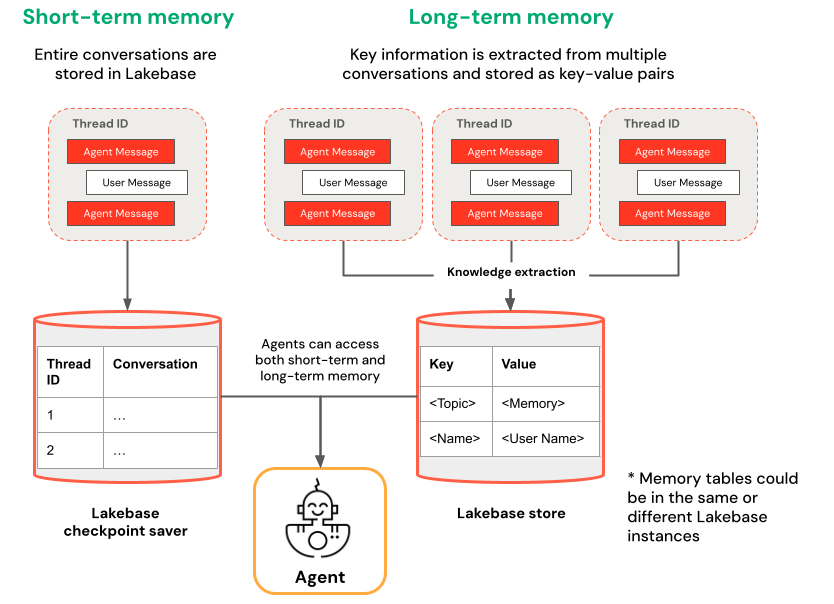
| Short-term memory | Long-term memory |
|---|---|
| Capture context in a single conversation session using thread IDs and checkpointing Maintain context for follow-up questions within a session |
Automatically extract and store key insights across multiple sessions Personalize interactions based on past preferences Build a knowledge base about users that improves responses over time |
Get started
To create an agent with memory on Databricks Apps, clone a pre-built app template and follow the development workflow described in Author an AI agent and deploy it on Apps. The following templates demonstrate how to add short-term and long-term memory to agents using popular frameworks.
LangGraph
Clone the agent-langgraph-advanced template to build a LangGraph agent with both short-term and long-term memory. The template uses LangGraph's built-in checkpointing with Lakebase for durable state management, including thread-based conversation context and persistent user insights across sessions.
git clone https://github.com/databricks/app-templates.git
cd app-templates/agent-langgraph-advanced
OpenAI Agents SDK
Clone the agent-openai-advanced template to build an agent using the OpenAI Agents SDK with short-term memory. The template uses Lakebase for durable state management, enabling stateful multi-turn conversations with automatic conversation history management.
git clone https://github.com/databricks/app-templates.git
cd app-templates/agent-openai-advanced
Background execution for long-running agents
Databricks Apps enforces an HTTP connection timeout of approximately 300 seconds. Background execution lets agent tasks that exceed this limit keep running after the connection closes; the client retrieves results from a separate endpoint or reconnects to resume streaming.
The advanced templates — agent-langgraph-advanced and agent-openai-advanced — extend the base templates with short-term memory and long-running background execution via LongRunningAgentServer from databricks-ai-bridge, which provides:
- Background mode: Set
background=truein the request body to return a response ID immediately and run the agent asynchronously. - Retrieve endpoint: Send
GET /responses/{id}to fetch the final result, or to open a streaming connection to an in-progress run. - Resumable streaming: Every server-sent event includes a
sequence_number. If the connection drops, reconnect withstarting_after=Nto resume from the next event. - TASK_TIMEOUT_SECONDS Environment variable that caps background task duration. This is independent of the 120-second Databricks Apps HTTP connection timeout, which only applies to a single HTTP request. (default: 1 hour)
The advanced template README shows request examples for five client modes:
- Invoke: A standard non-streaming POST.
- Stream: A standard streaming POST.
- Background, then poll: POST with
background=true, then pollGET /responses/{id}until done. - Background streaming, resume via stream: POST with
background=trueandstream=true; if the connection drops, reconnect toGET /responses/{id}withstream=true. - Background streaming, resume via poll: Same kickoff; if the connection drops, poll
GET /responses/{id}for the final result.
Deploy and query your agent
After you configure your agent with memory, follow the steps in Author an AI agent and deploy it on Apps to run your agent locally, evaluate it, and deploy it to Databricks Apps.