Note
Access to this page requires authorization. You can try signing in or changing directories.
Access to this page requires authorization. You can try changing directories.
This article explains how to integrate your Azure Container Apps environment with Azure Firewall by using user-defined routes (UDR). By using UDR, you can control how traffic is routed within your virtual network. You can route all outbound traffic from your container apps through Azure Firewall, which provides a central point for monitoring traffic and applying security policies. This setup helps protect your container apps from potential threats. It also helps you meet compliance requirements by providing detailed logs and monitoring capabilities.
User-defined routes (UDR)
User-defined routes (UDR) and controlled egress through NAT Gateway are supported only in a workload profiles environment.
Use UDR to restrict outbound traffic from your container app through Azure Firewall or other network appliances. For more information, see Control outbound traffic in Azure Container Apps with user defined routes.
You configure UDR outside of the Container Apps environment scope.
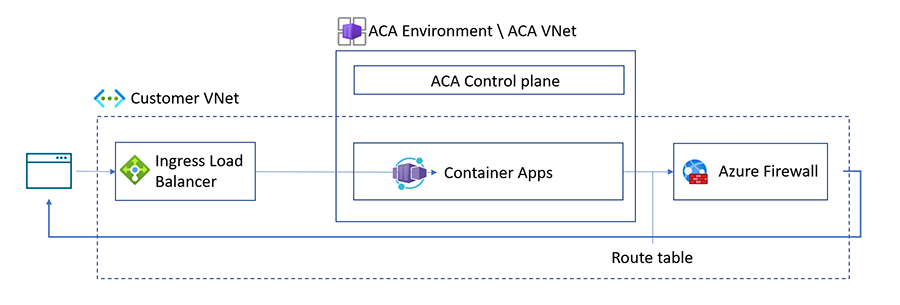
Azure creates a default route table for your virtual networks when you create them. By implementing a user-defined route table, you can control how traffic is routed within your virtual network. For example, you can create a UDR that restricts outbound traffic from your container app by routing it to Azure Firewall.
When you use UDR with Azure Firewall in Azure Container Apps, add the following application or network rules to the allow list for your firewall, depending on which resources you're using.
Note
You only need to configure either application rules or network rules, depending on your system’s requirements. Configuring both at the same time isn't necessary.
Application rules
Application rules allow or deny traffic based on the application layer. The following outbound firewall application rules are required based on the scenario.
| Scenarios | FQDNs | Description |
|---|---|---|
| All scenarios | mcr.microsoft.com, *.data.mcr.microsoft.com |
Azure Container Apps uses these FQDNs for Microsoft Container Registry (MCR). When using Azure Container Apps with Azure Firewall, add either these application rules or the network rules for MCR to the allowlist. |
| All scenarios | packages.aks.azure.com, acs-mirror.azureedge.net |
The underlying AKS cluster requires these FQDNs to download and install Kubernetes and Azure CNI binaries. When using Azure Container Apps with Azure Firewall, add either these application rules or the network rules for MCR to the allowlist. For more information, see the Azure Global required FQDN / application rules. |
| Azure Container Registry (ACR) | Your-ACR-address, *.blob.core.windows.net, login.microsoft.com |
These FQDNs are required when using Azure Container Apps with ACR and Azure Firewall. |
| Azure Key Vault | Your-Azure-Key-Vault-address, login.microsoft.com |
These FQDNs are required in addition to the service tag required for the network rule for Azure Key Vault. |
| Managed Identity | *.identity.azure.net, login.microsoftonline.com, *.login.microsoftonline.com, *.login.microsoft.com |
These FQDNs are required when using managed identity with Azure Firewall in Azure Container Apps. |
| Azure Service Bus | *.servicebus.windows.net |
These FQDNs are required when your container apps communicate with Azure Service Bus (queues, topics, or subscriptions) through Azure Firewall. |
| Aspire Dashboard | https://<YOUR-CONTAINERAPP-REGION>.ext.azurecontainerapps.dev |
This FQDN is required when using Aspire dashboard in an environment configured with a virtual network. Update the FQDN with your container app's region. |
| Docker Hub Registry | hub.docker.com, registry-1.docker.io, production.cloudflare.docker.com |
If you're using Docker Hub registry and want to access it through the firewall, add these FQDNs to the firewall. |
| Azure Service Bus | *.servicebus.windows.net |
This FQDN is required when using Azure Service Bus with Azure Container Apps and Azure Firewall. |
| Azure China: MCR | mcr.azure.cn, *.data.mcr.azure.cn |
These Microsoft Container Registry (MCR) endpoints are used to pull container images in the Azure China environment. |
| Azure China: AKS Infrastructure | mcr.azk8s.cn, mirror.azk8s.cn |
These China-specific AKS mirrors are used to download Kubernetes binaries and container images. |
| Azure China: ACR | *.azurecr.cn |
Required when using Azure Container Registry in the Azure China environment. |
| Azure China: Managed Identity | *.identity.azure.cn, login.chinacloudapi.cn, *.login.chinacloudapi.cn |
These FQDNs are required when using managed identity in the Azure China environment. |
| Azure China: Key Vault | *.vault.azure.cn, login.chinacloudapi.cn |
Required when using Azure Key Vault in the Azure China environment. |
| Azure China: Azure Management | management.chinacloudapi.cn, *.blob.core.chinacloudapi.cn |
Required for Azure Resource Manager API calls and platform-managed storage accounts in the Azure China environment. |
| Azure China: Monitoring | *.servicebus.chinacloudapi.cn, mooncake.warmpath.chinacloudapi.cn |
Required for platform monitoring and telemetry ingestion in the Azure China environment. |
| Azure China: Container Apps Platform | *.chinacloudsites.cn, *.ext.azurecontainerapps-dev.cn |
Required for the Container Apps regional control plane and extensions API in the Azure China environment. |
| Azure China: Aspire Dashboard | *.azurecontainerapps.cn |
Required when using Aspire Dashboard or app FQDNs in the Azure China environment. |
Note
The Azure China FQDNs listed earlier apply only to the Azure China environment. Docker Hub FQDNs are the same globally, but access from China might be unreliable. Consider mirroring images to Azure Container Registry (*.azurecr.cn) instead.
Network rules
Network rules allow or deny traffic based on the network and transport layer. When you use UDR with Azure Firewall in Azure Container Apps, add the following outbound firewall network rules based on the scenario.
| Scenarios | Service Tag | Description |
|---|---|---|
| All scenarios | MicrosoftContainerRegistry, AzureFrontDoorFirstParty |
Azure Container Apps uses these service tags for Microsoft Container Registry (MCR). To allow Azure Container Apps to use MCR, add either these network rules or the application rules for MCR to the allowlist when using Azure Container Apps with Azure Firewall. |
| Azure Container Registry (ACR) | AzureContainerRegistry, AzureActiveDirectory |
When you use ACR with Azure Container Apps, configure these network rules used by Azure Container Registry. |
| Azure Key Vault | AzureKeyVault, AzureActiveDirectory |
These service tags are required in addition to the FQDN for the network rule for Azure Key Vault. |
| Managed Identity | AzureActiveDirectory |
When you use Managed Identity with Azure Container Apps, configure these network rules used by Managed Identity. |
| Azure Service Bus | ServiceBus |
Required when your container apps access Azure Service Bus using Azure Firewall and service tags. |
Note
For Azure resources you're using with Azure Firewall that aren't listed in this article, see the service tags documentation.