Note
Access to this page requires authorization. You can try signing in or changing directories.
Access to this page requires authorization. You can try changing directories.
Advanced ransomware protection (ARP) in Azure NetApp Files is a built-in capability that helps safeguard your cloud file data against ransomware attacks. It uses intelligent, AI-driven monitoring to detect unusual file activity in real time and automatically creates a secure snapshot of your data when a potential ransomware threat is detected. This approach provides an extra line of defense at the storage layer – preserving clean recovery points and minimizing data loss if ransomware encrypts your files, without requiring any external appliances or software.
Why do we need advanced protection?
Ransomware attacks have become a serious and growing threat to organizations of all sizes. Attackers continually evolve methods to infiltrate environments (for example, through phishing emails or zero-day exploits) and can silently encrypt critical files, halting business operations. Traditional security measures such as firewalls, email filters, and anti-malware software do their best to prevent infections, but sophisticated ransomware can slip through these defenses. Once data is encrypted by malware, companies face an awful choice, either lose valuable data or pay a hefty ransom with no guarantee of recovery.
Azure NetApp Files advanced ransomware protection directly addresses this challenge by adding an integrated safety net at the storage level. Instead of relying solely on threat prevention, advanced ransomware protection assumes that an attacker might breach other defenses and focuses on limiting the damage done:
Proactive detection of ransomware behavior on file volumes (not just at the endpoint or network). This means the storage service itself watches for signs of encryption or mass file modifications as data is being written.
Automatic response in seconds when a threat is suspected, creating an immutable recovery point before ransomware can spread further and issuing an alert to the administrator.
Rapid recovery options to restore data from the secure snapshot, preventing extended downtime or data loss without paying a ransom.
In essence, advanced ransomware protection gives organizations a built-in contingency plan: even if ransomware manages to start encrypting files, the service will quickly preserve a clean version of your data and alert you, dramatically reducing the impact of the attack.

Note
Advanced ransomware protection isn't a replacement for preventive security measures like antivirus or network security – it doesn't stop the ransomware from entering your system. Instead, it minimizes damage by ensuring you have a recent, unaffected copy of your data and a way to recover quickly. Users and administrators should continue to follow the best security practices to avoid ransomware infections in the first place. ARP serves as a robust last line of defense if those primary defenses are compromised.
How advanced ransomware protection works
Advanced ransomware protection in Azure NetApp Files operates at the storage volume level, continuously analyzing file activity patterns to detect anomalies that resemble ransomware behavior.
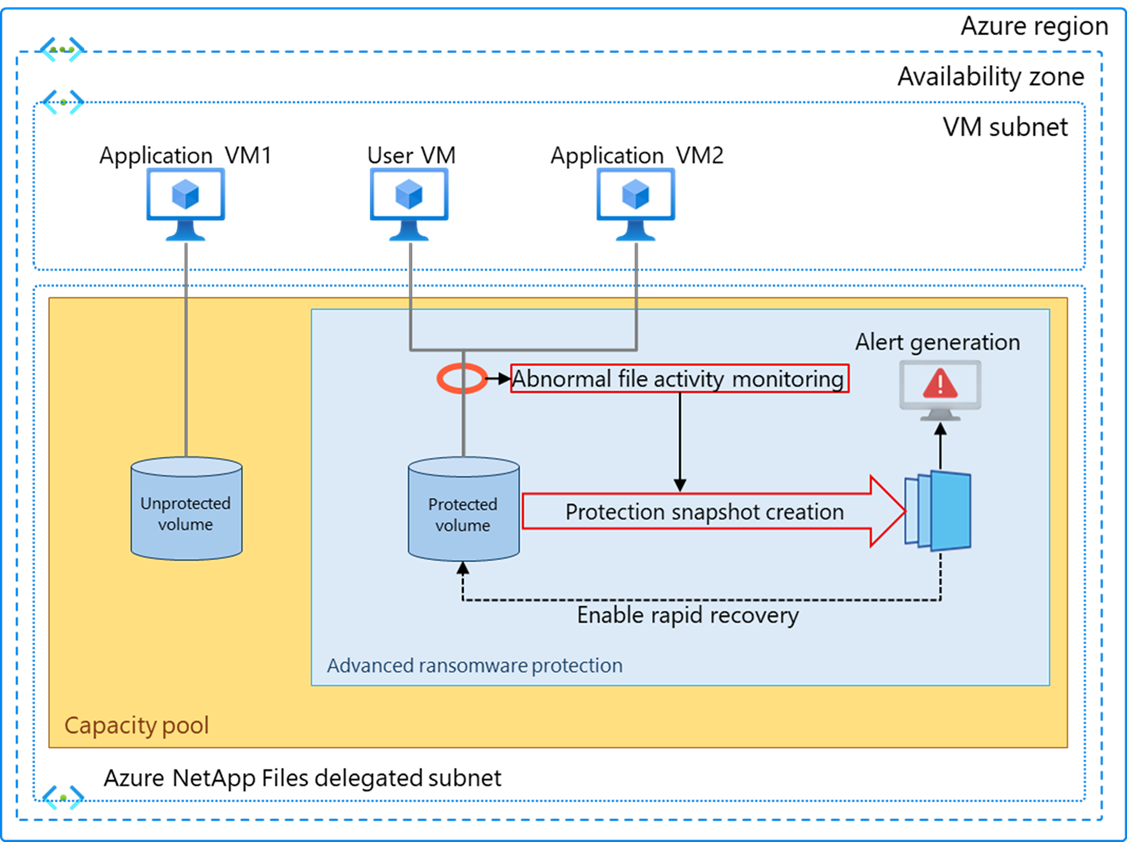
The mechanism can be summarized in a few key steps:
Baseline learning of normal activity: When enabled on a volume, advanced ransomware protection observes that volume’s typical usage patterns. It builds a profile of what normal looks like, for example, the common file types and extensions, typical read/write rates (IOPS), and the randomness (entropy) of file data. This baseline helps distinguish legitimate workloads from suspicious activity.
Continuous anomaly detection: Advanced ransomware protection uses AI/ML algorithms to monitor ongoing file operations and compares them against the learned baseline in real time. It looks for telltale signs of ransomware, such as a sudden surge in file modifications or encryptions, unusual file extensions being created, or high data entropy indicating encryption. These algorithms have shown a detection accuracy up to 99% in identifying ransomware patterns without extensive tuning.
Threat identification: If the system detects file activities that deviate significantly from normal patterns, for instance, dozens of files being rapidly renamed or encrypted, it flags this as a potential ransomware incident (often within seconds of the behavior starting). At this point, speed is critical to secure data.
Automatic snapshot creation: As soon as a threat is flagged, advanced ransomware protection automatically takes a secure point-in-time snapshot of the volume. This snapshot is essentially an instantaneous, read-only copy of the volume data at the moment in time before ransomware could cause widespread encryption. Advanced ransomware protection snapshots are immutable (locked), meaning they cannot be altered or deleted by an attacker.
Alerting and logging: In parallel with creating the snapshot, the system logs the event and generates an alert. Administrators are notified through Azure’s native monitoring channels (for example, an alert in Azure Monitor or an entry in the Azure NetApp Files Activity log) that a ransomware threat was detected and a protective snapshot was taken. This immediate alert allows your security or operations team to begin investigating the issue right away.
Attack report and analysis: Azure NetApp Files also retains information about suspicious activity (often called a ransomware report). This might include details like which files were being modified abnormally. These details can help in forensic analysis and are typically kept for a period of 30 days for review.
Once the advanced ransomware protection workflow has been triggered, you have a safe recovery point from which to restore. At this stage, an administrator can evaluate the situation.
If it turns out to be a confirmed ransomware attack, you can quickly recover data from the protection snapshot. Azure NetApp Files snapshots are space-efficient (they store only delta changes). You can revert the entire volume back to the snapshot state. This recovery can often be done within minutes, essentially undoing the ransomware’s damage up to the snapshot point. You can reverse any changes from the attack by using single file snapshot restore to restore individual files from previous snapshots.
Business continuity and minimal disruption
With advanced ransomware protection in place, business operations can resume swiftly following a ransomware incident. The system automatically captures a clean snapshot of your data the moment suspicious activity is detected, and recovery often means only the most recent seconds or minutes of changes are at risk. This rapid restoration process ensures that organizations experience minimal loss of data and a quick return to normal operations. This reduces the overall impact of a ransomware attack on productivity and service delivery. If the alert turns out to be a false positive (for example, an unusual but legitimate batch job that mimicked ransomware behavior), you still have the snapshot and no harm is done. You can continue normal operations. The snapshot can be retained as an extra backup or removed later if not needed. Administrators can also provide feedback to refine detection if needed.
Behind the scenes, advanced ransomware protection leverages the proven snapshot and cloning technology of Azure NetApp Files, augmented by intelligent monitoring. The monitoring is lightweight and happens within the managed service’s control plane. Likewise, the snapshots taken by advanced ransomware protection are the same highly efficient snapshots that Azure NetApp Files already uses for primary data protection, which don't significantly add to storage overhead unless a lot of new data is written after the snapshot. Advanced ransomware protection is designed to operate continuously without disrupting your workloads’ performance or requiring special configuration once enabled.
Benefits of advanced ransomware protection
Advanced ransomware protection provides several clear benefits for organizations using Azure NetApp Files:
Technical benefits
Immediate threat detection and response: Advanced ransomware protection uses AI driven anomaly detection to identify ransomware like file operations within seconds and automatically creates an immutable snapshot to secure clean data.
Immutable, secure snapshots: Snapshots triggered by advanced ransomware protection are read only and cannot be deleted or altered by attackers, even with elevated privileges.
Integrated, storage layer defense: Advanced ransomware protection operates natively within Azure NetApp Files and does not require agents, extra appliances, or additional configuration. It feeds into Azure Monitor and Azure NetApp Files events for operational visibility.
High detection accuracy with low impact: Its ML driven algorithms can detect ransomware patterns with up to 99% accuracy while running continuously without impacting application performance.
Business benefits
Minimized downtime and rapid recovery: Automatic protection snapshots provide clean recovery points, allowing restore operations in minutes and significantly reducing operational disruption.
Increased resilience and continuity: Even if ransomware bypasses primary defenses, advanced ransomware protection contains the impact by preserving clean data instantly, supporting strong business continuity strategies.
Strengthened security posture and compliance: Advanced ransomware protection helps organizations demonstrate robust data protection controls, aiding compliance efforts in regulated industries such as financial services, healthcare, and government.
Reduced risk exposure: Automatic detection and snapshots limit the spread and damage of ransomware, reducing the likelihood of data hostage situations and reputational damage.
Economic benefits
Avoided ransom payments and recovery costs: By enabling rapid restore from immutable snapshots, organizations avoid the financial and operational costs associated with paying ransom or rebuilding systems.
No additional infrastructure or licensing: AI is built into Azure NetApp Files with no separate deployment or specialized hardware/software required, reducing operational overhead.
Storage efficient protection: Snapshots are space efficient and consume capacity only for delta changes, minimizing incremental storage expense while providing strong protection.
Lower productivity loss: Quick recovery minimizes downtime, reducing the indirect costs of halted operations, lost employee productivity, and service delivery interruptions.
Advanced ransomware protection brings peace of mind: even if ransomware manages to infiltrate your environment, your Azure NetApp Files shares are not left defenseless. The capability gives you a fighting chance to detect and disarm a ransomware attack in progress, with minimal or even no data loss. This can save your organization from costly downtime, potential ransom payments, or reputational damage associated with data breaches.
Considerations and usage guidelines
Before using advanced ransomware protection, there are a few important points and limitations to understand:
Enrollment per volume: You must explicitly enable advanced ransomware protection on each volume that you want protected – it is not “on” by default. This can be done easily using the Azure portal (a toggle option in the volume settings) or through the Azure API/CLI by setting the ransomware protection property on the volume. Only volumes with advanced ransomware protection enabled will be monitored and automatically snapshotted on threats.
Storage capacity planning: Advanced ransomware protection’s automatic snapshots use your existing Azure NetApp Files volume capacity ensuring sufficient space for at least one extra snapshot per protected volume. Actual storage used depends on data changes before a snapshot. Advanced ransomware protection itself has no additional cost or separate SKU, but may increase storage usage as protection snapshots are created. Monitor your volumes and capacity pools to manage capacity during ransomware events.
Operational visibility: When advanced ransomware protection triggers, it logs alerts in Azure NetApp Files events and Azure Monitor. Make sure your operations team is monitoring these channels or has set up automated alert rules, so that a ransomware alert isn't missed. Treat an advanced ransomware protection alert as urgent, investigate the possibly compromised client or user account immediately, since the snapshot indicates suspicious activity was indeed happening. Early investigation can help you contain the threat (for example, by isolating a VM or revoking credentials) while the snapshot protects your data.
Data restoration process: In the event of a real ransomware attack, the recommended recovery method is to revert the entire volume to the protected snapshot using Azure NetApp Files’ restore capability. This essentially turns back the clock on that volume to the pre-attack state captured by the snapshot. Volume revert is very fast (usually seconds) regardless of volume size. If a full revert isn't desirable (say other parts of the volume had important recent changes you want to keep), you can also mount the snapshot as a new volume or use the single-file restore from snapshot capability to copy back only selected files that were encrypted. Azure NetApp Files gives flexibility in recovery, but in all cases the snapshot ensures you do not have to rebuild data from scratch.
Coexistence with other protection features: Advanced ransomware protection is designed to complement, not replace, existing data protection features like scheduled snapshots, backups, and cross-region replication. We recommend using advanced ransomware protection alongside a robust backup strategy. For example, you might keep daily snapshots and weekly backups for general data recovery and compliance, while advanced ransomware protection watches for the exceptional case of ransomware in between those scheduled snapshots and backups. Advanced ransomware protection also works in tandem with Azure’s security services, for instance, you might get an alert from Microsoft Defender for Storage or an antivirus at around the same time. Using multiple layers of defense is the best practice for comprehensive protection.
User access and permissions: Only subscription owners or contributors with the right Azure role can enable or disable advanced ransomware protection on a volume.
Immutable protection snapshots: When an advanced ransomware protection snapshot is created, remember that its immutability is a crucial safeguard as the protection snapshots are designed to be read-only, ensuring they cannot be altered or deleted even by privileged accounts. While this locked-down design keeps your backup safe from tampering or further ransomware attempts, it’s still essential to strictly control who can access and restore from these snapshots. Use Azure NetApp Files’ integration with Azure RBAC to restrict snapshot recovery permissions to only a trusted group of administrators.
Testing the feature: It’s a good idea to become familiar with how advanced ransomware protection works by testing it in a non-production environment. You might simulate a ransomware-like workload (for example, encrypt a set of test files on a volume) to see how and when an alert is generated and how the snapshot and restore process works. Testing helps validate your operational runbooks for responding to advanced ransomware protection alerts, so in a real incident everyone knows what to do. Keep in mind that the detection algorithms might not trigger on every possible change – they're tuned to catch common ransomware patterns – so avoid trying this in a way that could create false confidence. Microsoft’s internal testing has covered many scenarios, but real-world validation in your environment is valuable too.
By considering these aspects, you can deploy advanced ransomware protection effectively and be prepared to use it when needed. The capability significantly strengthens the resiliency of your Azure NetApp Files volumes against one of the most damaging types of cyberattacks today. With it enabled, you gain a dependable recovery fallback that operates automatically, letting you focus on preventing attacks and running your business – and knowing that if ransomware strikes, Azure NetApp Files advanced ransomware protection has you covered with a rapid, storage-integrated response.
Conclusion
Advanced ransomware protection for Azure NetApp Files is a conceptual game-changer for data protection in the cloud file storage space. It extends the Azure NetApp Files platform with an AI-powered ability to detect ransomware threats from within and respond instantly by securing your data. In practice, this means: your critical file shares are continuously watched for danger; if encryption malware sneaks in, the service itself will catch the abnormal pattern and shield your data by creating a protection snapshot and issuing an alarm. You can then quickly restore your files to the uninfected state and eliminate the malware – avoiding costly downtime and ransom payments.
With ransomware attacks on the rise globally, advanced ransomware protection adds an important layer of resilience for businesses using Azure NetApp Files. It uses the proven snapshot technology and the intelligence of cloud analytics to give you a robust insurance policy against the worst-case scenario of data hostage situations. We recommend evaluating Advanced Ransomware Protection for any Azure NetApp Files volumes that host mission-critical or sensitive data. By doing so, you invest in a safety mechanism that could one day be the difference between a minor security incident and a major business disaster.