Note
Access to this page requires authorization. You can try signing in or changing directories.
Access to this page requires authorization. You can try changing directories.
Azure Firewall
Azure Application Gateway
Azure Load Balancer
Azure Traffic Manager
This architecture is for global, internet-facing applications that use HTTP(S) and non-HTTP(S) protocols. It features Domain Name System (DNS)-based global load balancing, two forms of regional load balancing, and global virtual network peering to create a reliable architecture. Availability zones provide resiliency within each region, and multiregion deployment provides recoverability from a regional outage. Azure Web Application Firewall and Azure Firewall inspect traffic at multiple layers.
Architecture
This section describes the traffic flows through the architecture for inbound HTTP(S), inbound non-HTTP(S), and outbound requests. Each flow shows how the architecture routes, inspects, and distributes traffic across the application tiers in both regions.
Inbound HTTP(S) traffic flows
HTTP(S) traffic passes through the Azure Application Gateway web application firewall (WAF) and Azure Firewall Premium Transport Layer Security (TLS) inspection before it reaches the application tiers.

Download a Visio file of this architecture.
Azure Traffic Manager uses DNS-based routing to load balance incoming traffic across the two regions. Traffic Manager resolves DNS queries for the application to the public IP addresses of the Application Gateway endpoints. The public endpoints of the Application Gateway instances function as the back-end endpoints of Traffic Manager for HTTP(S) traffic. Traffic Manager resolves DNS queries based on the chosen routing method. The browser or other HTTP client connects directly to the endpoint. For more information, see Priority traffic-routing method.
The Application Gateway instances deployed across availability zones receive HTTP(S) traffic from the browser, and the WAF inspects that traffic to detect web attacks. The Application Gateway instances forward the traffic to the internal load balancer, which distributes it to the front-end virtual machines (VMs). In this flow, Application Gateway functions as the load balancer, so an extra internal load balancer in front of the web servers isn't required. But the internal load balancer is included in the design for consistency with the flow for non-HTTP(S) applications.
User-defined routes (UDRs) on the Application Gateway subnet redirect traffic between Application Gateway and the front-end internal load balancer through Azure Firewall Premium. Azure Firewall Premium is zone redundant and applies TLS inspection to the traffic for added security. If Azure Firewall detects a threat, it drops the packets. If Azure Firewall doesn't detect a threat, it forwards the traffic to the destination web tier internal load balancer.
The web tier is the first layer of the three-tier application. It contains the user interface (UI) and parses user interactions. The web tier load balancer spans all three availability zones and distributes traffic across the three web tier VMs.
The web tier VMs span all three availability zones and communicate with the business tier through a dedicated internal load balancer.
The business tier processes user interactions and determines next steps. It sits between the web and data tiers. The business tier internal load balancer distributes traffic to the business tier VMs across the three availability zones. The business tier load balancer is zone redundant, like the web tier load balancer.
The business tier VMs span availability zones and route traffic to the availability group listener of the databases.
The data tier stores the application data, typically in a database, object storage, or file share. This architecture has SQL Server on Azure Virtual Machines distributed across three availability zones. They use an Always On availability group with each SQL Server VM in a separate subnet. A multi-subnet deployment lets the availability group listener route traffic directly to the replicas and doesn't require an Azure load balancer or distributed network name (DNN).
Inbound non-HTTP(S) traffic flows
Some workloads accept traffic over protocols other than HTTP(S), like Secure File Transfer Protocol (SFTP) for file-based data ingestion from business partners or legacy Transmission Control Protocol (TCP)-based integrations. Non-HTTP(S) traffic routes directly to Azure Firewall for destination network address translation (DNAT) and inspection, which bypasses Application Gateway.
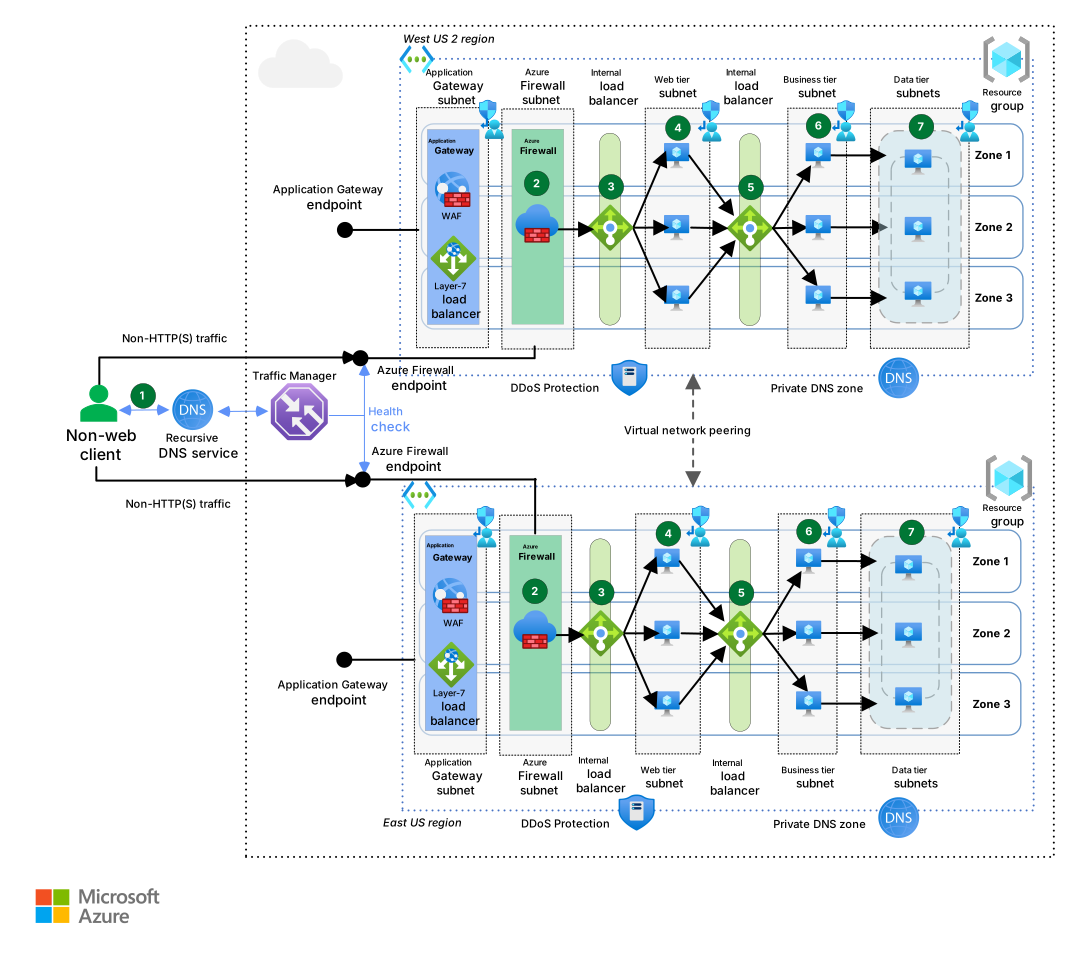
Download a Visio file of this architecture.
Traffic Manager uses DNS-based routing to load balance incoming traffic across the two regions. Traffic Manager resolves DNS queries for the application to the public IP addresses of the Azure endpoints. The public endpoints of Azure Firewall function as the back-end endpoints of Traffic Manager for non-HTTP(S) traffic. Traffic Manager resolves DNS queries based on the chosen routing method. The client connects directly to the resolved endpoint. For more information, see Priority traffic-routing method.
Azure Firewall Premium is zone redundant and inspects inbound traffic for security. If Azure Firewall detects a threat, it drops the packets. After a successful inspection, Azure Firewall applies DNAT to the inbound packets and forwards the traffic to the web tier internal load balancer.
The web tier is the first layer of the three-tier application. It contains the UI and parses user interactions. The web tier load balancer spans all three availability zones and distributes traffic to each of the three web tier VMs.
The web tier VMs span all three availability zones and communicate with the business tier via a dedicated internal load balancer.
The business tier processes user interactions and determines next steps. It sits between the web and data tiers. The business tier internal load balancer distributes traffic to the business tier VMs across the three availability zones. The business tier load balancer is zone redundant, like the web tier load balancer.
The business tier VMs span availability zones and route traffic to the availability group listener of the databases.
The data tier stores the application data, typically in a database, object storage, or file share. This architecture has SQL Server on Virtual Machines distributed across three availability zones. They use an Always On availability group with each SQL Server VM in a separate subnet. A multi-subnet deployment lets the availability group listener route traffic directly to the replicas and doesn't require an Azure load balancer or DNN.
Outbound traffic flows (all protocols)
Outbound traffic flows for VM patch updates or other internet-bound traffic go from the workload VMs to Azure Firewall through UDRs. Azure Firewall enforces connectivity rules by using web categories and network and application rules to prevent workloads from accessing disallowed content or exfiltrating data.
Components
Azure Firewall is a cloud service from Microsoft that provides next-generation firewall capabilities, including deep packet inspection for north-south and east-west traffic flows. In this architecture, Azure Firewall provides network security for both web and non-web traffic. It uses TLS inspection to inspect inbound HTTP(S) flows from Application Gateway, handles inbound non-HTTP(S) flows from the public internet, and inspects outbound flows from VMs to prevent data exfiltration.
Application Gateway is a layer-7 load balancer that provides WAF functionality. In this architecture, Application Gateway provides regional load balancing for HTTP(S) traffic, helps detect and prevent web attacks, and provides TLS termination and path-based routing. It functions as the back-end endpoint for Traffic Manager.
Traffic Manager is a DNS-based global traffic load balancer that distributes traffic to services across global Azure regions and provides high availability and responsiveness. In this architecture, Traffic Manager provides global load balancing and resolves DNS queries to direct traffic to the regional endpoints for the application. It monitors endpoint health and redirects DNS responses from unhealthy regions.
Azure Load Balancer is a layer-4 load balancer that distributes incoming network traffic among back-end resources. In this architecture, Load Balancer provides internal load balancing between application tiers and maintains high availability across availability zones within each region.
Azure DDoS Protection is a service that helps protect against distributed denial-of-service (DDoS) attacks. In this architecture, DDoS Protection provides protection for public IP addresses and helps ensure availability during attack scenarios.
Azure DNS is a hosting service for DNS domains. It provides name resolution through Azure infrastructure. In this architecture, Azure DNS manages DNS records and works with Traffic Manager to provide global DNS-based load balancing and failover capabilities.
Azure private DNS zones are a feature of Azure DNS. Azure private DNS zones provide name resolution within a virtual network and between virtual networks. In this architecture, Azure private DNS zones provide internal name resolution for resources within the virtual network infrastructure.
Azure Virtual Machines is a service that provides on-demand, scalable computing resources that give you the flexibility of virtualization but eliminate the maintenance demands of physical hardware. In this architecture, Virtual Machines hosts the application tiers, which are distributed across availability zones for resiliency and across multiple regions for recoverability.
Azure Virtual Machine Scale Sets with flexible orchestration is a service that you can use to create and manage a group of load-balanced VMs that can automatically scale based on demand. In this architecture, Virtual Machine Scale Sets host the web and business tier VMs across availability zones in each region. The data tier uses standalone SQL Server virtual machines, as described below.
SQL Server on Virtual Machines is a service that provides full versions of SQL Server in the cloud so that you don't need to manage any on-premises hardware. In this architecture, SQL Server on standalone Virtual Machines forms the data tier with Always On availability groups distributed across availability zones in a multi-subnet configuration.
Azure Virtual Network is a secure private network in the cloud. It connects VMs to one another, to the internet, and to cross-premises networks. In this architecture, Virtual Network provides network isolation and connectivity for all components. Global virtual network peering provides low-latency communication between regions.
UDRs are a mechanism to override the default routing in virtual networks. In this architecture, they force inbound and outbound traffic flows to traverse Azure Firewall for security inspection and policy enforcement.
Alternatives
This architecture uses specific technology choices to support mixed‑protocol, multiregion workloads. Your workload requirements might lead to different choices. Consider the following alternatives.
Global load balancer
Current approach: Traffic Manager provides DNS-based global load balancing that supports both HTTP(S) and non-HTTP(S) protocols. This architecture uses Traffic Manager because it must route non-HTTP(S) flows, like SFTP and legacy TCP integrations, through Azure Firewall for network-level inspection. Traffic Manager is DNS-based, so clients connect directly to the back-end endpoints, which requires Application Gateway and Azure Firewall to have public IP addresses.
Alternative approach: Use Azure Front Door instead of Traffic Manager. Azure Front Door is a layer-7 global load balancer for HTTP(S) traffic that provides caching, traffic acceleration, TLS termination, certificate management, and built-in WAF. Azure Front Door is a reverse proxy, so it can connect to Application Gateway over Azure Private Link, which eliminates the need for public IP addresses on your back-end infrastructure. It's the preferred global routing solution for HTTP(S)-only workloads.
Consider Azure Front Door if your workload meets the following conditions:
All inbound traffic uses HTTP(S) protocols.
You don't require Azure Firewall for deep packet inspection of inbound traffic.
You want integrated WAF and content delivery network capabilities at the global edge.
Compute platform
Current approach: The web, business, and data tiers run on Virtual Machine Scale Sets with SQL Server on Virtual Machines. This infrastructure as a service (IaaS) approach provides full control over the operating system (OS), middleware, and database engine configuration.
Alternative approach: Replace specific tiers with platform as a service (PaaS) resources like Azure App Service for the web tier or Azure SQL Database for the data tier. The overall network architecture doesn't change significantly if you use Private Link and App Service virtual network integration to integrate these PaaS services into the virtual network.
Consider PaaS alternatives if your workload meets the following conditions:
You don't require direct OS-level or middleware configuration control.
You want to reduce operational overhead for patching, scaling, and availability management.
Your database workload is compatible with the SQL Database feature set and limits.
Load-balancing service combination
Current approach: This architecture uses Traffic Manager for global, DNS-based routing. Within each region, Application Gateway handles layer-7 processing and WAF inspection, and Load Balancer manages layer-4, tier-to-tier distribution.
Alternative approach: Your workload's protocol, latency, and security requirements might require a different combination of load-balancing services. For example, workloads that don't need a WAF can use Load Balancer alone for regional distribution. Workloads that need path-based routing without a firewall can use Application Gateway without Azure Firewall in front of it.
To determine which services fit your scenario, see Load-balancing options in Azure.
Network topology
Current approach: This architecture uses a flat virtual network design with all components in a single virtual network for each region.
Alternative approach: Adapt this architecture to a hub-spoke virtual network design, in which Azure Firewall resides in the hub network and Application Gateway resides either in the hub or in a spoke. If you deploy Application Gateway in the hub, use multiple instances for different application groups to control Azure role-based access control (Azure RBAC) scope and remain within Application Gateway limits. In an Azure Virtual WAN environment, you can't deploy Application Gateway instances in the hub, so you install them in spoke virtual networks.
Scenario details
Global traffic routing: Traffic Manager uses performance routing to direct each user to the endpoint that has the lowest latency and automatically adjusts as conditions change. Health checks and priority routing redirect DNS responses from unhealthy regions.
Zone redundancy: The architecture deploys resources across three availability zones in each region. Application Gateway, internal load balancers, and VMs span all three availability zones. If a single zone experiences an outage, the remaining zones absorb the load without triggering a regional failover.
Regional load balancing and WAF: Application Gateway provides layer-7 capabilities within each region, including WAF, TLS termination, path-based routing, and cookie-based session affinity.
Network security and deep packet inspection: This architecture places Application Gateway in front of Azure Firewall for double inspection of web content. Alternative topologies are documented in Azure Firewall and Application Gateway for virtual networks. This topology preserves the client's source IP address in the HTTP
X-Forwarded-Forheader, provides end-to-end encryption, and prevents clients from bypassing the WAF.Azure Firewall Premium inspects three types of flows:
Inbound HTTP(S) flows from Application Gateway, protected with TLS inspection.
Inbound non-HTTP(S) flows from the public internet, inspected with the full premium feature set. Application Gateway also supports layer-4 (TCP/TLS) proxying, which consolidates both HTTP and non-HTTP ingress onto a single entry point. This capability is in preview and WAF doesn't apply to layer-4 traffic, so this architecture uses a separate path for non-HTTP(S) flows.
Outbound flows from VMs to prevent data exfiltration and access to prohibited destinations.
Compute orchestration: All three application tiers use Virtual Machine Scale Sets with flexible orchestration. The data tier's multi-subnet SQL Server availability group requires you to place individual VMs into specific subnets and fault domains, which only flexible orchestration supports. The web and business tiers also use flexible orchestration to maintain a single operational model across the workload rather than mix orchestration modes across tiers.
Cross-region connectivity: Global virtual network peering provides low-latency, high-bandwidth data replication between regions over the Microsoft backbone. In a hub-spoke topology, peerings exist between hub and spoke networks within each region and between hubs across regions.
Considerations
These considerations implement the pillars of the Azure Well-Architected Framework, which is a set of guiding tenets that you can use to improve the quality of a workload. For more information, see Well-Architected Framework.
Reliability
Reliability helps ensure that your application can meet the commitments that you make to your customers. For more information, see Design review checklist for Reliability.
Multiregion deployment: Deploy to at least two Azure regions for recoverability. An active-passive or active-active multiregion configuration helps your workload recover from a regional outage. Traffic Manager monitors endpoint health and redirects DNS responses from unhealthy regions, but you must ensure that the secondary region is ready to serve traffic, including data replication and application readiness.
For your secondary region, prefer a paired region when a paired region is available because it provides prioritized recovery sequencing and staggered platform updates. If your region doesn't have a paired region, you can build a multiregion solution. But some services, like geo-redundant storage (GRS), require alternative replication approaches. Factor in geographic distance, data residency, service availability, and cost. For more information, see Select Azure regions.
The SQL Server Always On availability group replicas in the secondary region use asynchronous commit with manual failover. Because the commit mode is asynchronous, the secondary region might not receive some committed transactions during a regional outage, so plan for potential data loss. Define your recovery point objective (RPO) and test whether the replication lag under your workload's write volume remains within that target. Failover to the secondary region is a manual operation that requires an operator or runbook to promote the asynchronous replica.
Zone resiliency: This architecture deploys Application Gateway, Azure Firewall, Load Balancer, and Virtual Machine Scale Sets across multiple availability zones within each region to provide resiliency against datacenter-level failures.
Virtual Machine Scale Sets: Flexible orchestration distributes VM instances across fault domains within each availability zone, which reduces the blast radius of a single host failure. It also provides the per-VM placement control that the multi-subnet SQL Server availability group configuration requires.
Global routing
Use the traffic-routing method that best meets your customers' needs. Traffic Manager supports multiple traffic-routing methods to deterministically route traffic to the various service endpoints.
Use Traffic Manager in a nested configuration if you need more granular control to choose a preferred failover within a region.
Use traffic view to see traffic patterns and latency metrics. Traffic view can help you plan expansion into new Azure regions.
Application Gateway
To maintain reliable traffic flow through Application Gateway, follow these practices:
Rely on the platform to distribute instances across fault domains and update domains. In regions that support availability zones, Application Gateway is zone redundant by default, so instances also span availability zones for zone fault tolerance.
Turn on autoscaling and set the minimum instance count to at least two. This reserved capacity ensures that Application Gateway can serve traffic without the three-to-five-minute delay to provision new instances. For more information, see Application Gateway autoscaling.
Turn on connection draining so that in-flight requests complete before Application Gateway removes back-end instances. Without it, scale-in events and configuration updates cause transient request failures.
Azure Firewall
This design requires Azure Firewall Premium to provide TLS inspection. Azure Firewall intercepts the TLS sessions between Application Gateway and the web tier VMs, generates its own certificates, and inspects outbound traffic flows from the virtual networks to the public internet. For more information, see Zero Trust network for web applications that use Azure Firewall and Application Gateway.
Monitor the expiration dates of the intermediate certificate authority (CA) certificates that Azure Firewall uses for TLS inspection. An expired certificate breaks the TLS handshake so that traffic can't reach your back-end servers, even though all infrastructure components remain healthy. For more information, see TLS certificate trust chain.
Health probe recommendations
Consider the following recommendations for health probes in Traffic Manager, Application Gateway, and Load Balancer.
Traffic Manager
Endpoint health: Create an endpoint that reports the overall health of the application. Traffic Manager uses an HTTP(S) probe to monitor the availability of each region. The probe checks for an HTTP 200 (OK) response for a specified URL path. Use the endpoint that you create for the health probe because other endpoints might cause the probe to report a healthy state even when critical parts of the application fail. For more information, see Health Endpoint Monitoring pattern.
Failover delay: Traffic Manager has a failover delay. The following factors determine the duration of the delay:
Probing intervals: How often the probe checks the health of the endpoint.
Tolerated number of failures: How many failures the probe tolerates before it marks the endpoint unhealthy.
Probe timeout: How long before Traffic Manager considers the endpoint unhealthy.
Time-to-live (TTL): DNS servers must update the cached DNS records for the IP address. The time it takes depends on the DNS TTL. The default TTL is 300 seconds (5 minutes), but you can set this value when you create the Traffic Manager profile. For more information, see Traffic Manager monitoring.
Application Gateway and Load Balancer
Familiarize yourself with the health probe policies of Application Gateway and Load Balancer to ensure that you understand the health of your VMs:
Application Gateway always uses an HTTP probe.
Load Balancer can evaluate either HTTP or TCP. Use an HTTP probe if a VM runs an HTTP server. Use TCP for all other cases.
HTTP probes send an HTTP GET request to a specified path and listen for an HTTP 200 response. This path can be the root path ("/") or a health-monitoring endpoint that implements custom logic to check the health of the application. The endpoint must allow anonymous HTTP requests. If a probe can't reach an instance within the timeout period, Application Gateway or Load Balancer stops sending traffic to that VM. The probe continues to check and returns the VM to the back-end pool if the VM becomes available again.
Security
Security provides assurances against deliberate attacks and the misuse of your valuable data and systems. For more information, see Design review checklist for Security.
This architecture follows assumes no implicit trust between components. Multiple layers inspect and authorize traffic. The Application Gateway WAF filters HTTP-level threats. Azure Firewall Premium inspects all traffic flows at a deep packet level. Network security groups (NSGs) enforce least-privilege segmentation between tiers. TLS encryption protects data in transit at every network hop. No single layer blocks every threat.
WAF: The WAF functionality of Application Gateway detects and prevents attacks at the HTTP level, like SQL injection (SQLi) or cross-site scripting (XSS).
Next-generation firewall: Azure Firewall Premium provides an extra layer of defense by inspecting content for non-web attacks like malicious files uploaded via HTTP(S) or other protocols.
End-to-end encryption: Traffic is always encrypted when it traverses the Azure network. Both Application Gateway and Azure Firewall encrypt traffic before they send it to the corresponding back-end system.
TLS certificate trust chain: Azure Firewall Premium functions as a forward proxy and dynamically generates certificates signed by a private CA during TLS inspection. Set up Application Gateway to trust the root CA certificate that Azure Firewall uses so that the TLS handshake between them succeeds.
For production deployments, use an enterprise public key infrastructure (PKI) to generate the intermediate CA certificate. For more information, see Deploy and set up enterprise CA certificates for Azure Firewall and the certificate chain details for this architecture.
DDoS: Use Azure DDoS Network Protection for greater DDoS protection than the basic protection that Azure provides.
NSGs: Use NSGs to restrict network traffic within the virtual network. For example, in the three-tier architecture, the data tier accepts traffic only from the business tier and not from the web tier. To enforce this rule, the database tier blocks all incoming traffic except for the business tier subnet:
Allow inbound traffic from the business tier subnet.
Allow inbound traffic from the database tier subnet. This rule allows communication between the database VMs. Database replication and failover need this rule.
Deny all inbound traffic from the virtual network by using the
VirtualNetworktag in the rule to overwrite the permit statement in the default NSG rules.
Create rule 3 with lower priority (higher number) than the first rules.
You can use service tags to define network access controls on NSGs or Azure Firewall. Application Gateway also has its own required NSG rules that you must allow on its dedicated subnet.
Cost Optimization
Cost Optimization focuses on ways to reduce unnecessary expenses and improve operational efficiencies. For more information, see Design review checklist for Cost Optimization.
Multiregion baseline cost: This architecture deploys a full infrastructure stamp in each region, including Virtual Machine Scale Sets across three tiers, Application Gateway, Azure Firewall Premium, and load balancers. The secondary region incurs cost whether it serves traffic or not. In an active-passive configuration, scale the secondary region's Virtual Machine Scale Sets instances to the minimum required for a timely failover rather than run them at full production capacity.
VMs: VMs are the primary cost driver because every tier in both regions runs compute continuously. Use Azure Reserved Virtual Machine Instances or Azure savings plans for compute. Reserved instances work well for the minimum always-on capacity, while savings plans provide flexibility if VM sizes change over time.
Azure Firewall Premium: Azure Firewall Premium has a fixed per-deployment-unit hourly charge plus variable per-gigabyte (GB) processing fees, and it runs in both regions. If your workload doesn't require intrusion detection and prevention system (IDPS) or TLS inspection, determine whether Azure Firewall Standard meets your security requirements at a lower price point.
DDoS Network Protection and WAF discount: DDoS Network Protection has a fixed monthly cost that covers up to 100 public IP addresses across subscriptions in a tenant.
When you turn on DDoS Network Protection, Azure bills Application Gateway WAF instances at the lower standard rate instead of the WAF rate. For architectures that have multiple Application Gateway instances, the WAF discount can offset a significant portion of the DDoS plan cost.
Application Gateway scaling: Application Gateway charges a fixed hourly rate plus variable capacity unit costs. A higher autoscale minimum instance count reserves capacity units that you pay for regardless of traffic. Balance the minimum instance count against acceptable cold-start latency to avoid paying for unused capacity.
For service-specific pricing details, see the following resources:
- Virtual Machines pricing
- Application Gateway pricing
- Azure Firewall pricing
- DDoS Protection pricing
- Traffic Manager pricing
Operational Excellence
Operational Excellence covers the operations processes that deploy an application and keep it running in production. For more information, see Design review checklist for Operational Excellence.
Infrastructure as code (IaC): This architecture has a large resource surface area that includes Traffic Manager, two regional stamps that each have Application Gateway, Azure Firewall, and load balancers, Virtual Machine Scale Sets, NSGs, virtual networks, and subnets. Define all resources in Bicep or Terraform to ensure that both regional stamps remain consistent and for repeatable deployments.
Deployment coordination: In deployments that have two active regional stamps, deploy updates to the secondary region and validate them before you promote the changes to the primary region. Use safe deployment practices with progressive exposure to limit the scope of impact. Traffic Manager DNS weighting can support canary traffic shifts between regions during rollouts.
Monitoring: Deploy a Log Analytics workspace in each region so that monitoring remains functional even during a regional outage.
Use cross-workspace queries and Azure Monitor workbooks to correlate signals across both regions into a unified operational view. Build a health model that combines Traffic Manager endpoint probes, Application Gateway back-end health, Azure Firewall logs, and VM-level metrics into a composite health status.
Configuration drift: Two identical regional stamps create an ongoing risk of configuration drift. Use Azure Policy to enforce guardrails, like NSG rules, Azure Firewall policy versions, and Application Gateway WAF rulesets that remain consistent across regions.
Resource organization: Use separate resource groups for each regional stamp so that you can manage, deploy, and clean up per-region resources independently. Place shared global resources like Traffic Manager and DNS zones in their own resource group.
Failover testing: Regularly test regional failover to validate that Traffic Manager health probes detect outages promptly, that the SQL Server availability group promotes correctly in the secondary region, and that the secondary stamp handles production load. Untested failover procedures often fail when you need to use them.
Operational overhead: This IaaS architecture requires you to manage middleware configuration, certificate rotation, firewall rule tuning, and SQL Server availability group health across both regions.
Flexible orchestration supports automatic guest patching for critical and security patches, but it doesn't support automatic OS image upgrades. Use Azure Update Manager or your deployment pipeline to handle OS image upgrades.
This ongoing operational burden is the primary trade-off for the control and flexibility that IaaS provides. If your team doesn't need this level of control, consider the PaaS alternatives.
Performance Efficiency
Performance Efficiency refers to your workload's ability to scale to meet user demands efficiently. For more information, see Design review checklist for Performance Efficiency.
Virtual Machine Scale Sets: Deploy a separate Virtual Machine Scale Sets instance with flexible orchestration for each application tier, including the web, business, and data tiers. Separate scale sets let you scale each tier independently based on its own demand profile. Set up autoscaling policies on the web and business tiers to scale out during demand increases and scale in during off-peak periods.
Double inspection latency: The HTTP(S) flow in this architecture passes traffic through both the Application Gateway WAF and Azure Firewall Premium TLS inspection. This layered defense adds latency to each request. Test your application's performance under realistic load to confirm that the extra inspection time meets your response-time requirements.
Azure Firewall throughput: IDPS in Alert and Deny modes significantly reduces the maximum throughput of Azure Firewall compared to other modes. If your workload requires both IDPS Deny mode and high throughput, plan capacity accordingly and monitor firewall throughput metrics. For more information, see Azure Firewall performance.
Application Gateway capacity: WAF rule processing and TLS operations consume compute units and reduce per-instance throughput. Monitor the capacity unit and compute unit metrics to confirm that autoscaling keeps pace with demand.
Read-only routing: The Always On availability group secondaries in this architecture can serve read-only queries, like reporting or analytics workloads. Set up read-only routing to offload read traffic from the primary replica and turn the high availability investment into a performance benefit.