Note
Access to this page requires authorization. You can try signing in or changing directories.
Access to this page requires authorization. You can try changing directories.
Data is central to all applications. One of your most important architectural decisions is choosing the right database solution. Azure provides a comprehensive portfolio of database services that span relational databases, NoSQL databases, in-memory caches, and managed database instances. Whether you build transactional applications, analytical workloads, or globally distributed systems, Azure database services provide the performance, scalability, and reliability that your organization needs.
The right database for your scenario depends on your data model, consistency requirements, query patterns, and operational preferences. Key considerations include data structure like relational versus nonrelational, transaction requirements, scalability needs, and your desired level of management overhead. The Azure database portfolio spans fully managed platform as a service (PaaS) offerings, infrastructure as a service (IaaS) options, and specialized services for specific workload patterns.
Architecture
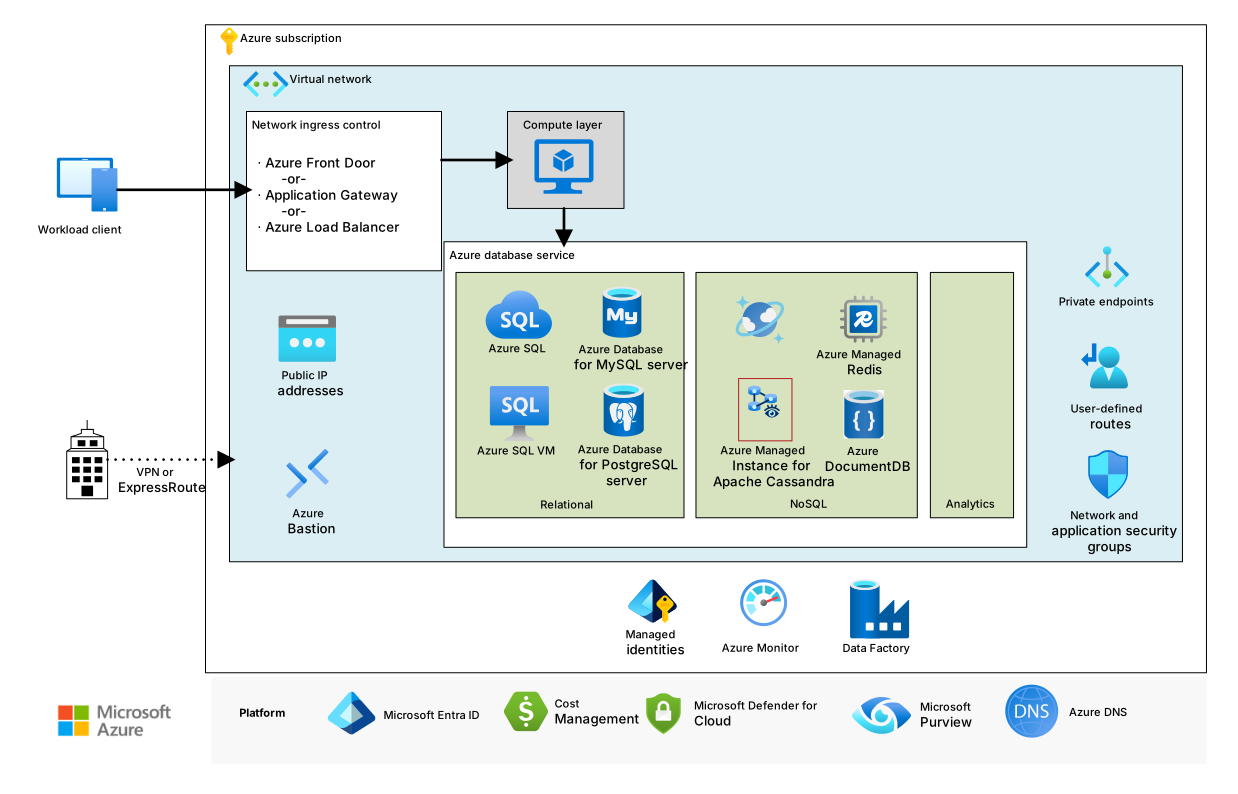
Download a Visio file of this architecture.
Apache®, Apache Cassandra®, and the Hadoop logo are either registered trademarks or trademarks of the Apache Software Foundation in the United States and/or other countries. No endorsement by The Apache Software Foundation is implied by the use of these marks.
The previous diagram demonstrates a typical basic or baseline database implementation. For real-world solutions that you can build in Azure, see Database architectures.
Azure database solutions include traditional relational database management systems (RDBMS) and online transaction processing (OLTP) systems, big data and analytics workloads including online analytical processing (OLAP) systems, and NoSQL workloads. To find real-world solutions that you can build in Azure, see Database architectures.
Explore database architectures and guides
The articles in this section include fully developed architectures that you can deploy in Azure and expand to production-grade solutions and guides. These articles can help you decide how to use database technologies in Azure. Solution ideas demonstrate implementation patterns and possibilities to consider as you plan your database proof-of-concept (POC) development.
Database guides
Technology choices
The following articles help you evaluate and select the best database technologies for your workload requirements:
- Prepare to choose a data store in Azure
- Understand data store models
- Big data storage
- Search data store
- Vector search
- Pipeline orchestration
- Data transfer options
NoSQL
Data processing
- OLAP solutions
- OLTP solutions
- Extract, transform, and load (ETL) guide
- Data lakes
- Big data architectures
Data governance
- Data obfuscation by using Delphix
- Data scrambling for SAP by using Delphix
- Collection structure for a federated Microsoft Purview catalog
Database architectures
The following production-ready architectures demonstrate end-to-end database solutions that you can deploy and customize:
Data warehouse
Azure Data Factory
- Medallion lakehouse by using Azure Data Factory
- Azure Data Factory baseline architecture
- Azure Data Factory enterprise hardened architecture
- Azure Data Factory mission-critical architecture
NoSQL
Mainframe
- Replicate and sync mainframe data
- Mainframe data replication by using Precisely Connect
- Mainframe data replication by using Qlik
- Mainframe data replication by using Rocket® Data Replicate and Sync (RDRS)
- Migrate mainframe data tier to Azure by using mLogica LIBER*IRIS
- Modernize mainframe midrange data
- Reengineer mainframe batch apps
- Rehost IMS Data Communication (IMS DC) and IMS Database (IMS DB)
- Implement SMA OpCon in Azure
Relational
Big data
Database solution ideas
Relational
- Migrate an Oracle database to Azure
- Migrate an Oracle database to an Azure virtual machine
- Migrate an Oracle database to Oracle Exadata Database@Azure
- Cross-region resiliency for SQL transparent data encryption (TDE) by using Azure Key Vault Managed HSM
NoSQL
Learn about databases on Azure
Microsoft Learn provides free online training resources for Azure database technologies. The platform offers videos, tutorials, and interactive labs for specific products and services, along with learning paths organized by job role.
The following resources provide foundational knowledge for database implementations on Azure:
- Explore Azure database and analytics services
- Choose a data storage approach in Azure
- Deploy Azure SQL Database
- Secure your Azure SQL Database
- Design your migration to Azure
- Browse Azure database modules
Learning paths by role
- Data engineer: Azure data fundamentals: Explore relational data in Azure
- Database administrator: Implement scalable database solutions by using Azure SQL
- Developer: Develop solutions that use Azure Cosmos DB
For more role-based training, browse other learning paths.
Organizational readiness
Organizations that are beginning their cloud adoption can use the Cloud Adoption Framework for Azure for proven guidance designed to accelerate cloud adoption. For cloud-scale analytics and data management guidance, see Cloud-scale analytics.
To help ensure the quality of your database solution on Azure, follow the Azure Well-Architected Framework. The Well-Architected Framework provides prescriptive guidance for organizations that seek architectural excellence and describes how to design, provision, and monitor cost-optimized Azure solutions.
For database-specific guidance, see the following Well-Architected Framework service guides:
Best practices
Review the following best practices when you design your database solutions.
| Best practice | Description |
|---|---|
| The Transactional Outbox pattern with Azure Cosmos DB | Learn how to use the Transactional Outbox pattern for reliable messaging and guaranteed event delivery. |
| Distribute your data globally by using Azure Cosmos DB | To achieve low latency and high availability, some applications must be deployed in datacenters that are close to their users. |
| Security in Azure Cosmos DB | Security best practices help prevent, detect, and respond to database breaches. |
| Continuous backup with point-in-time restore (PITR) in Azure Cosmos DB | Learn about Azure Cosmos DB PITR. |
| Achieve high availability by using Azure Cosmos DB | Azure Cosmos DB provides multiple features and configuration options to achieve high availability. |
| High availability for Azure SQL Database and Azure SQL Managed Instance | The database shouldn't be a single point of failure in your architecture. |
Stay current with databases
Azure database services evolve to address modern data challenges. Stay informed about the latest updates and features.
To stay current with key database services, see the following articles:
- What's new in Azure SQL Database
- What's new in Azure Database for PostgreSQL
- What's new in Azure Database for MySQL
Other resources
Databases is a broad category and covers a range of solutions. The following resources can help you discover more about Azure.
Hybrid and multicloud
Most organizations need a hybrid approach to databases because they have workloads that run both on-premises and in the cloud. Organizations typically extend on-premises database solutions to the cloud. To connect environments, organizations must choose a hybrid network architecture.
- Azure Arc-enabled PostgreSQL: Run Azure-managed PostgreSQL on your infrastructure.
- Azure hybrid and multicloud patterns: Connect on-premises databases to cloud services.
Review the following key hybrid database scenarios:
- Azure Arc hybrid management for SQL Server: Use Azure Arc to manage SQL Server across environments.
- Hybrid architecture design: Connect on-premises environments to Azure.
Mainframe data modernization
Organizations that use legacy mainframe systems can modernize their data workloads by migrating to Azure database services. Azure provides multiple migration patterns and replication strategies to help you transition mainframe data while maintaining business continuity.
- Modernize mainframe midrange data: Migrate legacy data sources to modern platforms.
- Replicate and sync mainframe data: Keep mainframe and cloud data synchronized.
- Mainframe data replication by using Connect: Use Precisely Connect for data replication.
- Mainframe data replication by using Qlik: Replicate data by using Qlik technologies.
Analytics integration
For analytics workloads that depend on well-architected database foundations, see the following articles:
- Analytics architecture design: See an overview of analytics solutions on Azure.
- Data warehousing and analytics: Integrate databases with analytics platforms.
Amazon Web Services (AWS) or Google Cloud professionals
To help you ramp up quickly, the following articles compare Azure database options to other cloud services:
- Relational database technologies on Azure and AWS: Compare Azure and AWS database services.
- Google Cloud to Azure services comparison: Data platform: Compare Azure and Google Cloud database services.
Contributors
Microsoft maintains this article. The following contributors wrote this article.
Principal authors:
- Mohit Agarwal | Principal Cloud Solution Architect
To see nonpublic LinkedIn profiles, sign in to LinkedIn.