Hi guys,
back again - not easy to fix this issue. I need more ideas, successfuel workarounds or your best practise configuration.
Every day again to logon is not an option for many customers.
FSLogix Version 26.01 is currently not installed - different problems here also reported.
FSLogix 25.09 Version: 3.25.822.19044
OS: Server 2022 Standard / Datacenter
Remote Desktop Serverfarm with Profile and ODFC Containers
Profile Settings
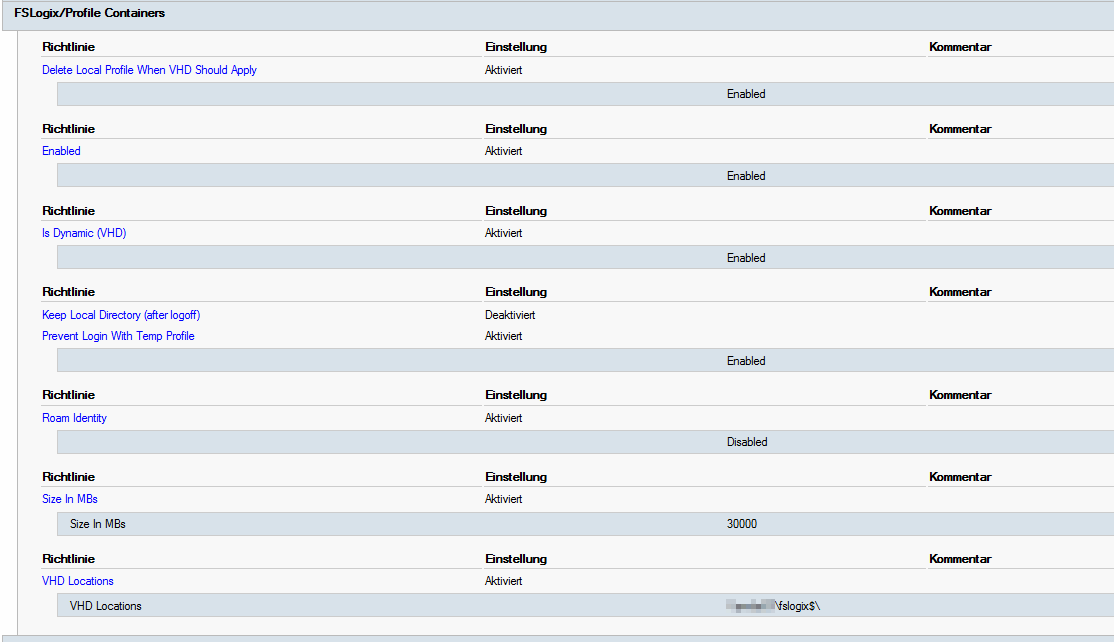
-Roam Identity - Enabled
ODFC Settings
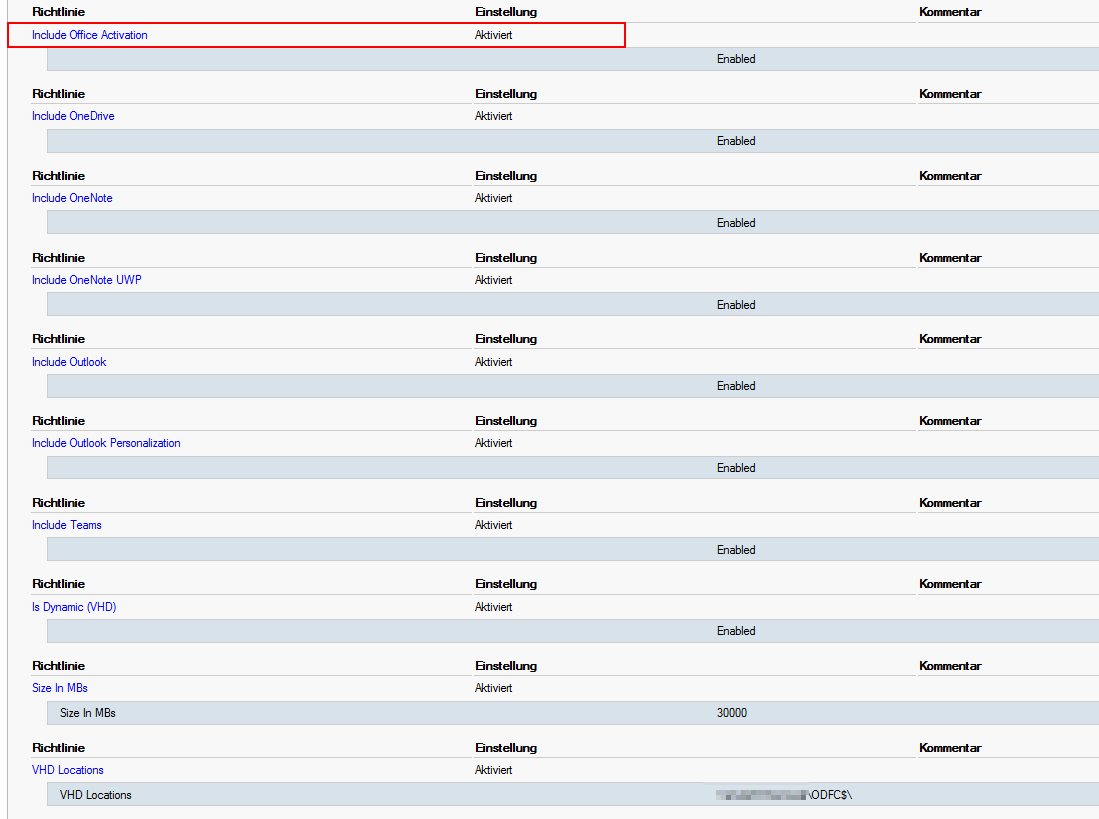
- Include Office Activation Enabled
redirections.xml
<?xml version="1.0"  encoding="UTF-8"?>
<FrxProfileFolderRedirection ExcludeCommonFolders="0">
<Excludes>
<Exclude>%localappdata%\Packages\Microsoft.AAD.BrokerPlugin_cw5n1h2txyewy</Exclude>
<Exclude>%localappdata%\Packages\Microsoft.Windows.CloudExperienceHost_cw5n1h2txyewy</Exclude>
<Exclude>%localappdata%\Packages</Exclude>
<Exclude>%localappdata%\Microsoft\TokenBroker</Exclude>
<Exclude>%localappdata%\Microsoft\OneAuth\accounts</Exclude>
<Exclude>%localappdata%\Microsoft\OneAuth\blobs</Exclude>
<Exclude>%localappdata%\Microsoft\Outlook</Exclude>
<Exclude>%appdata%\Microsoft\Outlook</Exclude>
<Exclude>%localappdata%\Microsoft\IdentityCache</Exclude>
<Exclude>HKEY_CURRENT_USER\SOFTWARE\Microsoft\IdentityCRL</Exclude>
<Exclude>HKEY_CURRENT_USER\SOFTWARE\Microsoft\Windows\CurrentVersion\AAD</Exclude>
<Exclude>HKEY_CURRENT_USER\SOFTWARE\Microsoft\Windows NT\CurrentVersion\WorkplaceJoin</Exclude>
<Exclude>HKEY_CURRENT_USER\Software\Microsoft\Office\16.0\Common\Identity</Exclude>
<Exclude>HKEY_CURRENT_USER\Software\Microsoft\Office\15.0\Common\Identity</Exclude>
</Excludes>
<Includes>
</Includes>
</FrxProfileFolderRedirection>
Issue on the User Profile - after every logon
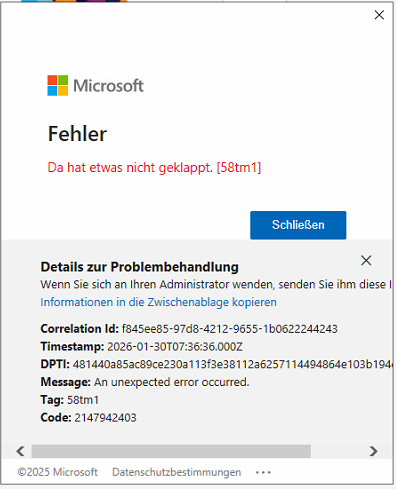
Manually fixes - not working every time:
Remove-Item -Recurse -Force "C:\Users\<username>\AppData\Local\Microsoft\IdentityCache" -ErrorAction SilentlyContinue
Remove-Item -Recurse -Force "C:\Users\<username>\AppData\Local\Microsoft\OneAuth" -ErrorAction SilentlyContinue
Remove-Item -Recurse -Force "C:\Users\<username>\AppData\Local\Microsoft\Office\16.0\TokenBroker" -ErrorAction SilentlyContinue
and also remove the crendentials stored locally on the remote desktop server.
Sometimes it helped to logoff in word/ excel and login again. Close Teams and OneDrive before.
#Update 10:25Uhr:
In this current configuration all apps, but not OneDrive are working after logon with the saved credentials.
Thank you for your reply!


' cx='32' cy='32' r='32' /%3E%3Ctext x='50%25' y='55%25' dominant-baseline='middle' text-anchor='middle' fill='%23FFF' %3ESF%3C/text%3E%3C/svg%3E)
' cx='32' cy='32' r='32' /%3E%3Ctext x='50%25' y='55%25' dominant-baseline='middle' text-anchor='middle' fill='%23FFF' %3EY2%3C/text%3E%3C/svg%3E)
' cx='32' cy='32' r='32' /%3E%3Ctext x='50%25' y='55%25' dominant-baseline='middle' text-anchor='middle' fill='%23FFF' %3EPS%3C/text%3E%3C/svg%3E)
' cx='32' cy='32' r='32' /%3E%3Ctext x='50%25' y='55%25' dominant-baseline='middle' text-anchor='middle' fill='%23FFF' %3EWS%3C/text%3E%3C/svg%3E)
' cx='32' cy='32' r='32' /%3E%3Ctext x='50%25' y='55%25' dominant-baseline='middle' text-anchor='middle' fill='%23FFF' %3EDH%3C/text%3E%3C/svg%3E)