' cx='32' cy='32' r='32' /%3E%3Ctext x='50%25' y='55%25' dominant-baseline='middle' text-anchor='middle' fill='%23FFF' %3ETZ%3C/text%3E%3C/svg%3E)

' cx='32' cy='32' r='32' /%3E%3Ctext x='50%25' y='55%25' dominant-baseline='middle' text-anchor='middle' fill='%23FFF' %3ECT%3C/text%3E%3C/svg%3E)
Hello Tina,
Thank you for posting question on Microsoft Windows Forum!
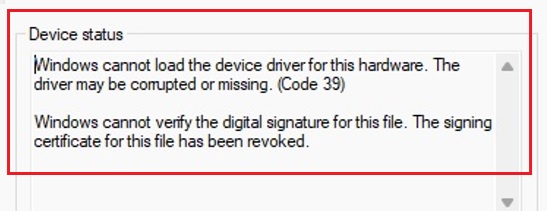
Based on the issue description as well as the provided Error Code 39 occurred on Windows 11 v22621 (22H2) which might indicate a conflict between the driver's attributes and the OS's modernized security policies.
Since Windows 11 22H2 enables Hypervisor-Protected Code Integrity (HVCI), also known as Memory Integrity, by default. If your driver does not meet HVCI requirements, Windows will block it from loading and report Error 39. Even if the driver passed DUA, DUA does not re-run the full HLK (Hardware Lab Kit) tests. It only verifies the INF changes. If the original binary was not HVCI-compliant, or if the INF modification inadvertently removed the Needs or Include directives that signal HVCI compatibility to the OS, the install will fail. The suggestion is to try temporarily toggling Memory Integrity to Off (on a non-production machine for testing) and restart by going to Windows Security > Device Security > Core Isolation details. Try installing the driver again. If it works, your driver code (the .sys file) is not HVCI-compatible.
Another point worth mentioning here is to check for Driver Isolation issues. As Windows 11 v22621 pushes heavily for Windows Drivers rather than "Legacy" or "Windows Desktop" drivers. Specifically, it looks for Driver Isolation, which requires that the driver package does not use co-installers and that the INF uses specific directives. If your DUA-modified INF changed the Manufacturer section or added hardware IDs in a way that conflicts with the original driver's isolation status, Windows may refuse to verify the signature's authority over those specific new IDs.
If your driver is intended to be HVCI compliant. Sometimes DUA edits can strip out metadata if the "Base" driver selected during submission was different from the one used for the original test. Since you mentioned the INF was modified. Try to make sure that the Provider and Manufacturer strings in the [Strings] section have not been changed to something that does not match the original WHQL/HLK submission's identity, as this can sometimes trigger a "Signer not found" error during the DUA merge.
You can consult the following article for more information
- https://learn.microsoft.com/en-us/windows-hardware/test/hlk/user/create-a-driver-only-update-package
Hope the above information is helpful! If it helps you getting more insight into the issue, It is appreciated to consider clicking "Accept Answer". Should you have more questions, feel free to leave a message.