Note
Access to this page requires authorization. You can try signing in or changing directories.
Access to this page requires authorization. You can try changing directories.
The AzAPI provider is a thin layer on top of the Azure ARM REST APIs. It enables you to manage any Azure resource type using any API version, enabling you to use the latest functionality within Azure. AzAPI is a first-class provider designed to be used on its own or in tandem with the AzureRM provider.
Benefits of using the AzAPI provider
The AzAPI provider features the following benefits:
- Supports all Azure control plane services:
- Preview services and features
- All API versions
- Full Terraform state file fidelity
- Properties and values are saved to state
- No dependency on Swagger
- Common and consistent Azure authentication
- Built-in preflight validation
- Granular control over infrastructure development
- Microsoft Terraform Visual Studio Code extension
Resources
To allow you to manage all Azure resources and features without requiring updates, the AzAPI provider includes the following generic resources:
| Resource Name | Description |
|---|---|
azapi_resource |
Used to fully manage any Azure (control plane) resource (API) with full CRUD. Example Use Cases: New preview service New feature added to existing service Any Azure resource accessible through the ARM API |
azapi_update_resource |
Used to manage resources or parts of resources that don't have full CRUD Example Use Cases: Update new properties on an existing service Update precreated child resource - such as DNS SOA record. |
azapi_resource_action |
Used to perform a single operation on a resource without managing the lifecycle of it Example Use Cases: Shut down a Virtual Machine Add a secret to a Key Vault |
azapi_data_plane_resource |
Used to manage a specific subset of Azure data plane resources Example Use Cases: KeyVault Certificate Contacts Synapse Workspace Libraries |
For a detailed explanation of how the data plane framework works and how parent_id differs from control plane resources, see Understand the AzAPI data plane framework.
Usage hierarchy
Overall, usage should follow these steps:
- Start with performing as many operations as possible within
azapi_resource. - If the resource type doesn't exist within
azapi_resourcebut does fall under one of the types supported byazapi_data_plane_resource, use that instead. - If the resource already exists in AzureRM or has a property that can't be accessed within
azapi_resource, useazapi_update_resourceto access these specific properties. Resources thatazapi_resourceorazapi_data_plane_resourcedon't support can't be updated through this resource. - If you're trying to perform an action that isn't based on an Azure CRUD-friendly resource,
azapi_resource_actionis less straightforward thanazapi_update_resourcebut more flexible.
Resource configuration examples
The following code snippet configures an Azure resource directly through the ARM API:
resource "azapi_resource" "publicip" {
  type      = "Microsoft.Network/Customipprefixes@2021-03-01"
  name      = "exfullrange"
  parent_id = azurerm_resource_group.example.id
  location  = "westus2"

  body = {
    properties = {
      cidr          = "10.0.0.0/24"
      signedMessage = "Sample Message for WAN"
    }
  }
}
The following code snippet configures a preview property for an existing resource from AzureRM:
resource "azapi_update_resource" "test" {
  type        = "Microsoft.ContainerRegistry/registries@2020-11-01-preview"
  resource_id = azurerm_container_registry.acr.id

  body = {
    properties = {
      anonymousPullEnabled = var.bool_anonymous_pull
    }
  }
}
The following code snippet configures a resource action on an existing AzureRM resource:
resource "azapi_resource_action" "vm_shutdown" {
  type = "Microsoft.Compute/virtualMachines@2023-07-01"
  resource_id = azurerm_linux_virtual_machine.example.id
  action = "powerOff”
}
The following code snippet configures a resource that doesn't currently exist in the AzureRM provider due to being provisioned on the data plane:
resource "azapi_data_plane_resource" "dataset" {
  type      = "Microsoft.Synapse/workspaces/datasets@2020-12-01"
  parent_id = trimprefix(data.azurerm_synapse_workspace.example.connectivity_endpoints.dev, "https://")
  name      = "example-dataset"
  body = {
    properties = {
      type = "AzureBlob",
      typeProperties = {
        folderPath = {
          value = "@dataset().MyFolderPath"
          type  = "Expression"
        }
        fileName = {
          value = "@dataset().MyFileName"
          type  = "Expression"
        }
        format = {
          type = "TextFormat"
        }
      }
      parameters = {
        MyFolderPath = {
          type = "String"
        }
        MyFileName = {
          type = "String"
        }
      }
    }
  }
}
Preflight usage example
The following code snippet errors during terraform plan due to AzAPI's built-in preflight validation:
provider "azapi" {
  enable_preflight = true
}
resource "azapi_resource" "vnet" {
  type      = "Microsoft.Network/virtualNetworks@2024-01-01"
  parent_id = azapi_resource.resourceGroup.id
  name      = "example-vnet"
  location  = "westus"
  body = {
    properties = {
      addressSpace = {
        addressPrefixes = [
          "10.0.0.0/160", # preflight will throw an error here
        ]
      }
    }
  }
}
When enabled, preflight surfaces configuration errors during terraform plan rather than at apply time.
Data Sources
The AzAPI provider supports various useful data sources:
| Data Source Name | Description |
|---|---|
azapi_resource |
Used to read information from any Azure (control plane) resource (API). Example Use Cases: New preview service New feature added to existing service Any Azure resource accessible through the ARM API |
azapi_client_config |
Access client information such as subscription ID and tenant ID. |
azapi_resource_action |
Used to perform a single read operation on a resource without managing the lifecycle of it Example Use Cases: List Keys Read status of VM |
azapi_data_plane_resource |
Used to access a specific subset of Azure data plane resources Example Use Cases: KeyVault Certificate Contacts Synapse Workspace Libraries |
azapi_resource_id |
Access a resource's resource ID, with the ability to output information such as subscription ID, parent ID, resource group name, and resource name. |
azapi_resource_list |
List all resources under a given parent resource ID. Example Use Cases: Resources under a subscription / resource group Subnets under a virtual network |
For a hands-on example using azapi_resource_list with JMESPath filtering, see List Azure resources with the AzAPI Terraform provider.
Read an existing resource with azapi_resource data source
The azapi_resource data source reads the current state of any Azure resource and exposes its properties through the output attribute. Use it when you need a property that the AzureRM provider doesn't expose:
data "azapi_resource" "aks" {
  type      = "Microsoft.ContainerService/managedClusters@2024-02-01"
  resource_id = azurerm_kubernetes_cluster.example.id

  # Extract the OIDC issuer URL, not exposed by azurerm_kubernetes_cluster
  response_export_values = ["properties.oidcIssuerProfile.issuerURL"]
}

output "oidc_issuer_url" {
  value = data.azapi_resource.aks.output.properties.oidcIssuerProfile.issuerURL
}
Use response_export_values and JMESPath
response_export_values controls which properties are extracted from the raw ARM API response and made available in the output attribute. It accepts a list or a map:
- List: Specify JSON property paths to extract. Use
["*"]to export the full response body. - Map: Use JMESPath expressions to filter and reshape the response. The key is the output field name; the value is the JMESPath query.
The map form is preferred for list responses and cases where you need to transform the output:
data "azapi_resource_list" "storage_accounts" {
  type      = "Microsoft.Storage/storageAccounts@2023-01-01"
  parent_id = azurerm_resource_group.example.id

  response_export_values = {
    "names"     = "value[].name"
    "locations" = "value[].location"
  }
}
For a full walkthrough, see List Azure resources with the AzAPI Terraform provider.
Authentication using the AzAPI provider
The AzAPI provider enables the same authentication methods as the AzureRM provider. For more information on authentication options, see Authenticate Terraform to Azure.
Experience and lifecycle of the AzAPI provider
This section describes some tools to help you use the AzAPI provider.
VS Code extension and Language Server
The Microsoft Terraform VS Code extension provides a rich authoring experience for both the AzureRM and AzAPI providers, including:
- List all available resource types and API versions.

- Autocompletion of the allowed properties and values for any resource.

- Show hints when hovering over a property.

- Syntax validation
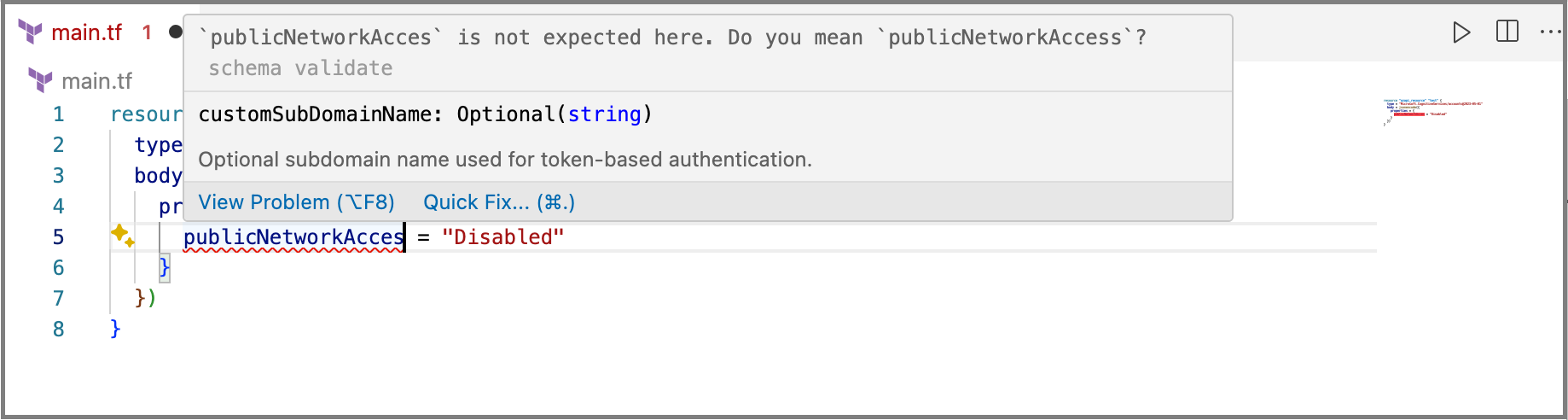
- Autocompletion with code samples.
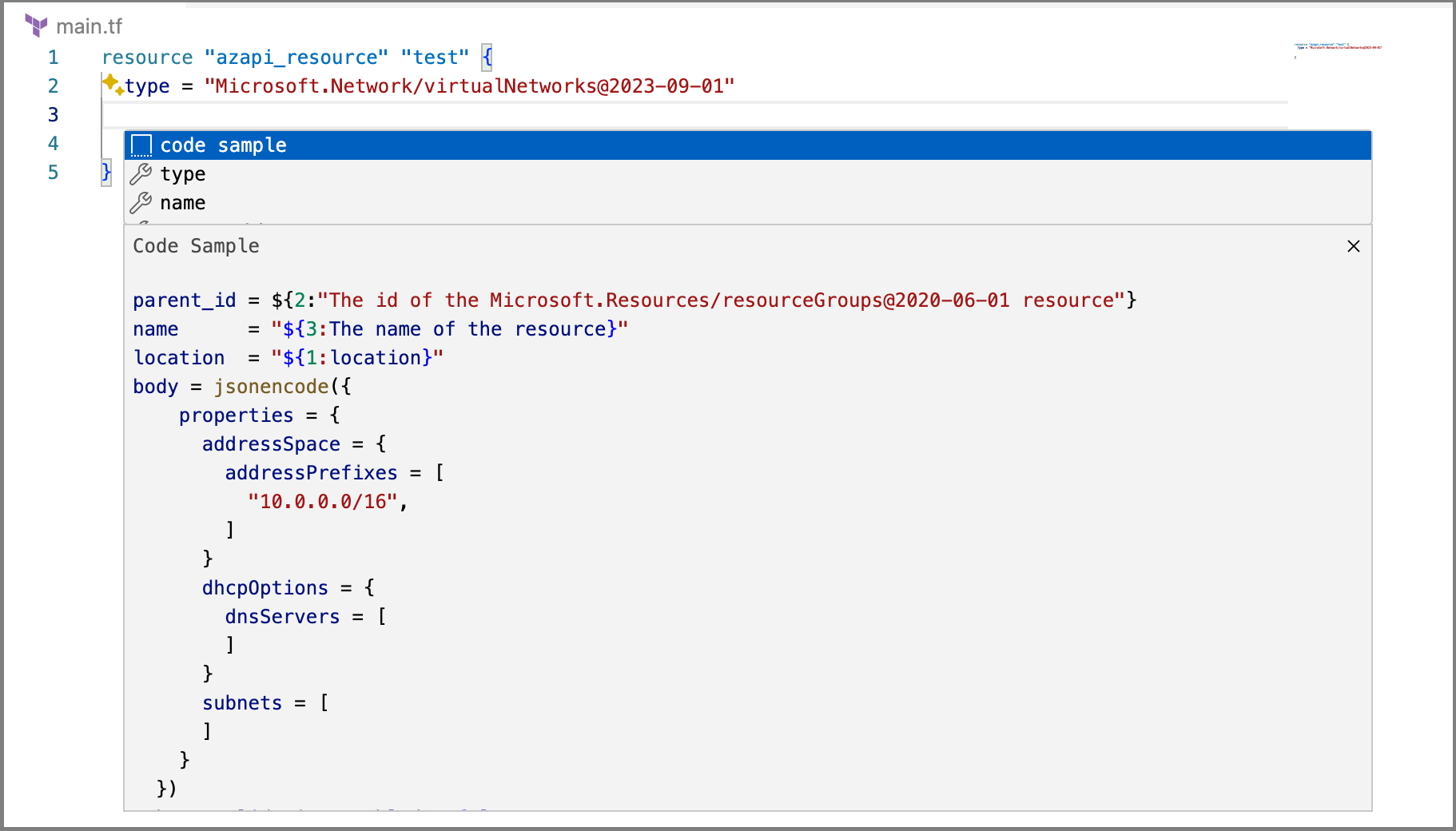
The extension also supports paste-as-AzAPI (converts ARM JSON to azapi_resource blocks), Azure resource export via aztfexport, AzureRM-to-AzAPI migration, and preflight validation. For a full guide, see Use the Microsoft Terraform VS Code extension.
aztfmigrate migration tool
The aztfmigrate tool is designed to help migrate existing resources between the AzAPI and AzureRM providers.
aztfmigrate has two modes: plan and migrate:
- Plan displays the AzAPI resources that can be migrated.
- Migrate migrates the AzAPI resources to AzureRM resources in both the HCL files and the state.
aztfmigrate ensures after migration that your Terraform configuration and state are aligned with your actual state. You can validate the update to state by running terraform plan after completing the migration to confirm no changes occurred.
For a step-by-step walkthrough, see Migrate resources from AzAPI to AzureRM.
Import existing Azure resources
To bring an existing Azure resource under AzAPI management without re-creating it, use the import block (Terraform 1.5 and later) or the terraform import command. The resource ID must include the API version as a query parameter:
import {
  to = azapi_resource.example
  id = "/subscriptions/00000000-0000-0000-0000-000000000000/resourceGroups/example-rg/providers/Microsoft.Network/virtualNetworks/example-vnet?api-version=2023-11-01"
}

resource "azapi_resource" "example" {
  type      = "Microsoft.Network/virtualNetworks@2023-11-01"
  name      = "example-vnet"
  parent_id = "/subscriptions/00000000-0000-0000-0000-000000000000/resourceGroups/example-rg"
  location  = "westus"
  body = {
    properties = {
      addressSpace = {
        addressPrefixes = ["10.0.0.0/16"]
      }
    }
  }
}
To import multiple resources at once from existing Azure infrastructure, use Azure Export for Terraform (aztfexport), which generates both the HCL configuration and the import blocks automatically.
Granular controls over infrastructure
One major benefit of AzAPI is through its ability to fine-tune your configuration to match the right design patterns. There are several ways to do this:
Provider configuration options
The AzAPI provider block accepts several settings that apply globally across all resources in the configuration:
| Option | Description |
|---|---|
enable_preflight |
Enables preflight validation at plan time. Defaults to false. See Enable preflight validation in the AzAPI Terraform provider for details. |
ignore_no_op_changes |
Suppresses plan-time noise from no-op differences between the configuration and normalized API responses. Defaults to true. |
disable_default_output |
When set to true, disables automatic output of read-only properties when response_export_values isn't specified. Defaults to false. |
default_location |
Sets a default location for all resources that don't specify one explicitly. |
default_tags |
Sets default tags applied to all resources. Resource-level tags override these defaults. |
skip_provider_registration |
Skips automatic resource provider registration. Set to true in restricted environments. |
For a full list of provider configuration options, see the AzAPI provider schema.
For a walkthrough of enabling preflight, see Enable preflight validation in the AzAPI Terraform provider.
Provider functions
AzAPI v2.0 and later includes several provider functions:
| Function Name | Description |
|---|---|
build_resource_id |
Constructs an Azure resource ID given the parent ID, resource type, and resource name. Useful for creating resource IDs for top-level and nested resources within a specific scope. |
extension_resource_id |
Constructs an Azure extension resource ID given the base resource ID, resource type, and more resource names. |
management_group_resource_id |
Constructs an Azure management group scope resource ID given the management group name, resource type, and resource names. |
parse_resource_id |
This function takes an Azure resource ID and a resource type and parses the ID into its individual components such as subscription ID, resource group name, provider namespace, and other parts. |
resource_group_resource_id |
Constructs an Azure resource group scope resource ID given the subscription ID, resource group name, resource type, and resource names. |
subscription_resource_id |
Constructs an Azure subscription scope resource ID given the subscription ID, resource type, and resource names. |
tenant_resource_id |
Constructs an Azure tenant scope resource ID given the resource type and resource names. |
User-defined retryable errors with the retry block
The AzAPI provider handles expected errors through the retry block. For example, use the following configuration to retry when a resource encounters a create timeout:
resource "azapi_resource" "example" {
    # usual properties
    retry {
        interval_seconds     = 5
        randomization_factor = 0.5 # adds randomization to retry pattern
        multiplier           = 2 # if try fails, multiplies time between next try by this much
        error_message_regex  = ["ResourceNotFound"]
    }
    timeouts {
        create = "10m"
}
The retry block accepts these attributes:
| Attribute | Description |
|---|---|
error_message_regex |
Required. A list of regular expressions matched against error messages. The request is retried when any expression matches. |
interval_seconds |
Base wait time between retries. Defaults to 10. |
max_interval_seconds |
Maximum wait time between retries. Defaults to 180. |
multiplier |
Multiplier applied to the interval after each failed attempt. Defaults to 1.5. |
randomization_factor |
Adds jitter to the retry interval to avoid thundering-herd patterns. Defaults to 0.5. |
Combine retry with the timeouts block to set an upper bound on total retry duration:
timeouts {
  create = "10m"
}
Ephemeral resources and write-only properties
AzAPI v2.x supports write-only arguments (Terraform 1.11 and later) through the sensitive_body attribute on azapi_resource. Write-only properties are sent to the ARM API but aren't stored in Terraform state, which is useful for secrets and credentials:
resource "azapi_resource" "example" {
  type      = "Microsoft.SomeService/resources@2024-01-01"
  name      = "example"
  parent_id = azurerm_resource_group.example.id

  body = {
    properties = {
      name = "example"
    }
  }

  # Write-only — not stored in state
  sensitive_body = {
    properties = {
      adminPassword = var.admin_password
    }
  }
}
Use sensitive_body_version to control when write-only properties are resent to the API (for example, when rotating credentials).
Triggers for resource replacement
The AzAPI provider allows you to configure parameters for resource replacement:
replace_triggers_external_values
Replaces the resource if a value changes. For example, if the SKU or zones variables were to be modified, this resource would be re-created:
resource "azapi_resource" "example" {
  name      = var.name
  type      = "Microsoft.Network/publicIPAddresses@2023-11-01"
  parent_id = "/subscriptions/00000000-0000-0000-0000-000000000000/resourceGroups/example"
  body      = properties = {
    sku   = var.sku
    zones = var.zones
  }
  replace_triggers_external_values = [
    var.sku,
    var.zones,
  ]
}
This trigger works across a broad set of resources—for example, a policy assignment when properties of the definition change.
replace_triggers_refs
Replaces the resource if the referenced value changes. For example, if the SKU name or tier was modified, this resource would be re-created:
resource "azapi_resource" "example" {
  type      = "Microsoft.Relay/namespaces@2021-11-01"
  parent_id = azurerm_resource_group.example.id
  name      = "xxx"
  location  = "westus"
  body = {
    properties = {
    }
    sku = {
      name = "Standard"
      tier = "Standard"
    }
  }

  replace_triggers_refs = ["sku"]
}
This wouldn't trigger a replace if a different resource's SKU changes.
Next steps
- Choose between AzureRM and AzAPI Terraform providers
- Understand the AzAPI data plane framework
- Deploy your first resource with the AzAPI provider
- Deploy your first Update Resource with the AzAPI provider
- Deploy your first resource action with the AzAPI provider
- Perform resource actions with the AzAPI provider
- Manage Azure data plane resources with AzAPI
- List Azure resources with the AzAPI provider
- Enable preflight validation
- Use AzAPI provider functions
- Migration paths between Azure, AzureRM, and AzAPI
- Visit the provider registry