Hinweis
Für den Zugriff auf diese Seite ist eine Autorisierung erforderlich. Sie können versuchen, sich anzumelden oder das Verzeichnis zu wechseln.
Für den Zugriff auf diese Seite ist eine Autorisierung erforderlich. Sie können versuchen, das Verzeichnis zu wechseln.
CompositionLight-Objekte werden in Verbindung mit SceneLightingEffect verwendet, um dynamische Beleuchtung und Reflektion zu simulieren.
Sie können Lichter auf visuelle Elemente und XAML-UIElements anwenden.
Anwenden von Lichtern auf XAML-UIElements
XamlLight-Objekte werden verwendet, um CompositionLights auf dynamisch leichte XAML-UIElements anzuwenden. XamlLight bietet Methoden zum Ausrichten von UIElements oder XAML-Pinsel, das Anwenden von Lichtern auf Bäume von UIElements und hilft bei der Verwaltung der Lebensdauer von CompositionLight-Ressourcen basierend darauf, ob sie derzeit verwendet werden.
- Wenn Sie auf einen Pinsel mit xamlLight abzielen, werden die Teile aller UIElements, die diesen Pinsel verwenden, vom Licht beleuchtet.
- Wenn Sie ein UIElement mithilfe von einem XamlLight beleuchten, wird das gesamte UIElement zusammen mit seinen untergeordneten UIElements vom Licht erhellt.
Erstellen und Verwenden eines XamlLight
XamlLight ist eine Basisklasse, die zum Erstellen von benutzerdefinierten Lichtern verwendet werden kann.
Dieses Beispiel zeigt die Definition für ein benutzerdefiniertes XamlLight, das ein mehrfarbiges Spotlight auf gezielte UIElements und Pinsel in WinUI anwendet.
public sealed class OrangeSpotLight : XamlLight
{
    // Register an attached property that lets you set a UIElement
    // or Brush as a target for this light type in markup.
    public static readonly DependencyProperty IsTargetProperty =
        DependencyProperty.RegisterAttached(
        "IsTarget",
        typeof(bool),
        typeof(OrangeSpotLight),
        new PropertyMetadata(null, OnIsTargetChanged)
    );

    public static void SetIsTarget(DependencyObject target, bool value)
    {
        target.SetValue(IsTargetProperty, value);
    }

    public static Boolean GetIsTarget(DependencyObject target)
    {
        return (bool)target.GetValue(IsTargetProperty);
    }

    // Handle attached property changed to automatically target and untarget UIElements and Brushes.
    private static void OnIsTargetChanged(DependencyObject obj, DependencyPropertyChangedEventArgs e)
    {
        var isAdding = (bool)e.NewValue;

        if (isAdding)
        {
            if (obj is UIElement)
            {
                XamlLight.AddTargetElement(GetIdStatic(), obj as UIElement);
            }
            else if (obj is Brush)
            {
                XamlLight.AddTargetBrush(GetIdStatic(), obj as Brush);
            }
        }
        else
        {
            if (obj is UIElement)
            {
                XamlLight.RemoveTargetElement(GetIdStatic(), obj as UIElement);
            }
            else if (obj is Brush)
            {
                XamlLight.RemoveTargetBrush(GetIdStatic(), obj as Brush);
            }
        }
    }

    protected override void OnConnected(UIElement newElement)
    {
        if (CompositionLight == null)
        {
            // OnConnected is called when the first target UIElement is shown on the screen.
            // This lets you delay creation of the composition object until it's actually needed.
            var spotLight = CompositionTarget.GetCompositorForCurrentThread().CreateSpotLight();
            spotLight.InnerConeColor = Colors.Orange;
            spotLight.OuterConeColor = Colors.Yellow;
            spotLight.InnerConeAngleInDegrees = 30;
            spotLight.OuterConeAngleInDegrees = 45;
            CompositionLight = spotLight;
        }
    }

    protected override void OnDisconnected(UIElement oldElement)
    {
        // OnDisconnected is called when there are no more target UIElements on the screen.
        // The CompositionLight should be disposed when no longer required.
        if (CompositionLight != null)
        {
            CompositionLight.Dispose();
            CompositionLight = null;
        }
    }

    protected override string GetId()
    {
        return GetIdStatic();
    }

    private static string GetIdStatic()
    {
        // This specifies the unique name of the light.
        // In most cases you should use the type's FullName.
        return typeof(OrangeSpotLight).FullName;
    }
}
// For the C++/WinRT code example below, you'll need to add a Midl File (.idl) file to your project.

// OrangeSpotLight.idl
namespace MyApp
{
    [default_interface]
    runtimeclass OrangeSpotLight : Microsoft.UI.Xaml.Media.XamlLight
    {
        OrangeSpotLight();
        static Microsoft.UI.Xaml.DependencyProperty IsTargetProperty{ get; };
        static Boolean GetIsTarget(Microsoft.UI.Xaml.DependencyObject target);
        static void SetIsTarget(Microsoft.UI.Xaml.DependencyObject target, Boolean value);
    }
}

// OrangeSpotLight.h
struct OrangeSpotLight : OrangeSpotLightT<OrangeSpotLight>
{
    OrangeSpotLight() = default;

    winrt::hstring GetId();

    static Microsoft::UI::Xaml::DependencyProperty IsTargetProperty() { return m_isTargetProperty; }

    static bool GetIsTarget(Microsoft::UI::Xaml::DependencyObject const& target)
    {
		return winrt::unbox_value<bool>(target.GetValue(m_isTargetProperty));
	}

    static void SetIsTarget(Microsoft::UI::Xaml::DependencyObject const& target, bool value)
    {
        target.SetValue(m_isTargetProperty, winrt::box_value(value));
    }

    void OnConnected(Microsoft::UI::Xaml::UIElement const& newElement);
    void OnDisconnected(Microsoft::UI::Xaml::UIElement const& oldElement);

    static void OnIsTargetChanged(Microsoft::UI::Xaml::DependencyObject const& d, Microsoft::UI::Xaml::DependencyPropertyChangedEventArgs const& e);

    inline static winrt::hstring GetIdStatic()
    {
        // This specifies the unique name of the light. In most cases you should use the type's full name.
        return winrt::xaml_typename<MyApp::OrangeSpotLight>().Name;
    }

private:
	static Microsoft::UI::Xaml::DependencyProperty m_isTargetProperty;
};

// OrangeSpotLight.cpp
Microsoft::UI::Xaml::DependencyProperty OrangeSpotLight::m_isTargetProperty =
    Microsoft::UI::Xaml::DependencyProperty::RegisterAttached(
        L"IsTarget",
        winrt::xaml_typename<bool>(),
        winrt::xaml_typename<MyApp::OrangeSpotLight>(),
        Microsoft::UI::Xaml::PropertyMetadata{ winrt::box_value(false), Microsoft::UI::Xaml::PropertyChangedCallback{ &OrangeSpotLight::OnIsTargetChanged } }
);

void OrangeSpotLight::OnConnected(Microsoft::UI::Xaml::UIElement const& /* newElement */)
{
    if (!CompositionLight())
    {
        // OnConnected is called when the first target UIElement is shown on the screen. This enables delaying composition object creation until it's actually necessary.
        auto spotLight{ Microsoft::UI::Xaml::Media::CompositionTarget::GetCompositorForCurrentThread().CreateSpotLight() };
        spotLight.InnerConeColor(Microsoft::UI::Colors::Orange());
        spotLight.OuterConeColor(Microsoft::UI::Colors::Yellow());
        spotLight.InnerConeAngleInDegrees(30);
        spotLight.OuterConeAngleInDegrees(45);
        CompositionLight(spotLight);
    }
}

void OrangeSpotLight::OnDisconnected(Microsoft::UI::Xaml::UIElement const& /* oldElement */)
{
    // OnDisconnected is called when there are no more target UIElements on the screen.
    // Dispose of composition resources when no longer in use.
    if (CompositionLight())
    {
        CompositionLight(nullptr);
    }
}

winrt::hstring OrangeSpotLight::GetId()
{
    return OrangeSpotLight::GetIdStatic();
}

void OrangeSpotLight::OnIsTargetChanged(Microsoft::UI::Xaml::DependencyObject const& d, Microsoft::UI::Xaml::DependencyPropertyChangedEventArgs const& e)
{
    auto uie{ d.try_as<Microsoft::UI::Xaml::UIElement>() };
    auto brush{ d.try_as<Microsoft::UI::Xaml::Media::Brush>() };

    auto isAdding = winrt::unbox_value<bool>(e.NewValue());
    if (isAdding)
    {

        if (uie)
        {
            Microsoft::UI::Xaml::Media::XamlLight::AddTargetElement(OrangeSpotLight::GetIdStatic(), uie);
        }
        else if (brush)
        {
            Microsoft::UI::Xaml::Media::XamlLight::AddTargetBrush(OrangeSpotLight::GetIdStatic(), brush);
        }
    }
    else
    {
        if (uie)
        {
            Microsoft::UI::Xaml::Media::XamlLight::RemoveTargetElement(OrangeSpotLight::GetIdStatic(), uie);
        }
        else if (brush)
        {
            Microsoft::UI::Xaml::Media::XamlLight::RemoveTargetBrush(OrangeSpotLight::GetIdStatic(), brush);
        }
    }
}

// MainPage.h
...
#include "OrangeSpotLight.h"
...
struct MainPage : MainPageT<MainPage>
{
    MainPage()
    {
        InitializeComponent();

		OrangeSpotLight::SetIsTarget(spotlitBrush(), true);
		OrangeSpotLight::SetIsTarget(spotlitUIElement(), true);
	}
...
};
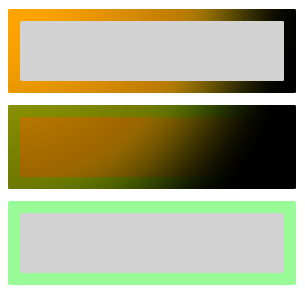
Sie können dieses Licht dann auf jedes XAML-UIElement oder Pinsel anwenden, um sie zu beleuchten. Dieses Beispiel zeigt unterschiedliche potenzielle Nutzungen.
Von Bedeutung
Entfernen Sie für C++/WinRT die beiden Vorkommen local:OrangeSpotLight.IsTarget="True" aus dem folgenden Markup. Die angefügten Eigenschaften werden bereits im CodeBehind festgelegt.
<StackPanel Width="100">
    <StackPanel.Lights>
        <local:OrangeSpotLight/>
    </StackPanel.Lights>

    <!-- This border is lit by the OrangeSpotLight, but its content is not. -->
    <Border BorderThickness="4" Margin="2">
        <Border.BorderBrush>
            <SolidColorBrush x:Name="spotlitBrush" Color="White" local:OrangeSpotLight.IsTarget="True"/>
        </Border.BorderBrush>
        <Rectangle Fill="LightGray" Height="20"/>
    </Border>

    <!-- This border and its content are lit by the OrangeSpotLight. -->
    <Border x:Name="spotlitUIElement" BorderThickness="4" BorderBrush="PaleGreen" Margin="2"
            local:OrangeSpotLight.IsTarget="True">
        <Rectangle Fill="LightGray" Height="20"/>
    </Border>

    <!-- This border and its content are not lit by the OrangeSpotLight. -->
    <Border BorderThickness="4" BorderBrush="PaleGreen" Margin="2">
        <Rectangle Fill="LightGray" Height="20"/>
    </Border>
</StackPanel>
Die Ergebnisse dieses XAML-Codes sehen wie folgt aus.
Von Bedeutung
Das Festlegen von UIElement.Lights im Markup, wie im obigen Beispiel gezeigt, wird nur für Apps mit einer Mindestversion unterstützt, die dem Windows 10 Creators Update oder höher entspricht. Für Apps, die auf frühere Versionen abzielen, müssen Lichter im CodeBehind erstellt werden.
Zusätzliche Ressourcen
- Erweiterte UI- und Kompositionsbeispiele in WindowsCompositionSamples GitHub.
Zusammenarbeit auf GitHub
Die Quelle für diesen Inhalt finden Sie auf GitHub, wo Sie auch Issues und Pull Requests erstellen und überprüfen können. Weitere Informationen finden Sie in unserem Leitfaden für Mitwirkende.

Windows developer