Bemærk
Adgang til denne side kræver godkendelse. Du kan prøve at logge på eller ændre mapper.
Adgang til denne side kræver godkendelse. Du kan prøve at ændre mapper.
You can run 32-bit applications with 32-bit drivers. The 32-bit applications and the 32-bit drivers use the Win32 API.
Architecture
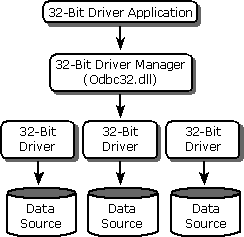
The following illustration shows how 32-bit applications communicate with 32-bit drivers. The application calls the 32-bit Driver Manager, which in turn calls 32-bit drivers.
Important
Do not use the 32-bit thunking installer DLL on WindowsNT/Windows2000. Although it has the same file name as the 32-bit installer DLL, it is a different DLL.
Administration
You can manage data sources for 32-bit drivers by using the ODBC Data Source Administrator. To open the ODBC Administrator on computers running Windows 2000, open the Windows Control Panel, double-click Administrative Tools, and then double-click Data Sources (ODBC). On computers running previous versions of Microsoft Windows, the icon is named 32-bit ODBC or simply ODBC.
Components
The ODBC component includes the following files for running 32-bit applications with 32-bit drivers. These components are in the \Redist directory.
| File name | Description |
|---|---|
| Odbc32.dll | 32-bit Driver Manager |
| Odbccp32.dll | 32-bit Installer DLL |
| Odbcad32.exe | 32-bit ODBC Administrator program |
| Odbcinst.hlp | Installer Help file |
| Msvcrt40.dll | C run-time library |