Bemærk
Adgang til denne side kræver godkendelse. Du kan prøve at logge på eller ændre mapper.
Adgang til denne side kræver godkendelse. Du kan prøve at ændre mapper.
Note
Community interest groups have now moved from Yammer to Microsoft Viva Engage. To join a Viva Engage community and take part in the latest discussions, fill out the Request access to Finance and Operations Viva Engage Community form and choose the community you want to join.
This article explains the split of the stack into three main models: the Application Platform, the Application Foundation, and the Application Suite.
Overview
Developing modular code is the driving force behind the model split. Splitting the stack into multiple models provides many benefits, including faster compile times and a greater distinction between partner IP in production. The three main models are the Application Platform, the Application Foundation, and the Application Suite.
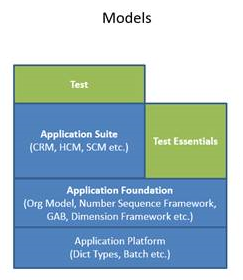
The Application Platform is the lowest model and contains the lowest level elements that interface with the kernel. The Application Object Server (AOS) can be started by using only the Application Platform. The Application Foundation sits atop the Application Platform and contains framework functionalities that all applications share. Finally, the Application Suite sits atop the Application Foundation and contains application specific elements. The Model Breakdown table in the appendix provides examples of components in each of these models. Each model compiles into its own assembly with dependencies on lower layer model assemblies. The Application Platform doesn't depend on any other models. This structure implies a direct mapping of the model to an assembly.
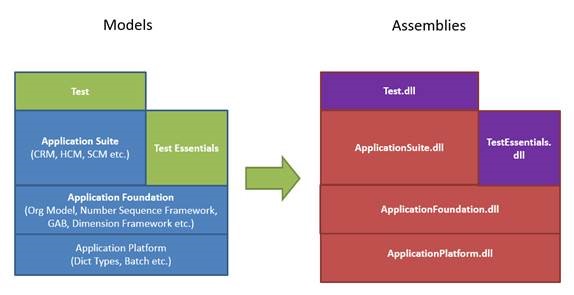
Developing in the modular stack allows changes to be made in the Application Suite and compiled without touching the rest of the stack. You only need to compile models with new changes, which greatly reduces compile time. For more information, see Model breakdown.
Customizing models
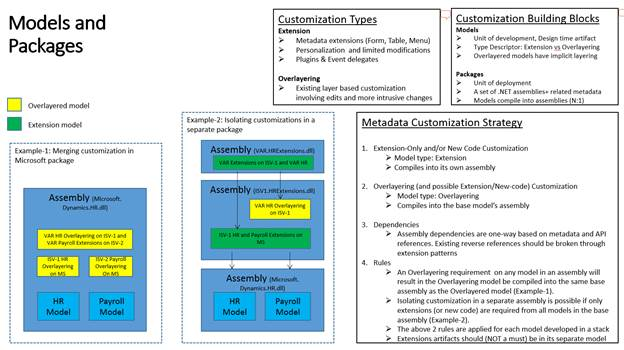
You can customize models by using two methods: overlayering and extensions. Overlayering supports making changes at multiple layers that alter or overlay elements in models at lower levels. Extensions support adding new elements or attaching code to element events or plug-in points. The type of customization you use affects how a model is compiled and packaged. One or more models compile into an assembly. An assembly, its non-code metadata, and its compiled artifacts form a package. A package is an independent deployable unit. You can compile a model that contains only extension customizations into its own assembly and deploy it in its own package. A model that contains any overlayering must be compiled into the assembly based on the overlayed model.
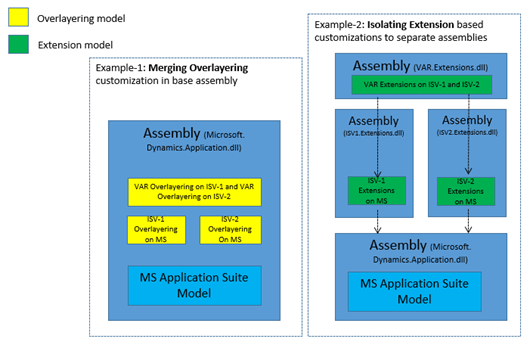
Using extensions has several advantages, including:
- For application lifecycle management purposes, you need to manage only your extension artifacts.
- Building a customization does not require you to recompile the entire application.
- In the cloud, Microsoft can install, patch, upgrade, and change internal APIs without affecting your customizations.
- You can service your solutions independently without concerns about other customizations.
Currently, the system supports code extensions, table extensions, form extensions, menu extensions, and enum extensions. The Extensions section in Customize through extension and overlayering and Customize model elements through extension provide more detailed explanations on how to use extensions. Use extensions on supported elements wherever possible. Use extensions when you don't need to change existing Microsoft code. To change a method's functionality by using a change, you need to use overlayering. Use overlayering in areas that extensions don't cover and when the customization alters the base functionality. The following illustration summarizes the differences between the two customization strategies.
Model breakdown
| Model | Concept |
|---|---|
| Application Platform | The Application Platform interfaces to kernel functionalities that are application logic agnostic. The AOS can be started with just this model. - AIF base objects - Batch - Form base objects - RunbaseSysOperations* base objects - DictXX objects - Appl, Info, Global, ClassFactory - Data access objects - Helper Classes - ENUM/EDT/Macros/ConfigKey/LicenseCode |
| Application Foundation | - Application foundation features: Dimension framework, Global Address Book, Number Sequence, OrgModel - Feature areas: Business Intelligence, Reports, Upgrade framework, Security, E-Signature, Data Import/Export, Workflow - SYS objects: Best Practices, CheckList, Policy, RecordTemplate - Miscellaneous: Currency, Unit of Measure |
| Application Suite | - Supply Chain Management - Human Capital Management - Professional Services, etc. |