Bemærk
Adgang til denne side kræver godkendelse. Du kan prøve at logge på eller ændre mapper.
Adgang til denne side kræver godkendelse. Du kan prøve at ændre mapper.
Note
Community interest groups have now moved from Yammer to Microsoft Viva Engage. To join a Viva Engage community and take part in the latest discussions, fill out the Request access to Finance and Operations Viva Engage Community form and choose the community you want to join.
This article describes how the application programming interfaces (APIs) of the Electronic reporting (ER) framework are changed in Microsoft Dynamics 365 Finance version 10.0.11.
API to run a format mapping for the generation of outbound documents
To generate an outbound document, run an ER format mapping. Most ER format mappings contain a data source of the Data model type. At runtime, a specific model mapping must be identified as the implementation of the data model for which the data source is configured.
When you use the initial API of the ER framework to call an ER format mapping from an execution point in the source code, the API finds a model mapping by using the settings (the default model mapping flag and country/region codes) of the corresponding ER configurations that contain a model mapping component. For more information, see Configure country/region context dependent ER model mappings.
In some cases, when an ER format mapping is called from a specific place in the X++ code, you must specify additional criteria to find the most appropriate model mapping. For example, you configure an ER format mapping by using a data model that has two model mappings. The first model mapping is marked as a default model mapping, because it ensures the smooth execution of this ER format mapping whenever it's called, from every execution point that's currently available. In X++, you implement a new execution point from which to call this ER format mapping. By using this new execution point, you force the data model to use the second model mapping, because that model mapping performs better given the other conditions of this call (for example, the arguments that are provided and the available resources of the current application instance).
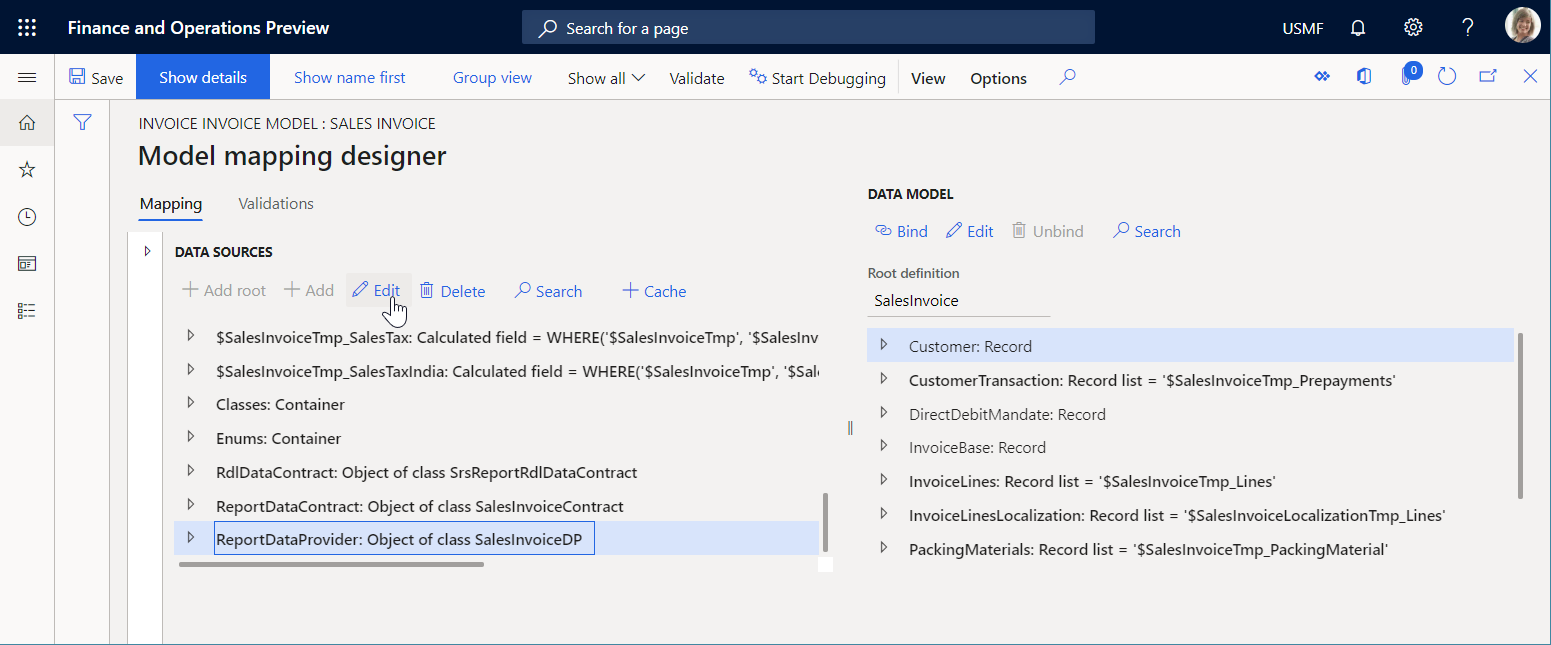
To complete this setup, configure your model mapping with an integration point. In the Data sources pane, select a single data source of your model mapping as the component of this integration point. Then select Edit to change the properties of this data source.
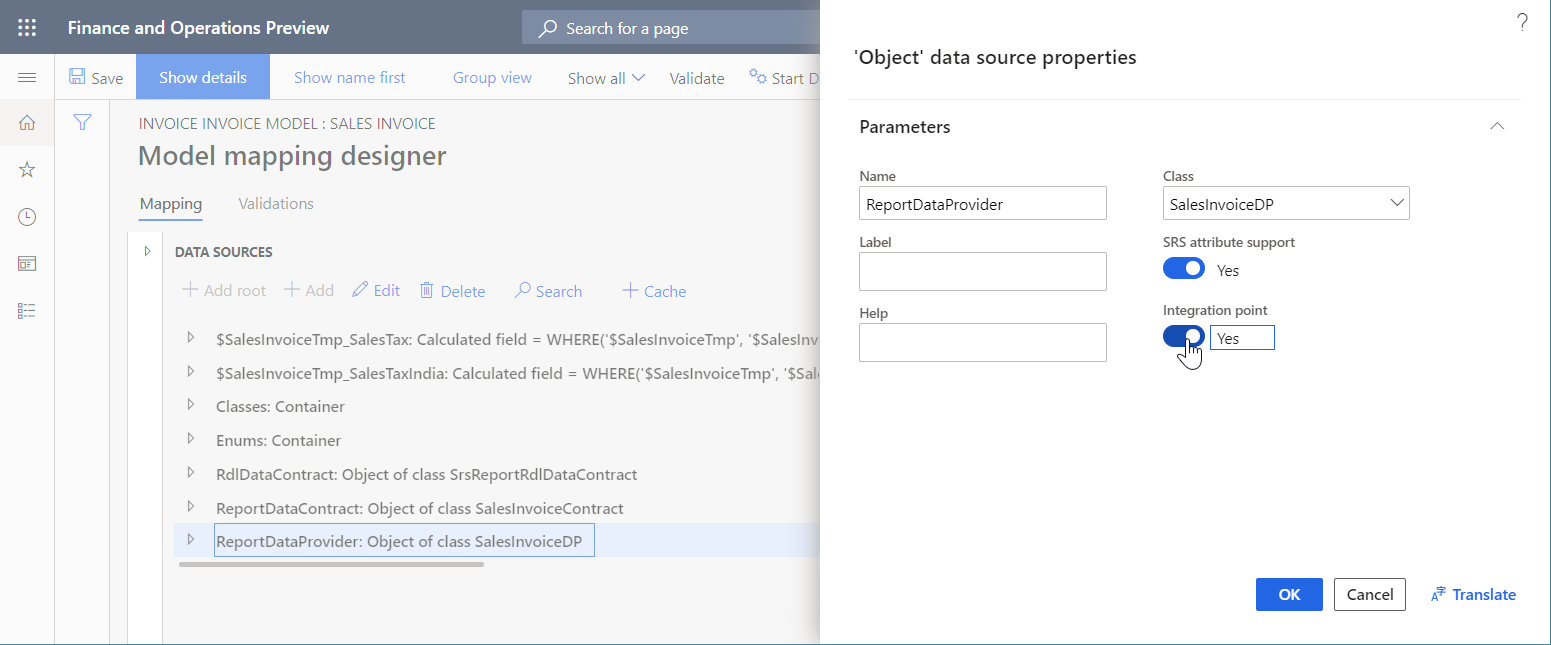
In the Data source properties dialog box, set the Integration point option to Yes to mark the data source as the component of the integration point.
You can then use the new API of the ER framework to call an ER format mapping and force it to use a model mapping that has a specific integration point. The following example shows how to use this new API.
using Microsoft.Dynamics365.LocalizationFramework;
using Microsoft.Dynamics365.LocalizationFramework.XppSupportLayer;

class ERIntegrationPointCodeSamples extends RunBaseBatch
{
    private ERFormatMappingId formatMappingId;

    public void run()
    {
        var runner = ERObjectsFactory::createFormatMappingRunByFormatMappingId(this.formatMappingId, 'OutboundFileName', true);
        var integration_point = new ERIntegrationPointFactory().WithObjectIntegrationPoint('SalesInvoiceDP').ToIntegrationPoint();
        /// new ERIntegrationPointFactory().WithTableRecordsIntegrationPoint(tableName)
        /// new ERIntegrationPointFactory().WithTableIntegrationPoint(tableName)
        /// new ERIntegrationPointFactory().WithObjectIntegrationPoint(className)
        /// new ERIntegrationPointFactory().WithClassIntegrationPoint(className)
        runner.withIntegrationPoint(integration_point).run();
    }
}
Note
- Only a data source of the Table record, Table, Class, or Object type can be the component of the model mapping integration point.
- Currently, only a single data source can be the component of the model mapping integration point.
- In addition to other existing criteria, the integration point is considered during the selection of the most appropriate model mapping.
- At runtime, an error occurs if more than one model mapping that has the requested integration point is found among the model mappings that are applicable to the ER format mapping that is running.
API to show a format mapping lookup
Use the initial API of the ER framework to look up the ER format mappings. It uses the data model name and container name as text constants. This lookup offers only the ER format mappings of the one data model that meets both these conditions:
- It has the specified names.
- Its criteria are met first in the ER configurations list.
The new API of the ER framework lets you use the configured integration point to implement the same lookup. This lookup offers all the ER format mappings that contain a data source of the Data model type that a model mapping that has the specified integration point is available for. The ER format mappings that are offered in this lookup can use different model mappings as data sources.
The following example shows how you can use this new API.
using Microsoft.Dynamics365.LocalizationFramework;
using Microsoft.Dynamics365.LocalizationFramework.XppSupportLayer;

class ERIntegrationPointCodeSamples extends RunBaseBatch
{
    private ERFormatMappingId formatMappingId;

    public void formatMappingLookup(FormReferenceControl _referenceGroupControl)
    {
        var integration_point = new ERIntegrationPointFactory().WithIntegrationPointKey('SalesInvoiceDP').ToIntegrationPoint();
        ERObjectsFactory::createFormatMappingTableLookupForIntegrationPoint(
            integration_point,
            _referenceGroupControl
            ).performFormLookup();
    }
}