Bemærk
Adgang til denne side kræver godkendelse. Du kan prøve at logge på eller ændre mapper.
Adgang til denne side kræver godkendelse. Du kan prøve at ændre mapper.
Your agent reasons through problems rather than following scripts. Because it builds Deep Context about your codebase, past incidents, and infrastructure, it reasons about your systems, not generic ones. It gathers evidence, selects the right tools, classifies actions by risk, and explains its thinking, all visible in the chat interface.
The reasoning loop
Every message you send goes through the same loop.
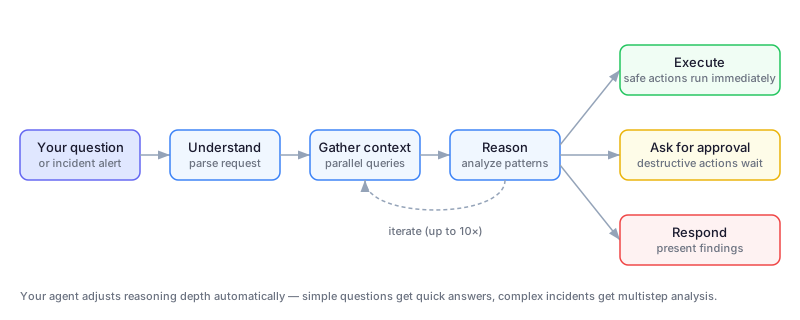
The agent first understands your request and identifies what data it needs. Then it gathers context by querying data sources in parallel (logs, metrics, resource status, deployment history, memory). Next it reasons over the gathered data, identifying patterns and forming conclusions. Finally it acts or responds by executing safe actions, requesting approval for risky ones, or presenting findings.
If the problem requires more work, the loop iterates up to 10 times per turn. After that, your agent asks whether to continue.
Adaptive thinking
For complex problems, your agent shows its reasoning process in the chat. A collapsible Thinking section appears with descriptive titles for each step (like "Exploring Azure health issues" or "Analyzing active alerts") and elapsed time.

Your agent automatically adjusts reasoning depth. A status check gets a quick response. A multistep outage gets multistep reasoning with evidence correlation.
Deep Context in reasoning
Your agent doesn't start from scratch. It draws on Deep Context at every step of the reasoning loop. Deep Context has three pillars that shape how your agent thinks:
- Code analysis: Your agent already reads your repositories, so when an incident happens, it knows where the retry logic lives and what changed recently.
- Persistent memory: Past investigations, resolution steps, and your uploaded runbooks inform every new conversation.
- Background intelligence: Codebase analysis, Kusto schema enrichment, and insight generation continuously deepen the agent's understanding.
Memory and knowledge
At the beginning of every conversation, your agent searches memory for relevant context.
| What it draws from | How it improves reasoning |
|---|---|
| Session insights | Learns from all past conversations, including incident investigations, troubleshooting sessions, and scheduled task results |
| Similar symptom patterns | Recognizes recurring patterns and jumps to likely causes faster |
| Your uploaded runbooks and docs | Follows your team's procedures instead of generic advice |
| User preferences | Remembers your environment context and response preferences |
The more knowledge you provide, such as runbooks, architecture docs, and team procedures, the more relevant your agent's reasoning becomes. For more information, see Memory and knowledge.
Tool selection
Your agent strategically selects tools based on the problem. It starts with all tools registered on the current custom agent, then filters by platform, using only incident tools for the connected incident platform. It further filters by published list to include only tools you make available, and adjusts as new information emerges during the conversation.
Each custom agent has its own tool set. When your agent delegates to a different custom agent, the available tools change automatically.
For more information on available tools, see Tools.
Parallel execution
When your agent identifies independent operations, actions that don't depend on each other's output, it issues them simultaneously in a single turn rather than running them one at a time.
For example, if your agent needs to check pod status, service health, and deployment history, it runs all three commands in parallel instead of waiting for each one to complete before starting the next. This approach reduces the number of reasoning turns and speeds up investigations.
Tool-level prompts guide parallel execution and tell the model: "If the commands are independent and can run in parallel, make multiple tool calls in a single message."
Action classification
Your agent classifies every action before executing it.
| Classification | Behavior | Examples |
|---|---|---|
| Safe | Executes immediately | Query logs, check resource status, list deployments |
| Cautious | Executes with a brief explanation | Send emails, post Teams messages |
| Destructive | Requires your confirmation | Restart an app, scale resources, modify configurations |
How your agent handles each type depends on your run mode.
| Run mode | Safe | Cautious | Destructive |
|---|---|---|---|
| Review | Executes | Executes | Asks for approval |
| Autonomous | Executes | Executes | Executes |
Conversation management
Several mechanisms keep long conversations productive.
| Mechanism | What it does |
|---|---|
| Compaction | When conversations get long, your agent summarizes earlier context while preserving key findings. You can trigger this action manually by using the /compact command. |
| Automatic retries | If a service interruption occurs mid-response, your agent retries transparently. |
| Error handling | If a model encounters a temporary problem, your agent displays a user-friendly message ("model is temporarily experiencing problems") instead of a generic internal error. |
Cancellation
When you select Stop, your agent immediately halts all operations and prevents retrying the canceled task. Your next message starts fresh, unless you explicitly modify the canceled request.
Boundaries
The following table summarizes what agent reasoning does and doesn't do.
| What reasoning does | What it doesn't do |
|---|---|
| Gathers evidence from multiple sources in parallel | Guarantee finding a root cause (evidence might be insufficient) |
| Classifies actions and respects your run mode | Autoremediate without confirmation in Review mode |
| Explains its thinking step by step | Share investigation methodology across separate agents |
| Adjusts reasoning depth to problem complexity | Replace human judgment for critical decisions |
Next step
Related content
- Root cause analysis: Deep investigation with hypothesis trees
- Deep Context: How your agent builds understanding of your environment
- Run modes: Review and Autonomous behavior
- Memory and knowledge: How your agent remembers context across conversations
- Tools: Built-in and custom tool capabilities
- Skills: Domain-specific investigation procedures