Bemærk
Adgang til denne side kræver godkendelse. Du kan prøve at logge på eller ændre mapper.
Adgang til denne side kræver godkendelse. Du kan prøve at ændre mapper.
This page explains core concepts of the Unity Catalog permissions model, including the object model, privileges, ownership, and inheritance.
For a general reference of all Unity Catalog privileges, see Unity Catalog privileges reference. For instructions on granting and revoking privileges, see Show, grant, and revoke privileges.
Securable objects
In Unity Catalog, data and metadata live in a top-level container called a metastore. Within this metastore, data is represented as objects in a three-level namespace: catalog.schema.table. This hierarchical structure also provides the foundation for access control in Unity Catalog.
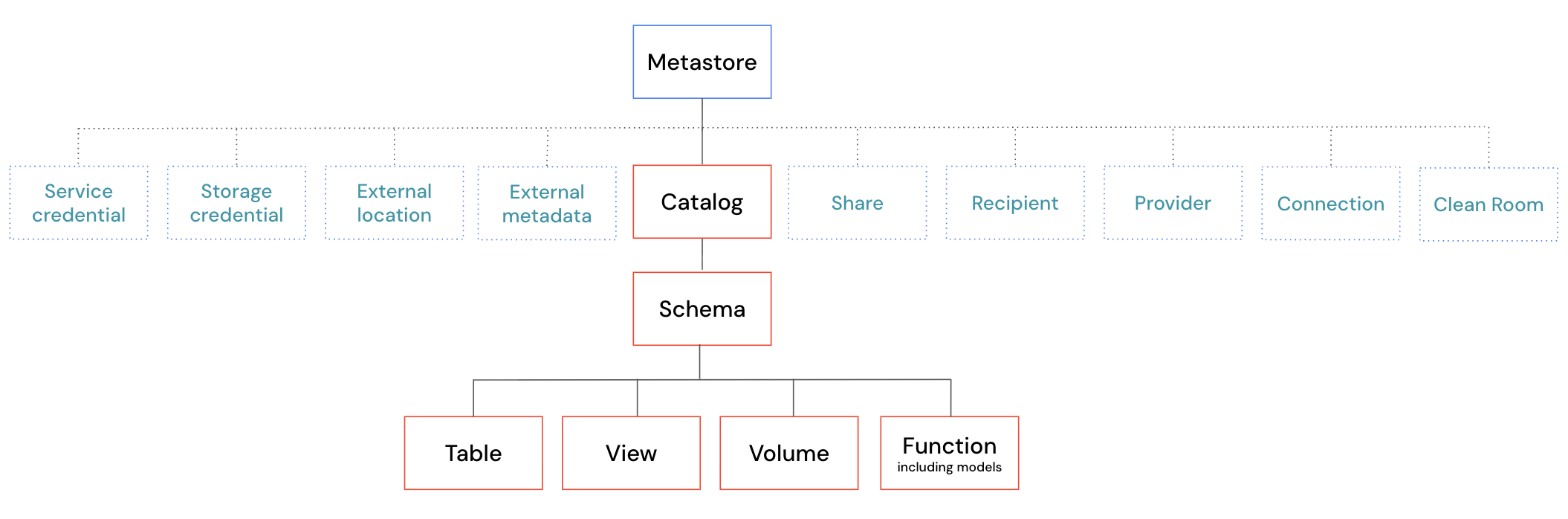
Every object in this hierarchy is a securable object. Access control in Unity Catalog works by granting privileges, such as SELECT, MODIFY, or USE SCHEMA, on these securable objects. This model provides fine-grained control over who can access and manage data across your organization.
For a complete list of securable objects and the privileges that apply to each, see Unity Catalog privileges reference.
Container objects
Some securable objects in Unity Catalog are container objects, meaning they contain child objects within the hierarchy. Container objects have a special role in the permissions model because privileges granted on them can affect their children through inheritance.
The following are container objects in Unity Catalog:
- Catalogs: The top level of the three-level namespace. Catalogs contain schemas as direct children.
- Schemas: The middle level of the three-level namespace. Schemas contain tables, views, volumes, and functions as direct children.
Container objects have several important characteristics:
| Characteristic | Description |
|---|---|
| Privilege inheritance | When you grant a privilege on a container object, that privilege automatically applies to all current and future child objects. For example, granting SELECT on a catalog allows users to read all tables in that catalog (with appropriate usage privileges). See Privilege inheritance. |
| Usage privileges | Access to child objects requires the appropriate USE CATALOG or USE SCHEMA privilege on the parent container objects. See Usage privileges. |
| Ability to manage child objects | When you own a container object, you automatically get the ability to manage all child objects, even if you don't own those children directly. See Ownership. |
| Creation privileges | Container objects support privileges that allow users to create child objects within them, such as CREATE SCHEMA on catalogs and CREATE TABLE on schemas. |
Non-container objects, like tables, views, volumes, and functions, don't contain child objects.
Privileges
Privileges determine what actions a user or group can perform on a securable object. Common privileges include:
SELECT: Read data from tables or viewsMODIFY: Write data to tables or viewsUSE CATALOG: Access a catalog (requires additional privileges to work with child objects)USE SCHEMA: Access a schema (requires additional privileges to work with child objects)CREATE TABLE: Create tables within a schema
A user or group must be explicitly granted a privilege to perform an action.
The following sections describe important special privileges in Azure Databricks. For a complete reference of all privileges, see Unity Catalog privileges reference.
Usage privileges
USE CATALOG and USE SCHEMA are usage privileges. Generally, usage privileges are a prerequisite to interact with an object and its child objects in the hierarchy.
To work with any object in a catalog, you need the USE CATALOG privilege on the catalog. To work with any object in a schema, you need the USE SCHEMA privilege on the schema.
For example, to perform most operations on tables, views, volumes, or functions, you need:
USE CATALOGon the parent catalogUSE SCHEMAon the parent schema- The specific privilege for the operation (such as
SELECT,MODIFY, orEXECUTE)
All three are required. Having only the SELECT privilege on a table is not sufficient to read it if you lack USE CATALOG or USE SCHEMA on its parent objects.
Usage privileges provide an important access control mechanism for higher-level administrators. For example, even if a table owner wants to share their table with other users, those users cannot access the table without USE CATALOG and USE SCHEMA privileges on the parent objects. Because only catalog and schema owners or users with the MANAGE privilege can grant these usage privileges, this prevents table owners from granting access outside approved boundaries.
The following table shows common operations and their required privileges:
| Operation | Required privileges |
|---|---|
| Read data from a table or view | USE CATALOG on catalog, USE SCHEMA on schema, SELECT on table or view |
| Write data to a table | USE CATALOG on catalog, USE SCHEMA on schema, MODIFY on table |
| Create a schema in a catalog | USE CATALOG on catalog, CREATE SCHEMA on catalog |
| Create a table in a schema | USE CATALOG on catalog, USE SCHEMA on schema, CREATE TABLE on schema (or catalog if granted at catalog-level) |
| Execute a function | USE CATALOG on catalog, USE SCHEMA on schema, EXECUTE on function |
| Read files from a volume | USE CATALOG on catalog, USE SCHEMA on schema, READ VOLUME on volume |
ALL PRIVILEGES behavior
ALL PRIVILEGES implies all applicable privileges for a specific object type, without Azure Databricks explicitly granting each individual privilege. For example:
ALL PRIVILEGESon a table implies the ability to performSELECT,MODIFY, andAPPLY TAG.ALL PRIVILEGESon a volume implies the ability to performREAD VOLUME,WRITE VOLUME, andAPPLY TAG.ALL PRIVILEGESon a schema implies all schema-level privileges.ALL PRIVILEGESon a catalog implies all catalog-level privileges.
ALL PRIVILEGES does not include the EXTERNAL USE SCHEMA, EXTERNAL USE LOCATION, or MANAGE privileges.
For more details on how ALL PRIVILEGES is evaluated and revoked, see ALL PRIVILEGES.
The MANAGE privilege
The MANAGE privilege allows users to manage privileges on, transfer ownership of, and delete an object without being the owner. Having MANAGE is similar to ownership, but there are some important differences. See Ownership versus the MANAGE privilege.
To exercise MANAGE, users still need the appropriate usage privileges on the object and all its parent objects.
If MANAGE is granted on a container object, the user also gets MANAGE on all child objects.
For full details, see MANAGE.
The BROWSE privilege
BROWSE allows users to discover objects and view their metadata without granting access to the underlying data. Users with BROWSE can see that an object exists, view its name, description, and tags, and request access to it without needing USE CATALOG or USE SCHEMA.
BROWSE is granted at the catalog level and applies to all objects within that catalog. Databricks recommends granting BROWSE on catalogs to the All account users group to make data discoverable throughout your organization.
For full details, see BROWSE.
Ownership
Every securable object in Unity Catalog has an owner. The owner can be a user, service principal, or group. The principal that creates an object becomes its initial owner.
Ownership has a special denotation in Unity Catalog. Object owners can automatically perform all capabilities on the object they own. However, Azure Databricks doesn't explicitly grant the ALL PRIVILEGES privilege to the owner. This means you won't see ALL PRIVILEGES returned when listing permissions using the Databricks API or with a SHOW GRANTS command.
Ownership doesn't inherit downward in Unity Catalog. However, object owners do automatically have the ability to manage all child objects. For example, if you own a catalog, you don't automatically own the child schemas within the catalog, but you can manage all child schemas. Similar to owners having all capabilities on their object without explicitly having ALL PRIVILEGES, Azure Databricks also doesn't explicitly grant the MANAGE privilege in this case.
Object owners can perform other important operations on the object, including granting and revoking permissions, transferring ownership, and dropping the object.
Note
To avoid accidental data exfiltration, schema owners do not have the EXTERNAL USE SCHEMA privilege by default and external location owners do not have the EXTERNAL USE LOCATION privilege by default. See Enable external data access to Unity Catalog.
To summarize, the owner of an object can do the following:
| Capability | Description |
|---|---|
| All object capabilities | Owners automatically have all capabilities on the object they own. This is functionally the same as having ALL PRIVILEGES, but Azure Databricks doesn't explicitly assign ALL PRIVILEGES to owners. |
| Manage child objects | Owners automatically get the ability to manage all child objects. This is functionally the same as having the MANAGE privilege on all child objects, but Azure Databricks doesn't explicitly assign the MANAGE privilege to owners. |
| Grant and revoke permissions | Owners can grant and revoke privileges on the object to users and groups |
| Transfer ownership | Owners can transfer ownership of their object to another principal |
| Drop objects | Owners can delete the objects they own |
For information about how to view and transfer ownership, see Manage object ownership.
Ownership versus the MANAGE privilege
The MANAGE privilege grants a user the ability to grant and revoke privileges on the object. It does not grant the user all privileges on the object. However, users with MANAGE can explicitly grant themselves data access privileges such as SELECT.
In contrast, object owners have all capabilities on their object by default. Because ownership doesn't inherit downward to child objects, owners still require explicit grants on those child objects.
Users with the MANAGE privilege require the appropriate usage privilege at the level of the object if applicable, and all parent container objects. For example, to exercise the MANAGE privilege on a schema, you need USE SCHEMA on the schema, and USE CATALOG on the parent catalog. To grant permissions on a table, you must have MANAGE on the table, USE CATALOG on the parent catalog, and USE SCHEMA on the parent schema.
The following table summarizes the key differences between ownership and the MANAGE privilege:
| Capability | Owner | MANAGE privilege |
|---|---|---|
| All capabilities on the object | Yes, all capabilities are implied. This is different from explicitly having ALL PRIVILEGES. See Ownership. |
No, privileges must be granted separately. Users with MANAGE can grant themselves these privileges. |
| Grant and revoke privileges on the object | Yes | Yes |
| Transfer ownership | Yes | Yes |
| Drop the object | Yes | Yes |
| Ability to manage child objects | Yes, manage capabilities on child objects are implied. See Ownership. | Yes, the MANAGE privilege is explicitly granted on child objects. |
| Requires usage privileges | No | Yes, requires the appropriate USE CATALOG and USE SCHEMA privileges |
| Number of principals | Only one principal (user, service principal, or group) | Can be granted to multiple principals |
To avoid accidental privilege escalation, the ALL PRIVILEGES privilege doesn't include the MANAGE privilege.
Privilege inheritance
Note
If you created your Unity Catalog metastore during the public preview (before August 25, 2022), you might be on an earlier privilege model that doesn't support the current inheritance model. You can upgrade to Privilege Model version 1.0 to get privilege inheritance. See Upgrade to privilege inheritance.
Privilege inheritance is a key feature of the Unity Catalog permissions model. When you grant a privilege on a parent object, that privilege automatically applies to all current and future child objects. This simplifies access management by reducing the number of individual grants you need to make.
Privileges inherit downward through the object model hierarchy:
- A privilege granted on a catalog applies to all schemas in that catalog, and all tables, views, volumes, and functions in those schemas
- A privilege granted on a schema applies to all tables, views, volumes, and functions in that schema
For example, if you grant a user the SELECT privilege on a catalog, then that user can read all tables and views in that catalog (with the appropriate USE CATALOG and USE SCHEMA usage privileges).
Important
Privileges granted on a metastore do not inherit to child objects. Metastore-level grants control metastore-scoped operations like CREATE CATALOG and CREATE EXTERNAL LOCATION, not access to data within the metastore.
Ownership doesn't inherit downward in Unity Catalog. As the owner of an object, you're automatically granted all privileges on that object only. You don't automatically assume ownership of child objects created under your object. However, you do automatically get the MANAGE privilege on all new and existing child objects.
Inheritance examples
Suppose you grant SELECT, USE CATALOG, and USE SCHEMA at the catalog level to the finance_team group:
GRANT USE CATALOG, USE SCHEMA, SELECT ON CATALOG sales TO finance_team;
This grant allows the finance_team group to:
- Access the
salescatalog - Access all schemas in the catalog
- Read data from all current and future tables and views in the catalog
Suppose you grant CREATE TABLE, USE CATALOG, and USE SCHEMA at the catalog level to the data_engineers group:
GRANT USE CATALOG, USE SCHEMA, CREATE TABLE ON CATALOG analytics TO data_engineers;
This grant allows the data_engineers group to:
- Access the
analyticscatalog - Access all schemas in the catalog
- Create tables in any current or future schema in the catalog
For instructions on how to grant and revoke privileges, see Show, grant, and revoke privileges.